
Last Updated on January 19, 2026 by Shrestha Dash
Every organization implementing an ERP system faces a critical decision that profoundly impacts their long-term success: should they customize the software to fit their processes, or configure it using built-in options? This choice affects implementation costs, timeline, and most critically—future upgrade capabilities.
The difference between ERP customization vs configuration isn’t just technical terminology. Configuration uses the system’s existing tools and settings to adapt functionality, while customization involves modifying source code to create features that don’t exist in the standard system. Industry research suggests that well-matched ERP systems should meet 80-90% of core requirements out of the box, yet organizations consistently struggle with the temptation to customize beyond what’s truly necessary. Understanding when to customize, when to adapt your processes, and how to find the right balance determines whether your ERP becomes a platform for growth or a maintenance burden that delays upgrades indefinitely and constrains organizational agility.

Understanding the Fundamental Difference
Before evaluating when customization makes sense, it’s essential to understand what distinguishes customization from configuration at a technical and strategic level.
What Is ERP Configuration?
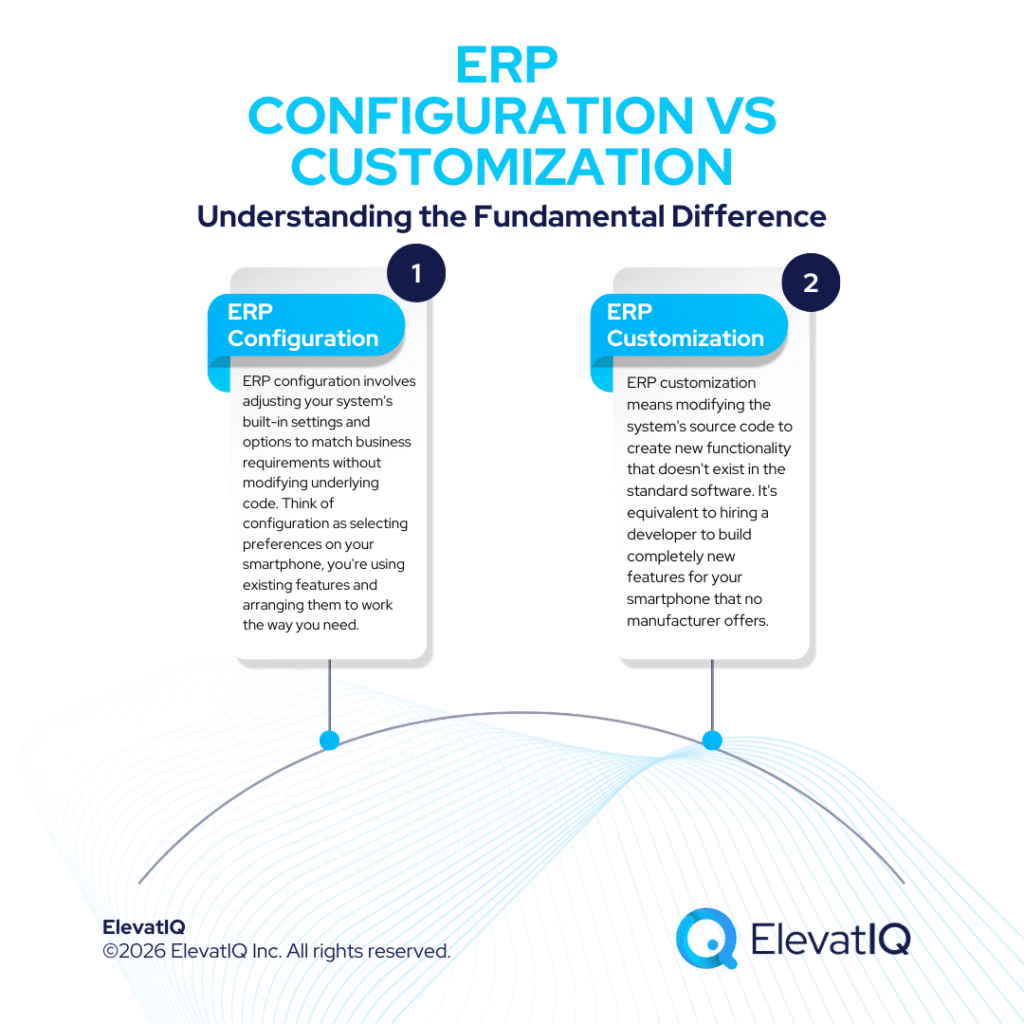
ERP configuration involves adjusting your system’s built-in settings and options to match business requirements without modifying underlying code. Think of configuration as selecting preferences on your smartphone, you’re using existing features and arranging them to work the way you need.
Common configuration activities include:
- Setting time zones, languages, and currencies for multi-location operations
- Defining user roles and permissions to control system access
- Creating approval workflows for purchase orders, expense reports, or journal entries
- Customizing financial reports and dashboards using built-in reporting tools
- Establishing data validation rules and business logic using configuration parameters
- Configuring integration endpoints for connecting third-party applications
Configuration works within the predetermined framework the vendor designed. You’re selecting from available options rather than creating new ones. Most modern ERP systems offer powerful configuration capabilities that address common business needs without requiring custom development.
What Is ERP Customization?
ERP customization means modifying the system’s source code to create new functionality that doesn’t exist in the standard software. It’s equivalent to hiring a developer to build completely new features for your smartphone that no manufacturer offers.
Common customization scenarios include:
- Developing custom algorithms for pricing, commission calculations, or production scheduling
- Building specialized interfaces for unique workflows that don’t match standard ERP processes
- Creating custom reports that require data structures or calculations beyond configuration capabilities
- Developing integrations with proprietary legacy systems or specialized industry applications
- Modifying core business logic in areas like order-to-cash or procure-to-pay processes
- Building extensions that add entirely new modules to the ERP system
Customization changes the system’s fundamental DNA. While this provides unlimited flexibility to match any business requirement, it introduces complexity, cost, and most significantly—future upgrade challenges.
The Upgrade Implications: Why This Decision Matters Long-Term
The most critical consideration in the ERP customization vs configuration decision isn’t initial cost or implementation timeline. It’s what happens when you need to upgrade. This is where many organizations discover they’ve locked themselves into a corner.
How Configuration Supports Smooth Upgrades
When ERP vendors release updates, configuration settings typically remain intact. Modern ERP systems are designed so that upgrades preserve your configurations, allowing you to benefit from new features and security patches without losing your customizations.
Configuration advantages for upgrades:
- Automatic preservation: Configuration parameters transfer seamlessly to new versions without manual intervention
- Vendor testing: ERP vendors thoroughly test upgrades against all standard configuration options before release
- No code conflicts: Since you haven’t modified source code, there’s no risk of your changes breaking with vendor updates
- Immediate access to new features: You can adopt new capabilities as soon as they’re released without compatibility concerns
Organizations using primarily configuration-based approaches can typically upgrade within days or weeks of a new version release, staying current with the latest features and security enhancements.


ERP Selection Requirements Template
This resource provides the template that you need to capture the requirements of different functional areas, processes, and teams.
How Customization Complicates Upgrades
Customizations create a fundamentally different upgrade experience. When vendors release new versions, custom code often requires rewriting to maintain compatibility with the updated platform.
Customization challenges for upgrades:
| Challenge | Impact | Typical Cost |
| Code compatibility | Custom code may break with new versions | 20-40% of original development cost per upgrade |
| Testing requirements | Extensive regression testing needed | 3-6 weeks additional testing per upgrade |
| Documentation gaps | Custom code often poorly documented, creating knowledge dependencies | Delays of 2-4 months if original developers unavailable |
| Vendor support limitations | Vendors may limit or refuse support for heavily customized areas | Premium support fees or complete support exclusion |
| Feature conflicts | New vendor features may overlap or conflict with customizations | Requires rework or removal of custom code |
The Deferred Upgrade Trap
Perhaps the most insidious upgrade implication is the deferred upgrade pattern. Organizations with extensive customizations face such complex and expensive upgrade processes that they simply choose not to upgrade at all. This creates a vicious cycle: skipping one upgrade makes the next even more difficult. After two or three upgrade cycles pass, the gap between your current version and the latest release becomes so large that upgrading is no longer feasible. Your system becomes frozen in time, missing out on vendor innovations, security patches, and new capabilities. Research indicates that the most common reason organizations replace rather than upgrade their ERP systems is excessive customization that makes upgrades too risky or expensive to undertake.

The 2026 Digital Transformation Report
Thinking of embarking on a ERP journey and looking for a digital transformation report? Want to learn the best practices of digital transformation? Then, you have come to the right place.
When Configuration Is the Right Choice
For most organizations, configuration can meet the majority of ERP requirements. Modern ERP systems are designed with flexibility in mind, offering powerful tools that address common business needs without custom coding.
Scenarios Where Configuration Makes Sense
- Standard Business Processes: Functions such as order management, accounts payable, inventory tracking, and general ledger operations are covered by built-in ERP capabilities. These processes follow industry best practices that work effectively across thousands of organizations.
- Basic Automation and Workflows: Approval routing, automatic notifications, conditional business rules, and workflow triggers are common configuration tasks. Most ERP systems include visual workflow builders that make automation simple and maintainable without coding.
- Standard Reporting and Analytics: Built-in reporting tools handle most business intelligence needs. Even if you require custom layouts or specific data combinations, configuration options usually allow creating them without custom development.
- Short Implementation Timelines: When a fast go-live is critical, configuration provides the quickest path. You can implement faster and add refinements later as the system matures and organizational needs clarify.
- Limited Technical Resources: If you lack in-house developers or a large IT budget, configuration is the practical option. Business analysts and ERP consultants can manage most configuration changes directly without specialized programming skills.
Configuration Benefits Beyond Upgrades
Configuration advantages extend beyond upgrade simplicity:
- Lower total cost of ownership: Configuration changes are typically included in standard implementation costs, while moderate customizations can add 10-30% to overall ERP budgets
- Faster implementation: Configuration can often be implemented in days or weeks rather than months required for custom development
- Business user control: Power users can make many configuration changes without IT involvement, improving agility
- Vendor support coverage: Full vendor support applies to all configuration options since they’re part of the standard product
When Customization Becomes Necessary
While configuration handles most requirements, some scenarios genuinely demand customization. In these cases, custom development is not optional—it’s essential for the ERP system to function as intended and support business goals.
Legitimate Customization Scenarios
- Unique Competitive Advantages: If your business processes create competitive differentiation, protecting those capabilities matters more than avoiding custom code. A manufacturer with proprietary production scheduling algorithms or a retailer with unique pricing models may require customization to maintain competitive edge.
- Complex Industry-Specific Requirements: Highly regulated industries like healthcare, pharmaceuticals, or defense contracting may have compliance requirements that standard ERP systems don’t address. Custom development becomes necessary to meet regulatory obligations.
- Specialized Integration Needs: Connecting to proprietary legacy systems, specialized equipment, or industry-specific applications may require custom integration development when standard APIs or connectors don’t exist.
- Unique Business Models: Organizations with non-standard revenue models, complex multi-entity structures, or unusual operational workflows may find that configuration alone cannot accommodate their requirements.
- Critical Performance Requirements: Custom algorithms may be necessary when standard processing can’t handle the volume or speed requirements of your operations.
The 10-15% Customization Rule
Industry best practice suggests that customization should ideally not exceed 10-15% of the overall ERP system to minimize risks while still providing necessary functionality. Organizations that exceed this threshold often experience:
- Significantly increased maintenance costs
- Delayed or abandoned upgrade cycles
- Vendor support complications
- User training challenges as custom features don’t match standard documentation
- Difficulty finding consultants familiar with your unique configuration
The Hidden Costs of Over-Customization
Organizations often focus on the initial cost of customization without fully accounting for long-term implications that compound over the system’s lifecycle.
Initial Development Costs
Custom development typically costs 10-30% of your total ERP budget for initial programming, but that’s just the beginning. This includes requirements analysis, design, coding, unit testing, integration testing, and user acceptance testing specific to custom features.
Ongoing Maintenance Burden
Every customization requires ongoing maintenance. As business requirements change, custom code must evolve. When vendors release quarterly updates, custom features need retesting. When key developers leave, knowledge must transfer or customizations become orphaned. Organizations should budget 15-25% of initial customization cost annually for ongoing maintenance, not including upgrade-related rework.
Technical Debt Accumulation
Poorly planned customizations create technical debt—the accumulated cost of shortcuts and suboptimal solutions. Common technical debt symptoms include:
- Performance degradation: Custom code that slows query execution or increases memory consumption
- Integration fragility: Custom interfaces that break when connected systems change
- Security vulnerabilities: Custom code that doesn’t follow security best practices
- Documentation gaps: Undocumented customizations that become mysteries when original developers depart
The “Single Employee” Customization Problem
Many organizations implement customizations to meet requirements of specific individuals. When those employees leave, nobody else understands the customization purpose or functionality. The business’s ability to evolve becomes hindered by functionality that serves no clear purpose but complicates every upgrade.
Finding the Right Balance: A Decision Framework
Determining the optimal balance between ERP customization vs configuration requires a structured approach that considers both immediate needs and long-term implications.
The Configuration-First Principle
Start every requirement evaluation with a configuration-first mindset. Ask:
- Can standard ERP functionality address this requirement? Modern ERP systems incorporate best practices from thousands of implementations. If your process differs significantly from standard workflows, consider whether the ERP’s approach might actually be more efficient.
- Can configuration tools handle this? Most ERP systems offer workflow builders, report designers, and business rule engines that provide significant flexibility without customization.
- Are third-party solutions available? Many vendors offer add-on modules or marketplace solutions that extend functionality without custom development. These pre-built solutions benefit from ongoing vendor support and upgrade compatibility.
- Can we adapt our process? Sometimes adjusting business processes to align with ERP best practices delivers better results than forcing the system to match legacy workflows. This option should be seriously evaluated before customization.
Only after exhausting these options should customization be considered. At this point, the business case should be clear and well-documented.
The Customization Justification Test
Before approving any customization, require clear answers to these questions:
| Question | Why It Matters |
| What business value does this deliver? | Quantify expected benefits in revenue, cost savings, or risk reduction |
| Why can’t configuration address this? | Document specific limitations that necessitate custom code |
| What alternatives were considered? | Demonstrate thorough evaluation of configuration and third-party options |
| What are the upgrade implications? | Estimate ongoing costs and complexity for maintaining through upgrades |
| Who will maintain this long-term? | Identify resources and ensure knowledge transfer plans exist |
| Is this a competitive differentiator? | Distinguish between strategic capabilities and standard operations |
Customizations that can’t answer these questions convincingly should be reconsidered or deferred.
Modular Customization Strategy
When customization is necessary, implement it using modular approaches that minimize upgrade friction:
- Build extensions, not modifications: Create add-on modules that sit alongside standard code rather than modifying core ERP functions
- Use vendor-provided APIs: Leverage published APIs and development frameworks that vendors commit to supporting across upgrades
- Isolate custom code: Keep customizations in separate modules that can be detached during upgrades and reattached after testing
- Document extensively: Maintain comprehensive documentation of what was customized, why, and how it works
- Plan for obsolescence: Regularly review customizations to identify candidates for removal as vendor features evolve
Working with Independent ERP Advisors
Organizations often lack the internal expertise to make sophisticated ERP customization vs configuration decisions. IT teams understand technical possibilities but may not grasp business implications. Business users understand requirements but may not appreciate technical and upgrade consequences.
This is where independent ERP advisors provide critical value. Unlike vendor implementation partners incentivized to minimize project scope, or systems integrators who may profit from extensive custom development, independent advisors focus on long-term client success.
At ElevatIQ, we help organizations navigate the customization vs configuration balance through:
- Requirements Analysis and Prioritization: We assess which requirements truly demand customization versus those addressable through configuration, process adaptation, or third-party solutions.
- Total Cost of Ownership Modeling: We calculate the complete lifecycle costs of customization options, including initial development, ongoing maintenance, and upgrade implications across realistic timeframes.
- Vendor Capability Assessment: We evaluate how well different ERP systems match your requirements out-of-the-box, reducing customization needs through better vendor selection.
- Customization Governance: For necessary customizations, we establish governance frameworks that ensure strategic value, proper documentation, and upgrade-friendly implementation approaches.
Our independent position means recommendations focus on your long-term success, not vendor revenue targets or implementation partner utilization rates.
Conclusion
The balance between ERP customization vs configuration represents one of the most consequential decisions in ERP implementation. While customization promises unlimited flexibility to match any business requirement, configuration offers long-term sustainability, upgrade compatibility, and lower total cost of ownership. The organizations that achieve optimal results are those that start with configuration-first principles, exhaustively evaluate alternatives before customizing, and reserve custom development for requirements that genuinely demand it, typically processes that create competitive differentiation or address unique regulatory needs. Understanding the upgrade implications is particularly critical. Customizations that appear manageable during initial implementation often become significant burdens during upgrades, leading organizations to defer updates until they’re running outdated systems that miss vendor innovations and security enhancements.
The industry standard of keeping customization under 10-15% of total system functionality isn’t arbitrary—it’s based on decades of implementation experience showing that organizations exceeding this threshold consistently encounter maintenance challenges, upgrade complications, and vendor support limitations that undermine ERP value. As you make customization decisions, remember that ERP systems embody best practices developed across thousands of implementations. When your processes differ significantly from standard ERP workflows, it’s worth considering whether the software’s approach might offer genuine improvements rather than forcing the system to replicate legacy processes. The right balance between customization and configuration enables your ERP to support business growth without becoming a maintenance burden that constrains organizational agility and delays access to vendor innovations.

ERP Selection: The Ultimate Guide
This is an in-depth guide with over 80 pages and covers every topic as it pertains to ERP selection in sufficient detail to help you make an informed decision.
FAQs
Related Posts: