
Last Updated on September 9, 2026 by Shrestha Dash
Key Highlights
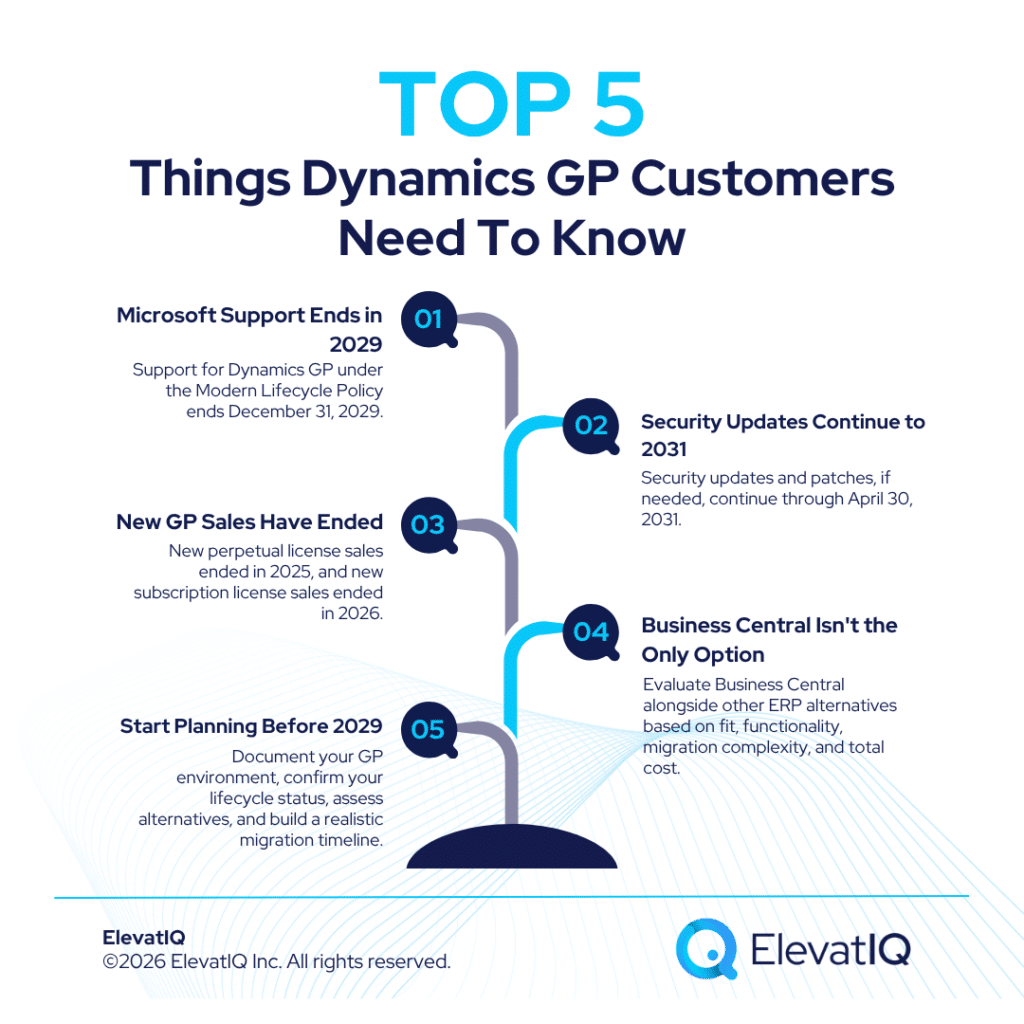
- Microsoft has confirmed that support for Dynamics GP under the Modern Lifecycle Policy ends December 31, 2029. Along with security updates and patches, if needed, continuing through April 30, 2031.
- New Dynamics GP sales are already closed. New perpetual license sales stopped April 1, 2025, and new subscription license sales stopped April 1, 2026. Meaning GP is no longer available for new customers under any licensing model.
- Dynamics GP alternatives evaluations shouldn’t start and end with MS Dynamics 365 BC. It’s Microsoft’s natural migration path for GP customers. But a genuine evaluation should weigh it against other platforms on its own merits, not by default.
- The specific support end date that applies to a given GP installation depends on which Microsoft lifecycle policy governs that version. Customers on older releases may already be facing different timelines. And in some cases earlier timelines than the widely cited 2029/2031 dates.

Introduction
Microsoft’s phase-out of Dynamics GP has unfolded in stages rather than a single announcement. This has left some GP customers with a fuzzier picture of the actual timeline than the situation warrants. Microsoft’s current documentation confirms the December 31, 2029 end-of-support date and the April 30, 2031 security-update milestone.
What’s less commonly understood is how much has already changed ahead of those dates. New Dynamics GP sales, both perpetual and subscription licensing, have already stopped. For businesses currently running GP, this means the relevant question isn’t whether Dynamics GP alternatives will eventually need to be considered, but when, and against what criteria, that evaluation should happen.
This piece lays out the timeline in full, what actually changes at each milestone, why a Dynamics GP alternatives evaluation shouldn’t default automatically to Microsoft’s own migration path. And also, what GP customers should be doing with the time they still have.
The Confirmed Timeline: What Microsoft Has Actually Announced
Understanding what a Dynamics GP alternatives decision needs to account for starts with the actual, confirmed dates, since several of these have been revised or clarified since Microsoft’s original announcement.
Dynamics GP Sunset Timeline
| Date | Milestone |
| April 1, 2025 | New Dynamics GP perpetual license sales stopped |
| April 1, 2026 | New Dynamics GP subscription license sales stopped, meaning Microsoft no longer sells Dynamics GP to new customers under perpetual or subscription licensing |
| December 31, 2029 | End of Microsoft support for product enhancements, regulatory updates, service packs, and technical support. |
| April 30, 2031 | End of security updates and patches (if needed) |
One detail worth flagging for accuracy: these dates apply under Microsoft’s Modern Lifecycle Policy, which covers current GP releases. Customers running older versions governed by Microsoft’s Fixed Lifecycle Policy may be on a different support timeline entirely. In some cases, one that has already passed. Confirming which policy applies to a specific GP environment is a necessary first step before assuming the 2029/2031 dates apply directly.


ERP Selection Requirements Template
This resource provides the template that you need to capture the requirements of different functional areas, processes, and teams.
What “End of Life” Actually Means, Operationally
The gap between December 2029 and April 2031 matters more than it might first appear, since different forms of Microsoft support end at each stage.
What Changes at Each Support Milestone
| Period | Microsoft support position |
| Through Dec 31, 2029 | Product enhancements, regulatory/tax updates, service packs and technical support remain available under the applicable lifecycle terms |
| Jan 1, 2030–Apr 30, 2031 | Security updates and patches, if needed |
| After Apr 30, 2031 | No further Microsoft security updates or product support under the announced Dynamics GP lifecycle |
For payroll-dependent GP customers specifically, the loss of regulatory and tax updates at the December 2029 milestone is often the more operationally urgent change, since annual payroll tax table updates stop well before the final 2031 cutoff. Non-payroll GP functionality may continue operating during this period, but without Microsoft’s standard product support, enhancements, or regulatory updates.

ERP System Scorecard Matrix
This resource provides a framework for quantifying the ERP selection process and how to make heterogeneous solutions comparable.
Business Central Is Microsoft’s Path, Not Necessarily the Only One
Microsoft encourages Dynamics GP customers to transition to Dynamics 365 Business Central, and for many organizations already invested in the Microsoft ecosystem, that’s a reasonable starting point. It shouldn’t, however, be the only option considered in a genuine Dynamics GP alternatives evaluation.
Evaluation Framework for Dynamics GP Alternatives
| Factor | What to Actually Assess |
| Ecosystem fit | Whether existing investment in Microsoft 365, Power Platform, or Azure makes Business Central meaningfully easier to adopt than a non-Microsoft option |
| Functional gap analysis | Whether Business Central, or any alternative, actually replicates GP’s specific configuration, customizations, and reporting today, not just on a roadmap |
| Migration complexity | Data migration and business process re-mapping tend to be substantial regardless of destination platform, particularly for long-running GP environments with significant customizations or integrations |
| Total cost of ownership | Licensing, migration services, and internal resource time modeled over a realistic multi-year horizon, not just first-year cost |
| Broader alternatives | Platforms outside the Microsoft ecosystem including mid-market ERP systems with strong financial management capabilities, may fit some GP customers’ requirements better than a same-vendor migration |
A Dynamics GP alternatives evaluation driven primarily by “what does Microsoft want us to move to” risks skipping the step of confirming that Business Central, or any other option, actually fits the business’s specific requirements. The right answer depends on the organization’s own operational needs, not on which platform happens to be the path of least resistance from the incumbent vendor.
What GP Customers Should Do Now
With several years of runway still remaining before the final support milestones, the right posture is deliberate planning rather than urgency.
Planning Steps Worth Starting Now
| Action | Why It Matters |
| Confirm which Microsoft lifecycle policy governs your specific GP version | Older releases may already be on a different, potentially earlier, support timeline |
| Document current customizations, integrations, and reporting built on GP | This is the foundation for any realistic migration cost estimate, regardless of destination |
| Begin a genuine requirements-based evaluation, not a Business Central assumption | Ensures the eventual choice fits actual operational needs rather than defaulting to Microsoft’s preferred path |
| Build a realistic migration timeline | Some ERP implementation partners report migration timelines of roughly 9–18 months, depending on project complexity, which should factor into when planning begins relative to the 2029 deadline |
| Revisit the plan periodically | Microsoft extended the originally announced September 30, 2029 date to December 31, 2029; planning built on today’s dates should be treated as a living document |
How ElevatIQ Can Help
Evaluating Dynamics GP alternatives is exactly the kind of decision that benefits from an assessment not shaped by which platform a particular vendor or partner is positioned to sell. As an independent ERP consulting firm, ElevatIQ doesn’t sell Dynamics 365 Business Central, any other Microsoft product, or any competing platform, and we don’t receive referral fees from any vendor.
For GP customers working through this decision, that independence means we can help document your current environment’s actual complexity. Also build a realistic cost and timeline estimate for a future migration, and run a genuine requirements-based evaluation across the full range of Dynamics GP alternatives, including but not limited to Business Central, so the eventual decision is grounded in your operational needs rather than in Microsoft’s own migration path.
Conclusion
Microsoft’s Dynamics GP end-of-life timeline is now fully confirmed: support for Dynamics GP under the Modern Lifecycle Policy ends December 31, 2029, while security updates and patches, if needed, continue through April 30, 2031. That gives most GP customers a real runway, but the time is best used for deliberate evaluation, not deferred until the deadline forces a decision.
A few things are worth confirming as part of that planning:
- You know which Microsoft lifecycle policy applies to your specific GP version and its actual support end date
- Your organization’s customizations and integrations are documented well before any migration conversation begins
- Any Dynamics GP alternatives evaluation considers options beyond Business Central on their actual merits, not just as the path of least resistance
- Your migration timeline planning accounts for the roughly 9–18 months window some implementation partners report, working backward from 2029 rather than forward from today
Starting this evaluation early, and keeping it grounded in your organization’s actual requirements rather than a single vendor’s preferred next step, is what turns a confirmed end-of-life date into a manageable transition rather than a rushed one.

ERP Selection: The Ultimate Guide
This is an in-depth guide with over 80 pages and covers every topic as it pertains to ERP selection in sufficient detail to help you make an informed decision.
Related Posts: