SAP has outlined how SAP Ariba Category Management transforms procurement planning from traditional spreadsheet-based processes to AI-enhanced strategic operations. The announcement, part of SAP’s “triple crown of strategic procurement” series, positions the solution as the second phase following spend analysis, focusing on converting procurement insights into actionable business strategies.
Structured Breakdown of the News
Evolution from Traditional Procurement Methods
SAP Ariba Category Management addresses limitations in conventional procurement planning that relied heavily on spreadsheets and extended meeting cycles. The solution introduces an intelligent, collaborative framework designed for dynamic business environments where agility and data-driven decision-making are essential.
Core Technological Capabilities
The platform operates as a centralized command center enabling collaborative strategy development across procurement teams. SAP Ariba Category Management incorporates AI capabilities to generate analytical frameworks including Kraljic matrices and Porter’s Five Forces analyses, delivering results with increased speed and accuracy compared to manual methods.
Collaborative Framework Integration
The solution transforms category manager alignment processes through real-time collaboration features. SAP Ariba Category Management enables distributed teams to share insights, discuss strategies, and align objectives through a unified platform, reducing coordination time and improving strategic coherence.
Practical Implementation Example
SAP demonstrated the solution’s application through an IT hardware cost scenario. When escalating costs are identified through SAP Spend Control Tower, SAP Ariba Category Management automatically imports relevant data and generates strategic analyses. The AI component suggests risk mitigation strategies, such as multi-sourcing approaches for high-value, high-risk categories.
The 2026 Digital Transformation Report
Thinking of embarking on a ERP journey and looking for a digital transformation report? Want to learn the best practices of digital transformation? Then, you have come to the right place.
Q: How does AI integration affect existing procurement workflows?
SAP Ariba Category Management augments rather than replaces human expertise. The AI generates analytical frameworks that procurement professionals can refine with their experience and insights.
Q: What is the implementation timeline for strategy development?
According to SAP’s example, processes that traditionally required weeks can be completed within hours using the platform’s automated data import and collaborative features.
Q: How does the solution handle global team coordination?
SAP Ariba Category Management provides real-time collaboration capabilities, enabling team members across different regions to contribute insights and align on strategic objectives through a centralized platform.
Q: What types of analytical frameworks are supported?
The solution generates Kraljic matrices and Porter’s Five Forces analyses using AI, which users can then customize based on their specific requirements and market knowledge.
Analyst’s Take on This Development
Customer Requirements Analysis
Merit: SAP Ariba Category Management addresses genuine market needs for faster, more collaborative procurement planning. The AI-enhanced analytical capabilities can significantly reduce manual effort in generating strategic frameworks.
Demerit: Organizations may face challenges in change management as teams transition from familiar spreadsheet-based processes to platform-based workflows. The effectiveness depends heavily on user adoption and data quality.
Impact on IT Executives
CIOs benefit from SAP Ariba Category Management through improved procurement technology integration and reduced manual process dependencies. The platform’s centralized approach aligns with digital transformation initiatives, though it requires investment in user training and system integration capabilities. The solution potentially reduces IT support requirements for procurement teams while increasing demand for data governance and platform management resources.
Impact on Finance Executives
CFOs gain enhanced visibility into procurement strategy development and execution timelines. SAP Ariba Category Management provides audit trails and collaborative documentation that improve financial oversight of procurement decisions. The accelerated planning cycles can contribute to faster realization of cost savings initiatives, though CFOs must evaluate the total cost of ownership including licensing, implementation, and ongoing maintenance expenses.
Future Predictions
The integration of AI in procurement planning represents a broader industry shift toward intelligent automation. SAP Ariba Category Management positions organizations for advanced analytics capabilities as AI technology continues evolving. Market adoption will likely depend on demonstrated ROI in pilot implementations and successful integration with existing procurement technology stacks.
Industry Trends Analysis
The procurement software market is experiencing consolidation around platforms that combine spend analysis, strategic planning, and sourcing execution. SAP Ariba reflects this trend by positioning itself within SAP’s comprehensive procurement suite. Organizations are increasingly seeking solutions that balance automation capabilities with human expertise retention, which aligns with the platform’s augmentation rather than replacement approach.
Key Stakeholder Statements
Sudy Bharadwaj, Global Vice President of Strategic Engagements for SAP Finance and Spend, emphasized the transformative potential: “Think of it as your procurement superpower. It can give you the insights to make better decisions, faster.” The announcement positions procurement teams to “respond swiftly to market changes, align more closely with organizational goals, and drive sustainable value creation,” according to the company’s strategic vision outlined in the release.
FAQs
How does SAP Ariba Category Management improve upon traditional spreadsheet-based procurement planning?
SAP Ariba Category Management is expected to improve procurement planning by replacing static spreadsheet processes with an intelligent, collaborative platform. Instead of managing procurement strategies through disconnected spreadsheets and lengthy meeting cycles, the solution provides a centralized command center where teams can collaborate in real-time.
What role does artificial intelligence play in the procurement planning process?
The AI component in SAP Ariba Category Management is likely to serve as an augmentation tool rather than a replacement for human expertise. It automatically imports relevant data from systems like SAP Spend Control Tower and generates comprehensive analytical frameworks and risk mitigation strategies.
How does the solution address global team coordination challenges in procurement?
SAP Ariba Category Management is expected to tackle global coordination challenges through its real-time collaboration capabilities and unified platform approach. Distributed procurement teams across different regions can simultaneously contribute insights, discuss strategies, and align on objectives through the centralized system. This eliminates the coordination delays typical of traditional methods and ensures strategic coherence across global operations.
Zoho Corporation announced the integration of advanced AI capabilities into Zoho Creator platform, its low-code application development platform. The update introduces CoCreator, an AI-powered service that enables application development through natural language prompts, voice commands, and business documentation. This enhancement represents Zoho’s strategic investment in practical AI solutions without additional subscription costs for existing customers.
Structured Breakdown of the News
CoCreator: The Core AI Enhancement
Zoho Creator platform now features CoCreator, a comprehensive AI assistant powered by Zia, Zoho’s proprietary AI engine operational since 2015. CoCreator accepts multiple input formats including voice prompts, written instructions, process flow diagrams, and software requirement specifications. The system generates complete applications with integrated automations, permission frameworks, and analytical dashboards.
The platform leverages both ZohoAI and OpenAI technologies to process business requirements and convert them into functional applications. CoCreator democratizes application development by enabling users with varying technical expertise to create business-critical software solutions.
Idea-to-App Generation Capabilities
The Idea-to-App Generation feature within Zoho Creator platform transforms abstract business concepts into deployable applications. Users can input requirements through natural language descriptions, voice recordings, or structured documentation. The system analyzes these inputs and generates domain-specific recommendations, relevant data fields, and appropriate modules aligned with business objectives. This capability addresses the traditional gap between business requirements and technical implementation, allowing non-technical stakeholders to participate directly in application development processes.
Enhanced Development Tools
Zoho Creator platform introduces intelligent code generation features that automatically create contextual code blocks based on application architecture and requirements. The system can optimize existing code structures and provide automated annotations for improved performance and maintainability. The platform includes proactive field recommendation capabilities that suggest relevant data fields within application forms, a feature that distinguishes it from comparable low-code development tools in the market.
Data Processing and Management
The updated platform incorporates AI-powered data cleansing and modeling capabilities. These features eliminate data inconsistencies and establish logical data structures automatically. Zoho Creator platform can process unstructured data from various file formats and database sources, converting them into structured applications. The data modeling functionality streamlines the transformation of raw business data into actionable application components, reducing the time required for data preparation and structuring.
AI Skills Framework
The AI skills framework of the Zoho Creator platform enables the development of applications with advanced cognitive functions that interpret natural language commands and execute complex automated workflows. The AI Skills feature utilizes Zoho’s proprietary Deluge scripting language combined with specialized AI models to create intelligent automation sequences that understand business context and operational requirements.
Custom AI Model Integration
The platform supports deployment of custom AI models for specialized functions including optical character recognition (OCR), predictive analytics, and object detection. This capability allows organizations to integrate industry-specific AI functionalities directly into their low-code applications.
Common Questions That We Are Hearing
What are the pricing implications of these AI features?
Zoho has incorporated these AI capabilities into the existing Zoho Creator platform subscription model without additional charges. Organizations using current Zoho Creator licenses can access CoCreator and related AI features without upgrading their subscription plans or incurring supplementary costs.
The 2026 Digital Transformation Report
Thinking of embarking on a ERP journey and looking for a digital transformation report? Want to learn the best practices of digital transformation? Then, you have come to the right place.
How does Zoho ensure data privacy with AI integration?
Zoho’s AI models operate without training on customer data and do not retain user information after processing. The company maintains ownership of its technology infrastructure, including data centers, providing direct oversight of data privacy and security protocols.
What technical expertise is required to use these AI features?
Zoho Creator platform is designed for users across different technical proficiency levels. The natural language processing capabilities allow business users without programming knowledge to create applications through conversational interfaces and voice commands.
How does this compare to other low-code platforms with AI?
Zoho Creator platform differentiates itself through contextual AI integration across its 55-application ecosystem. The platform’s AI engine, Zia, provides cross-application intelligence that understands business workflows beyond individual application boundaries.
Analyst’s Take on This
Merit and Demerit Analysis
Merits:
Integration of AI capabilities without additional licensing costs provides immediate value to existing customers
Multi-modal input acceptance (voice, text, documentation) accommodates diverse user preferences and workflows
Cross-platform AI integration leverages existing Zoho ecosystem investments
Demerits:
Dependency on AI-generated code may create maintenance challenges for complex applications
Limited customization options for AI-generated components compared to manual development
Potential over-reliance on automated processes may reduce developer skill development
AI Skills feature availability delayed until June 2025 limits immediate access to advanced capabilities
Impact on IT Executives
CIOs may face increasing pressure to accelerate digital transformation while managing technical resource constraints. Zoho Creator platform addresses these challenges by enabling business users to participate directly in application development, reducing IT department bottlenecks.
The platform’s AI-driven code generation and optimization features can help CIOs maintain application quality standards while increasing development velocity. However, CIOs must establish governance frameworks to ensure AI-generated applications meet security, compliance, and architectural standards. The integration of custom AI models provides CIOs with opportunities to implement specialized business intelligence and automation capabilities without extensive machine learning expertise or infrastructure investments.
Impact on Financial Executives
CFOs may benefit from Zoho Creator platform’s cost-neutral implementation approach, which delivers enhanced capabilities without budget increases. The platform’s ability to accelerate application development can reduce time-to-market for digital initiatives, potentially improving return on technology investments.
The democratization of application development through AI assistance may reduce dependency on external development resources, providing long-term cost optimization opportunities. However, CFOs should consider potential training requirements and change management costs associated with expanded user participation in development processes.
Future Predictions
The integration of AI capabilities into low-code platforms represents a fundamental shift toward citizen development models. Organizations will likely experience increased application development velocity as business users gain direct access to development tools through natural language interfaces.
We anticipate that Zoho Creator platform will expand its AI model library to include industry-specific templates and pre-configured business process automations. The platform may also introduce collaborative AI features that enable multiple users to contribute to application development simultaneously. The success of Zoho’s cost-neutral AI integration approach may influence competitive pricing strategies across the low-code platform market, potentially accelerating AI adoption in enterprise software development.
Industry Trend Observations
The low-code development market is experiencing rapid convergence with artificial intelligence technologies. Major platforms are prioritizing AI integration to address the growing demand for accelerated application development capabilities. Natural language programming interfaces are becoming standard features in enterprise development tools, reflecting the industry’s focus on accessibility and user experience. This trend indicates a shift toward more intuitive software development methodologies that bridge technical and business expertise gaps.
The emphasis on data privacy and proprietary AI models demonstrates increasing enterprise awareness of security considerations in AI implementation. Organizations are prioritizing platforms that provide transparency and control over AI processing and data handling practices.
Key Stakeholder Statements
Bharath Kumar B, Head of Marketing and Customer Experience at Zoho Creator, stated: “Since Zoho Creator’s introduction in 2006, we have been laser-focused on simplifying and speeding up the app development process without sacrificing functionality. This focus has enabled our users to launch millions of business-critical applications successfully. AI allows us to take it to another level. We are now able to help users transform abstract business ideas into apps, while raising the baseline on speed of quality app creation with deep capabilities. Keeping with Zoho’s philosophy, we are incorporating this capability into our main platform–no additional or hidden costs.”
This statement emphasizes Zoho’s commitment to maintaining accessibility while advancing technological capabilities, reflecting the company’s long-term strategy of democratizing enterprise software development tools.
FAQs
Will I need to pay extra to access the new AI features in Zoho Creator?
No, Zoho has integrated these AI capabilities into the existing Zoho Creator subscription model without any additional charges. If you’re already using Zoho Creator, you can likely access CoCreator and all related AI features without upgrading your subscription plan or paying supplementary costs. This cost-neutral approach is expected to get you enhanced functionality while maintaining your current budget.
Do I need programming knowledge to use CoCreator’s AI features?
Not at all. Zoho Creator’s AI capabilities are specifically designed for users across different technical skill levels. CoCreator is expected to accept natural language prompts, voice commands, and even business documentation as input. You can literally describe what you want your application to do in plain English, or record a voice message explaining your requirements, and CoCreator is expected generate a functional application. This democratizes app development, allowing business users without coding experience to create sophisticated applications through conversational interfaces.
How does Zoho protect my data when using AI features?
Zoho maintains strict data privacy standards with their AI integration. Their AI models is expected to operate without training on customer data and do not retain user information after processing requests. Additionally, Zoho also owns its entire technology infrastructure, including data centers, which is expected to give them direct oversight of data privacy and security protocols. This means your business data stays secure and private while benefiting from AI-powered development capabilities.
Zoho CRM is widely adopted by SMB marketing agencies, tech startups, and software development firms, but its presence in the enterprise sector remains limited. It is particularly beneficial for businesses that already use other Zoho products, such as HCM or accounting tools. Compared to platforms like HubSpot or Salesforce, Zoho offers fewer third-party integrations, which can restrict flexibility for businesses relying on a diverse range of tech tools.
Oracle Cloud CX, by contrast, offers a comprehensive suite of best-in-class CRM modules—including sales, marketing, service, content management, and advertising cloud—tailored for large B2C enterprises. It is particularly strong in verticals such as communications, media, and financial services, and it shines in complex areas like ad spend tracking and CPQ workflows.
Both platforms follow a suite-based approach. Zoho offers an all-in-one solution covering sales, marketing, customer service, and field operations. Oracle Cloud CX, meanwhile, delivers enterprise-grade functionality with strengths in marketing automation, ad spend traceability, and digital asset management.
While Zoho provides a workflow-focused suite suitable for growing businesses, Oracle Cloud CX distinguishes itself with advanced support for regulated processes and robust CPQ capabilities—making it a better fit for highly specialized industries like media, telecom, and financial services. Though Zoho includes CPQ features in its bundled package, replicating the depth and seamless integration of Oracle’s offerings typically demands extensive customization and consulting, which may be impractical for SMBs.
Regarding integration and ecosystem support, Zoho operates within a relatively closed system, offering limited third-party app compatibility. Oracle Cloud CX is even more restricted in this respect, as it lacks widespread recognition as a mainstream CRM platform, resulting in a narrower ecosystem overall.
What Is Zoho CRM?
Zoho has steadily grown its CRM portfolio to address a diverse range of business needs, from small startups to enterprise-level organizations. Its Bigin product is purpose-built for small businesses with limited budgets, offering essential CRM features in a DIY-friendly package that requires little to no consulting support. Meanwhile, Zoho CRM—the company’s flagship offering—has evolved from an SMB-focused platform into a more robust solution capable of supporting mid-market and even some enterprise-level organizations. Zoho’s approach mirrors that of Microsoft, emphasizing breadth across its application suite to cover everything from sales and marketing to ITSM and business intelligence. Its extensive lineup of native applications helps businesses minimize reliance on third-party vendors, although this strategy comes at the cost of a more limited ecosystem and fewer native integrations.
Despite Zoho’s advancements, critical questions remain for growing businesses evaluating CRM platforms. How important is ecosystem openness and the availability of third-party integrations to your long-term strategy? Can your organization thrive within a closed-loop environment that prioritizes native tools over best-of-breed flexibility? And will the lower upfront cost of Zoho truly offset potential expenses related to integration or scaling over time? If you’re trying to determine whether Zoho or Oracle Cloud CX is the better fit for your organization’s needs, download our Ultimate Zoho CRM vs. Oracle Cloud CX Comparison Guide now.
What Is Oracle Cloud CX?
Oracle Cloud CX presents a powerful option for enterprises already invested in Oracle’s broader cloud ecosystem, particularly those with complex regulatory requirements and global CRM needs. Its deep integration with Oracle Cloud ERP, advanced CPQ, and ad management tools make it a strong fit for large, service-oriented industries. Unlike Zoho’s unified and internally developed marketing automation suite, Oracle offers two separate enterprise-grade solutions for B2B and B2C—enabling more specialization, but often adding complexity. Zoho’s streamlined automation and native toolset offer a faster, lower-friction setup for workflow automation, making it more approachable for SMBs or mid-market organizations that want functionality without the overhead of heavy consulting.
Yet the trade-offs between flexibility, complexity, and cost raise important strategic questions for buyers. How much customization do you truly need—and at what cost? Can your team manage a more rigid platform like Oracle Cloud CX, or would Zoho’s integrated, mobile-friendly, and AI-embedded approach better serve your business goals? Are you prepared to navigate Oracle’s extensive setup requirements, or do you need something that can deliver value more quickly with fewer external resources? To get a comprehensive view of how these platforms compare across key areas like scalability, automation, integration, and total cost of ownership, download the Ultimate Zoho CRM vs. Oracle Cloud CX Comparison Guide now.
Zoho CRM vs Oracle Cloud CX Comparison
While Zoho CRM mirrors Salesforce’s data model and offers some integration across its native apps, it may lack the extensibility and regulatory robustness required by larger enterprises. Oracle Cloud CX, in contrast, delivers a highly customizable and enterprise-ready architecture that supports complex sales automation, service management, and advanced territory planning—but at a much higher cost and often with the need for significant consulting support. Zoho stands out for its simplified pricing model and ease of use, particularly for SMBs looking to consolidate business functions under a unified platform without incurring high integration or consulting costs.
However, determining the right fit requires answering a few critical questions. Are you prioritizing enterprise-grade functionality with deep customization, or are you looking for a nimble, cost-effective solution that’s easy to deploy and manage? Does your organization require tight integration with a broader ERP ecosystem like Oracle’s, or would native app synergy within Zoho’s suite offer greater efficiency? Can your team handle the complexity of Oracle’s feature set, or would Zoho’s simplified, workflow-centric environment better align with your operational model? For a detailed breakdown across all key dimensions—from data models and automation to pricing and ecosystem strength—download the Ultimate Zoho CRM vs. Oracle Cloud CX Comparison Guide now.
Zoho CRM vs Oracle Cloud CX Module Comparison
Both platforms come equipped with a wide array of features aimed at optimizing business operations and driving efficiency. In this feature comparison, we explore the unique strengths of Zoho CRM and Oracle Cloud CX across several key areas, offering valuable insights to help businesses make a well-informed CRM choice. Specifically, this section examines the capabilities of each platform within the core modules of marketing, sales, customer service, and e-commerce.
Marketing
When it comes to content and campaign management, Zoho CRM and Oracle Cloud CX take distinctly different approaches tailored to their target markets. Zoho CRM leverages its broader ecosystem—tools like Zoho Writer, PageSense, Sites, and Campaigns—to support content creation, SEO, social media, and email marketing, all under a single, cost-effective umbrella. Its social media capabilities, powered by Zoho Social, enable users to manage and analyze engagement across major platforms. While it lacks a centralized, dedicated content creation module like HubSpot, Zoho’s modular approach offers a cohesive experience for SMBs looking to streamline digital marketing within one ecosystem.
Oracle Cloud CX, on the other hand, delivers enterprise-grade content management and campaign automation through its Marketing Cloud. With powerful tools for segmentation, personalization, and integration across various marketing channels, Oracle is built for businesses requiring high-volume, data-driven campaigns. It also benefits from partner integrations to enhance SEO and social media management. But with all that power comes added complexity and cost. So, what’s more important for your team—an affordable, all-in-one suite with strong native functionality, or a scalable enterprise solution with deeper capabilities but heavier overhead? Can your marketing team make full use of Oracle’s advanced features, or would Zoho’s intuitive tools drive faster results? Download the Ultimate Zoho CRM vs. Oracle Cloud CX Comparison Guide now to uncover which platform aligns best with your business goals.
Sales
Zoho CRM and Oracle Cloud CX both offer robust sales and collaboration features, but they differ significantly in usability and integration depth. Zoho CRM excels in lead management and sales pipeline tracking, providing intuitive tools to capture, nurture, and convert leads while offering a clear visual overview of deal progression. It also includes built-in email tracking, pre-designed templates, and seamless meeting scheduling with integrated calendars and reminders—features especially valuable for SMBs and mid-sized teams. Additionally, Zoho’s real-time chat and collaboration tools enable sales teams to stay connected and agile within the same platform.
Oracle Cloud CX, while more complex, is tailored for enterprise-level lead management and sales operations with broader end-to-end capabilities. It integrates tightly with Oracle Marketing Cloud for email tracking and offers flexible task management tools that support meeting coordination, albeit without dedicated scheduling features. Team collaboration is supported through various enterprise tools, but may require additional configuration or integrations to match Zoho’s out-of-the-box simplicity. So, which platform aligns better with your team’s sales process and collaboration needs? Do you prioritize an all-in-one, user-friendly experience or enterprise-grade depth with scalable integrations? Download the Ultimate Zoho CRM vs. Oracle Cloud CX Comparison Guide now.
Customer Service
Both Zoho CRM and Oracle Cloud CX deliver comprehensive customer service capabilities, but they differ in their approach to usability and scale. Zoho CRM, supported by Zoho Desk and Zoho SalesIQ, offers a tightly integrated ticketing system, live chat, and customer support automation features like predefined responses, escalation rules, and workflow automation. These tools make it easy for SMBs to manage service requests efficiently without relying on complex setups. Its omni-channel support also ensures consistent customer engagement across email, chat, phone, and social media—all from a unified platform.
Oracle Cloud CX, particularly through its Oracle Service Cloud, is engineered for large-scale customer service environments that demand more advanced automation and AI capabilities. It includes robust ticketing, AI-driven recommendations, and full omni-channel engagement, designed to support global service teams and complex enterprise needs. However, its implementation can require significant technical expertise and integration effort. So, what matters more to your organization—quick deployment with built-in automation or enterprise-scale service tools with deeper configurability? Is your team equipped to manage Oracle’s complexity, or would Zoho’s simplicity and native integration better suit your support model? Download the Ultimate Zoho CRM vs. Oracle Cloud CX Comparison Guide now to discover which solution is the right fit for your customer service strategy.
E-commerce
When it comes to supporting e-commerce and product-driven workflows, both Zoho CRM and Oracle Cloud CX offer tools designed to streamline catalog and order management—but with different levels of scale and complexity. Zoho CRM, in combination with Zoho Inventory, enables businesses to manage product catalogs, track inventory, and oversee order fulfillment in an integrated environment. This setup is especially appealing for SMBs looking for a cohesive platform to deliver personalized shopping experiences through unified data and lightweight integrations across the Zoho ecosystem.
Oracle Cloud CX, on the other hand, is built to handle enterprise-level e-commerce operations with powerful catalog management and seamless integration with Oracle Order Management Cloud. It offers personalized shopping journeys, leveraging AI and customer insights to deliver tailored content and product recommendations—ideal for large-scale, multi-channel retailers. But does your business need enterprise-grade complexity, or will Zoho’s streamlined tools meet your product and fulfillment requirements? Are you prioritizing scalability or ease of deployment and integration? Download the Ultimate Zoho CRM vs. Oracle Cloud CX Comparison Guide now to uncover which platform best aligns with your e-commerce strategy.
Zoho CRM vs Oracle Cloud CX Pros
Zoho CRM and Oracle Cloud CX both cater to advanced business needs, but they differ in how they approach customization, integration, and industry alignment. For example, Zoho CRM stands out with its built-in workflow builder and the inclusion of Zoho Creator, allowing developers to build intricate workflows and custom applications without relying on third-party tools. This is ideal for businesses that want flexibility without heavy IT overhead. Zoho also excels in embedding field service workflows within its CRM and supports marketing automation, although at a lighter enterprise scale.
Oracle Cloud CX, in contrast, offers a more comprehensive enterprise-grade stack, particularly in CPQ and ad-spend tracking—features that make it especially appealing to telecom and media companies. With powerful tools for territory planning, sales compensation, and behavioral insights, Oracle delivers deep functionality tailored for complex, high-volume operations. But is that level of complexity necessary for your business? Or would a more agile, developer-friendly platform like Zoho CRM provide a faster path to value? Download the Ultimate Zoho CRM vs. Oracle Cloud CX Comparison Guide now to evaluate which platform is better aligned with your operational needs and strategic goals.
Zoho CRM vs Oracle CX Cloud Cons
Zoho CRM offers a user-friendly platform that serves many SMBs well, but it has notable limitations in territory management and sales team planning. Integration beyond the Zoho ecosystem can be challenging, restricting flexibility for companies that rely on diverse third-party tools. While Zoho’s platform is robust, its relative complexity means organizations must invest in change management to fully realize its benefits. Compared to competitors like HubSpot, Zoho operates within a somewhat closed ecosystem, which can limit scalability and customization in certain scenarios.
Oracle Cloud CX brings a broad suite of integrated systems aimed at enhancing customer experience, but this comes with trade-offs such as a clunky user interface and a steep learning curve. Its complex data and process models often necessitate consulting support, making it a significant investment in both time and resources. Additionally, Oracle’s post-sales CRM capabilities, especially in B2B contexts, may not fully meet all business needs. So, does your organization have the capacity and budget to manage Oracle’s complexity? Or would Zoho’s simpler yet more limited platform better suit your sales and integration requirements? Download the Ultimate Zoho CRM vs. Oracle Cloud CX Comparison Guide now.
SAP has outlined six AI-accelerated, proactive, and preventative methods that are improving customer support operations across industries. The company’s approach moves beyond traditional reactive support models to implement predictive analytics, real-time monitoring, and preventative measures. Thus, address issues before they impact customers. These SAP AI Support methods leverage artificial intelligence capabilities to create comprehensive customer support profiles, reduce support ticket volumes, and achieve significant operational improvements, including 100% uptime during critical business periods.
Structured Breakdown of SAP’s Six AI Methods
Real-Time Monitoring Through Advanced Observability
SAP AI Support begins with comprehensive real-time monitoring capabilities delivered through SAP Cloud ALM, which provides a feature-rich observability platform. This system collects telemetry data, including metrics, logs, and traces, from applications and their supporting infrastructure. The platform enables support teams to review system health through real-time analytics and centralized dashboards, allowing IT teams to respond quickly and fix issues while maintaining business operations with minimal interruptions.
The system utilizes OpenTelemetry standards to provide standardized observability within modern customer landscapes. This approach mirrors the predictive capabilities found in autonomous vehicles, where AI analyzes vast amounts of sensor data to prevent issues before they become critical problems. Omprakash H, Senior Director at Blueprint Technologies Pvt. Ltd., described the impact: “The SAP Cloud ALM solution has been instrumental for our IT operations. It offers real-time insights and seamless integration across all our enterprise applications, making everything run more smoothly. It’s like having a bird’s-eye view of our operations, ensuring efficiency and helping us stay proactive rather than reactive.”
Proactive Resolution Based on Customer Feedback Analysis
The second SAP AI Support method focuses on proactive resolution through systematic analysis of customer feedback loops. This approach identifies repeat requests in customer and user feedback, helping service providers prioritize critical needs and feature delivery. The effectiveness of this method is demonstrated in SAP Business Network and SAP Ariba solutions, where users now visit help centers 10.8 times less than in previous years due to product improvements based on customer feedback.
AI-enabled outbreak detection plays a crucial role in this method, allowing support teams to address unexpected increases in anomalies, customer complaints, or issues before they escalate. This proactive approach transforms traditional reactive support into a preventative system that addresses root causes. Alexey Ukrainsky, Solution Support Architect at SAP MCC, explained the process: “We continuously identify the reasons for frequent customer demands and challenges from inquiries raised to SAP support. This allows SAP to proactively deliver the most impactful product changes before they become a challenge for more customers. This way, we improve our products while also focusing on key product capabilities used by our customers today.”
Predictive Analytics for Issue Prevention
SAP AI Support incorporates sophisticated predictive analytics capabilities, demonstrated through SAP’s holiday season readiness program. This program provides comprehensive 360-degree customer support profiles designed to accelerate issue detection and anticipate potential problems before they occur. The system includes AI-driven features such as virtual support assistants, resource prediction, web traffic prediction, recommendation engines, case history analysis, issue correlation, and pattern recognition. The program’s effectiveness was proven during high-traffic periods, with measurable results in maintaining system uptime during critical business operations. The predictive analytics approach positions SAP as a leader in AI-driven, proactive support solutions across retail and other industries.
Tarun Luthra, Head of Support for I&CX Solutions, reported concrete results: “During Cyber Week 2024, SAP’s holiday reason readiness program equipped our support and ops teams to achieve 100% uptime for our customers with the predictive, proactive, and bi-directional support model implemented by the program.”
The 2026 Digital Transformation Report
Thinking of embarking on a ERP journey and looking for a digital transformation report? Want to learn the best practices of digital transformation? Then, you have come to the right place.
The fourth SAP AI Support method utilizes SAP Signavio solutions to help businesses visualize end-to-end customer journeys across different touchpoints. This comprehensive mapping enables companies to identify improvement areas in customer support processes, leading to more personalized and effective customer interactions. SAP Signavio Process Intelligence maps support processes to implement AI improvements for service optimization, resulting in a reported 100% increase in customer value. The SAP Signavio Journey-to-Process Analytics solution specifically addresses the challenge of connecting customer experience data with operational data, reducing time to insight while uncovering anomalies and trends.
Stefan Gammel, Business Process Consultant at Hilti Group, highlighted the integration benefits: “The challenge in increasing our customer experience lies in the direct link between process and journey activities. I see SAP Signavio solutions as the perfect tools for consolidating these two perspectives to develop operational excellence in step with customer experience.”
In-App Support Integration
SAP AI Supportincludes integration of support features directly within products, services, and systems. This Built-In Support approach provides users easy access to request assistance within the interface without requiring contact with support teams or leaving the platform. The system includes contextual, AI-assisted self-service options such as help documentation, troubleshooting tools, knowledge bases, and FAQs, along with real-time options like live chats with support engineers. WalkMe solutions and Built-In Support, when layered over multiple applications in business workflows, provide real-time, proactive, in-app guidance that significantly reduces the need for live assistance or support tickets. This approach minimizes disruption to user workflows while providing immediate access to relevant support resources.
Wilhelm Jütte, Chief Product Owner for Customer Support at SAP, described the concept: “Context significantly enhances the quality of support. Built-In Support works like a pit stop at a racetrack. The repair crew is right where the action is. The interruption is brief and far less disruptive than taking your car to the workshop, ensuring a smoother return to your activities. In the context of your company, this helps you win your business race.”
Proactive Mindset and Cultural Transformation
The final SAP AI Support method emphasizes the importance of an organizational mindset in sustaining proactive and preventative support strategies. High-performing support teams achieve optimal results through human-machine collaboration within a culture that promotes forward-thinking, outcome-driven, service-oriented, and data-driven approaches. This method recognizes that technological tools and processes require teams aligned with proactive thinking to achieve sustainability. The approach focuses on preventing issues rather than solely solving them, creating peace of mind for end-users, customers, partners, and support engineers, while ensuring every customer receives customized care before they need help.
Derek Matthews, Technical Support – Procurement Chief Innovation Officer at SAP, explained the philosophy: “Knowledge management within support is not just about enabling self-service through portals to deflect incoming tickets, but about eliminating the need to come to the support portal in the first place.”
Common Questions Buyers Are Asking
Q: How does SAP’s AI-driven support reduce actual support costs?
A: SAP AI Support demonstrates measurable cost reduction through decreased support ticket volumes. SAP Business Network and SAP Ariba users are now expected to visit help centers 10.8 times less than previously, indicating a significant reduction in support resource requirements and associated costs.
Q: What technical infrastructure is required to implement these AI support methods?
A: The implementation requires SAP Cloud ALM for observability, SAP Signavio solutions for process mapping, and integration capabilities for in-app support features. The system utilizes OpenTelemetry standards for modern observability frameworks.
Q: How does predictive analytics actually prevent issues before they occur?
A: SAP AI Support uses historical data analysis, pattern recognition, and machine learning algorithms to identify potential problems before they impact customers. The system likely analyzes case history, correlates issues, and predicts resource needs based on traffic patterns and usage trends.
Analyst’s Take
Merit and Demerit Analysis of Key Features
Advantages of SAP AI Support Methods
SAP AI Support offers significant advantages in operational efficiency and customer satisfaction. The real-time monitoring capabilities provide immediate visibility into system health, enabling rapid response to potential issues. The 10.8x reduction in help center visits demonstrates tangible improvement in user experience and support cost reduction. The predictive analytics approach, proven through 100% uptime achievement during Cyber Week 2024, shows concrete business value in maintaining critical operations during peak periods. The integration of multiple AI-driven features creates a comprehensive support ecosystem that addresses issues at multiple touchpoints.
Potential Limitations and Challenges
The SAP AI Support implementation requires significant investment in technology infrastructure and cultural change management. Organizations must invest in SAP Cloud ALM, Signavio solutions, and integration capabilities, which may represent substantial upfront costs. The success of these methods depends heavily on data quality and organizational readiness to adopt proactive mindsets. Companies with limited historical data or resistance to cultural change may experience reduced effectiveness from these AI-driven approaches.
Impact on IT Executives
SAP AI Support provides CIOs with comprehensive visibility into IT operations through centralized dashboards and real-time analytics. The OpenTelemetry standardization offers CIOs better control over observability frameworks and reduces complexity in managing multiple monitoring systems. The predictive analytics capabilities enable CIOs to shift from reactive IT management to proactive system optimization. The ability to achieve 100% uptime during critical business periods demonstrates the value proposition for CIOs focused on operational excellence and business continuity.
However, CIOs must consider the integration complexity and ensure adequate training for IT teams to effectively utilize these AI-driven capabilities. The success of SAP AI Support implementation depends on proper data governance and security protocols to protect sensitive customer information processed by AI systems.
Impact on Finance Executives
CFOs benefit from SAP AI Support through measurable cost reductions in support operations. The 10.8x reduction in help center visits translates directly to reduced support staff requirements and operational costs. The prevention-focused approach reduces the financial impact of system downtime and customer dissatisfaction. The comprehensive customer support profiles and predictive analytics provide CFOs with better visibility into support costs and resource planning. The ability to maintain 100% uptime during critical business periods protects revenue and reduces potential financial losses from system failures.
CFOs must evaluate the return on investment for SAP AI Support implementation, considering upfront technology costs against long-term operational savings. The success metrics demonstrated by SAP suggest positive ROI potential, but individual organizations should conduct detailed cost-benefit analyses based on their specific support volume and operational requirements.
Future Predictions
SAP AI Support represents a significant shift toward AI-first customer support strategies that will likely become industry standard. Future developments will probably expand predictive capabilities beyond current anomaly detection to include more sophisticated pattern recognition and automated resolution systems. The integration of human-machine collaboration models suggests that future support systems will increasingly rely on AI augmentation rather than the replacement of human support staff. Organizations that adopt these proactive approaches early will likely gain competitive advantages in customer satisfaction and operational efficiency. The emphasis on in-app support and contextual assistance indicates that future customer support will become more seamlessly integrated into user workflows, reducing friction and improving user experience across all business applications.
Industry Trends
The SAP AI Support methods reflect broader industry trends toward proactive, data-driven customer service operations. The shift from reactive ticket-based support to predictive, preventative approaches represents a fundamental change in how organizations approach customer support strategy. The integration of multiple AI technologies, including machine learning, natural language processing, and predictive analytics, also demonstrates the maturation of AI applications in enterprise software. This trend toward comprehensive AI ecosystems rather than isolated AI features will likely accelerate across the enterprise software industry. The emphasis on cultural transformation alongside technological implementation reflects growing recognition that successful AI adoption requires organizational change management. This holistic approach to AI implementation will likely become standard practice for enterprise AI initiatives across all industries.
FAQs
How does SAP’s AI-driven support actually reduce support costs?
SAP AI Support demonstrates measurable cost reduction through significantly decreased support ticket volumes. Users of SAP Business Network and SAP Ariba now visit help centers 10.8 times less than previously, indicating substantial reduction in support resource requirements and associated operational costs.
What makes SAP’s approach different from traditional reactive support?
SAP’s six AI methods focus on prevention rather than reaction. The system uses real-time monitoring through SAP Cloud ALM, predictive analytics to identify issues before they occur, and proactive resolution based on customer feedback analysis.
What infrastructure is needed to implement these AI support methods?
Implementation requires SAP Cloud ALM for real-time observability and monitoring, SAP Signavio solutions for customer journey mapping and process optimization, and integration capabilities for in-app support features. The system uses OpenTelemetry standards for modern observability frameworks and requires organizational readiness for cultural transformation toward proactive mindset.
Acumatica announced the general availability of its 2025 R1 product release. The Acumatica 2025 R1 update “delivers enhanced usability, industry-specific innovations, and AI-driven automation specifically designed for small and mid-sized businesses across key industries.” This release includes hundreds of updated features developed based on customer input and feedback, focusing on intuitive tools, streamlined workflows, and modern functionality to help businesses improve performance and maintain competitiveness.
Structured Breakdown of Key Features
Enhanced Usability for Operational Excellence
The Acumatica 2025 R1 release introduces substantial improvements to user experience through a more intuitive interface design. The platform features low-code/no-code capabilities that will likely enable businesses to simplify their operations without requiring extensive technical expertise. Users can view a list of modified forms across the system on one screen, which can help reduce time spent navigating between different sections.
The update also includes streamlined customization management, allowing users to quickly determine whether workflow modifications have been applied from any form. This enhancement makes the customization process more intuitive and likely reduces the complexity traditionally associated with ERP system modifications.
Industry-Specific Enhancements
Manufacturing Edition Improvements
The Acumatica 2025 R1 Manufacturing Edition introduces Production Orders by Build Capability, which provides improved visibility into material shortages while streamlining inventory validation processes. This feature is expected to address production delays by giving manufacturers better control over their supply chain management.
New Scheduling Views enhance visualization of production schedules, reducing inefficiencies and manual bottlenecks that commonly impact manufacturing timelines. These improvements will likely allow manufacturers to optimize their production planning and resource allocation more effectively.
Distribution Edition Updates
The Distribution Edition in Acumatica 2025 R1 features Product Catalog and Pricing Control for Shopify integration, simplifying complex catalog management while supporting variable pricing models. This enhancement will likely enable buyer customization and streamline e-commerce operations for distribution companies.
The Selling Unique Products feature improves the system’s ability to capture detailed product characteristics such as condition, scratches, and warranty coverage. This functionality will likely make it easier for distributors to identify and sell one-of-a-kind inventory items with specific attributes.
Retail Edition Enhancements
Acumatica 2025 R1 Retail Edition delivers improved Shopify integrations that enable order imports without importing customers, document imports in the default store currency, improved tax mapping, and better price list synchronization. These features address common challenges faced by retail businesses managing multiple sales channels.
Amazon Fulfillment Center Synchronization provides automated shipment syncing between Acumatica and Amazon fulfillment centers. Thus, reducing manual data entry and improving order fulfillment accuracy for retailers using Amazon’s logistics services.
Construction Edition Features
The Construction Edition in Acumatica 2025 R1 includes Progress Pro Forma with Time & Materials Detail. It is likely designed to help construction businesses decrease days in accounts receivable, increase billing volume, and accelerate income recognition. This feature addresses cash flow challenges commonly faced in the construction industry.
Project Information in AP Incoming Documents automates project recognition and subcontractor association. Thus, eliminating manual data entry requirements and reducing errors in project accounting processes.
Professional Services Edition Launch
Acumatica 2025 R1 introduces a comprehensive Professional Services Edition designed specifically for architecture, engineering, construction services, consultants, and IT professionals. This new edition is expected to enable firms to manage accounting, resource allocation, time and expense tracking, financials, service and support, and project management within a single platform.
The integrated Resource Planning and Project Scheduling feature connects project tasks to cost and revenue workflows. Thus, optimizing labor productivity and transparency while enhancing team collaboration capabilities.
AI-Powered Capabilities
The Acumatica 2025 R1 release includes AI-driven features delivered through Acumatica AI Studio. These capabilities are built around two key pillars: Insights and Automation. The Anomaly Detection feature is expected to improve data accuracy by identifying irregularities in business processes. While Accounts Payable Document Recognition is expected to streamline financial workflows by automating document processing.
These AI innovations are likely to empower users without requiring extensive technical expertise. Thus, ensuring businesses can leverage artificial intelligence to drive efficiency and make informed decisions. Built-in security measures protect sensitive information, ensuring AI-powered operations remain compliant and secure.
The 2026 Digital Transformation Report
Thinking of embarking on a ERP journey and looking for a digital transformation report? Want to learn the best practices of digital transformation? Then, you have come to the right place.
Q: How does the AI functionality work without technical expertise?
Acumatica 2025 R1 delivers AI capabilities through AI Studio, which provides a user-friendly interface that doesn’t require extensive technical knowledge. The system is likely to include built-in security measures and is designed to integrate AI directly into existing business processes.
Q: What is the impact on existing customizations during the upgrade?
The new release includes improved customization management tools that allow users to quickly identify and manage workflow modifications. The enhanced visibility features will likely help ensure existing customizations are properly maintained during system updates.
Q: What training is required for the new AI features?
Acumatica 2025 R1 AI capabilities are designed to be intuitive and require minimal training. The system is expected to provide actionable insights and predictive analytics through user-friendly interfaces that integrate seamlessly with existing workflows.
Analyst’s Take
Customer Impact Assessment
Merits and Demerits of Key Features
The Acumatica 2025 R1 AI-driven features offer advantages in automation and decision-making capabilities. The Anomaly Detection feature provides valuable data accuracy improvements, while AP Document Recognition can likely reduce manual processing time. However, businesses must consider the learning curve associated with integrating AI into existing workflows and the potential need for data quality improvements to maximize AI effectiveness.
The industry-specific enhancements represent a clear merit for businesses in targeted sectors, providing tailored functionality that addresses specific operational challenges. The potential demerit lies in the complexity of managing multiple industry-specific features for businesses operating across different sectors.
Impact on IT Executives
CIOs will benefit from the low-code/no-code platform capabilities in Acumatica 2025 R1, which can reduce IT department workload and enable business users to make system modifications independently. The enhanced customization visibility tools provide better control over system changes and reduce the risk of unintended modifications affecting system performance.
The AI integration offers CIOs an opportunity to demonstrate technological leadership while providing measurable business value through improved data accuracy and process automation. However, CIOs must also consider data governance requirements and ensure proper security protocols are maintained when implementing AI-driven features.
Impact on Finance Executives
CFOs will find significant value in the enhanced financial workflow automation, particularly the AP Document Recognition feature that can reduce processing costs and improve accuracy in financial operations. The industry-specific billing and revenue recognition features, especially in the Construction Edition, address common cash flow challenges that directly impact financial performance.
The Acumatica 2025 R1 AI capabilities provide CFOs with better anomaly detection for financial data, potentially reducing fraud risk and improving financial reporting accuracy. The predictive analytics features can support better financial planning and budgeting processes.
Future Predictions
The Acumatica 2025 R1 release indicates a clear trajectory toward AI-first ERP solutions that prioritize user experience and industry-specific functionality. Future releases will likely expand AI capabilities beyond current anomaly detection and document recognition to include more sophisticated predictive analytics and automated decision-making features.
The emphasis on low-code/no-code platforms suggests that future ERP solutions will continue to democratize system customization, reducing dependence on technical specialists and enabling business users to adapt systems more quickly to changing requirements.
Industry Trends
The Acumatica 2025 R1 release reflects broader industry trends toward AI integration in business software. Particularly, with a focus on practical applications that deliver immediate value rather than experimental features. The industry-specific approach demonstrates the market’s movement away from one-size-fits-all ERP solutions toward specialized platforms that address unique sector requirements.
The emphasis on improved e-commerce integration, particularly with platforms like Shopify and Amazon, reflects the continued importance of omnichannel retail strategies and the need for ERP systems to support complex multi-platform operations.
Key Stakeholder Statements
Ali Jani, Chief Product Officer at Acumatica, emphasized the company’s strategic direction: “2025 R1 marks another step forward in our mission to provide AI-powered ERP solutions that truly work for our customers. We’ve focused on making Acumatica Cloud ERP even more intuitive with features and interfaces that customers love to use, automating workflows to save time and delivering industry-specific innovations that help businesses stay agile and resilient in an increasingly complex landscape.
Regarding the AI strategy, Jani stated: “Our AI-first product strategy is focused on developing and delivering innovations to solve real business problems. With 2025 R1, we deliver AI-powered capabilities that enhance human decision-making and empower mid-market businesses with the power of AI. By embedding AI directly into business processes and delivering AI Studio, a flexible AI engine, we’re transforming ERP into a strategic business platform that drives performance and growth for small and mid-sized organizations.”
FAQs
What AI features are included in Acumatica 2025 R1?
The release includes AI-powered capabilities through Acumatica AI Studio, featuring Anomaly Detection expected to improve data accuracy by identifying irregularities in business processes, and Accounts Payable Document Recognition to automate financial document processing. These AI tools are designed to be user-friendly and don’t require extensive technical expertise.
Which industries benefit from the new edition-specific features?
Acumatica 2025 R1 delivers targeted enhancements for Manufacturing (Production Orders and Scheduling Views), Distribution (Shopify integration and unique product management), Retail (improved e-commerce integrations with Shopify and Amazon), Construction (Progress Pro Forma billing), and introduces a new Professional Services Edition for architecture, engineering, and consulting firms.
How does the low-code/no-code functionality help businesses?
The enhanced low-code/no-code capabilities are likely to enable business users to customize workflows and make system modifications without requiring extensive technical knowledge. Users can view all modified forms on one screen and quickly identify applied customizations, making the ERP system more adaptable and reducing dependence on IT specialists for routine changes.
Zoho CRM is widely adopted by SMB marketing agencies, tech startups, and software development firms, but its presence in the enterprise sector remains limited. It is particularly beneficial for businesses that already use other Zoho products, such as HCM or accounting tools. Compared to platforms like HubSpot or Salesforce, Zoho offers fewer third-party integrations, which can restrict flexibility for businesses relying on a diverse range of tech tools.
In contrast, SAP C/4 HANA is designed for large enterprises, particularly those already using the S/4HANA suite as their core system, and is especially suited for highly regulated industries. SAP C/4 HANA provides extensive customization options and strong security features, offering enterprises greater control and flexibility to manage complex workflows.
Both Zoho and SAP C/4 HANA deliver suite-centric solutions, though they cater to different markets. Zoho provides an integrated platform encompassing sales, marketing, customer service, and field service, while SAP C/4 HANA offers a comprehensive CRM suite with a focus on commerce and product-centric industries in both B2B and B2C segments. SAP C/4 HANA is bundled within the SAP Customer Experience (CX) portfolio, which includes SAP Hybris, enhancing its digital commerce capabilities.
While Zoho excels with a robust workflow-centric platform, SAP C/4 HANA stands out with its enterprise-grade CDP and advanced identity resolution and management capabilities, crucial for regions with strict data privacy regulations, such as GDPR in Europe. Regarding integration and ecosystem, Zoho operates within a somewhat closed environment, offering limited third-party integrations. In comparison, SAP C/4 HANA’s ecosystem is even more restricted, as it is not widely considered a mainstream CRM platform in the broader market.
The 2026 Digital Transformation Report
Thinking of embarking on a ERP journey and looking for a digital transformation report? Want to learn the best practices of digital transformation? Then, you have come to the right place.
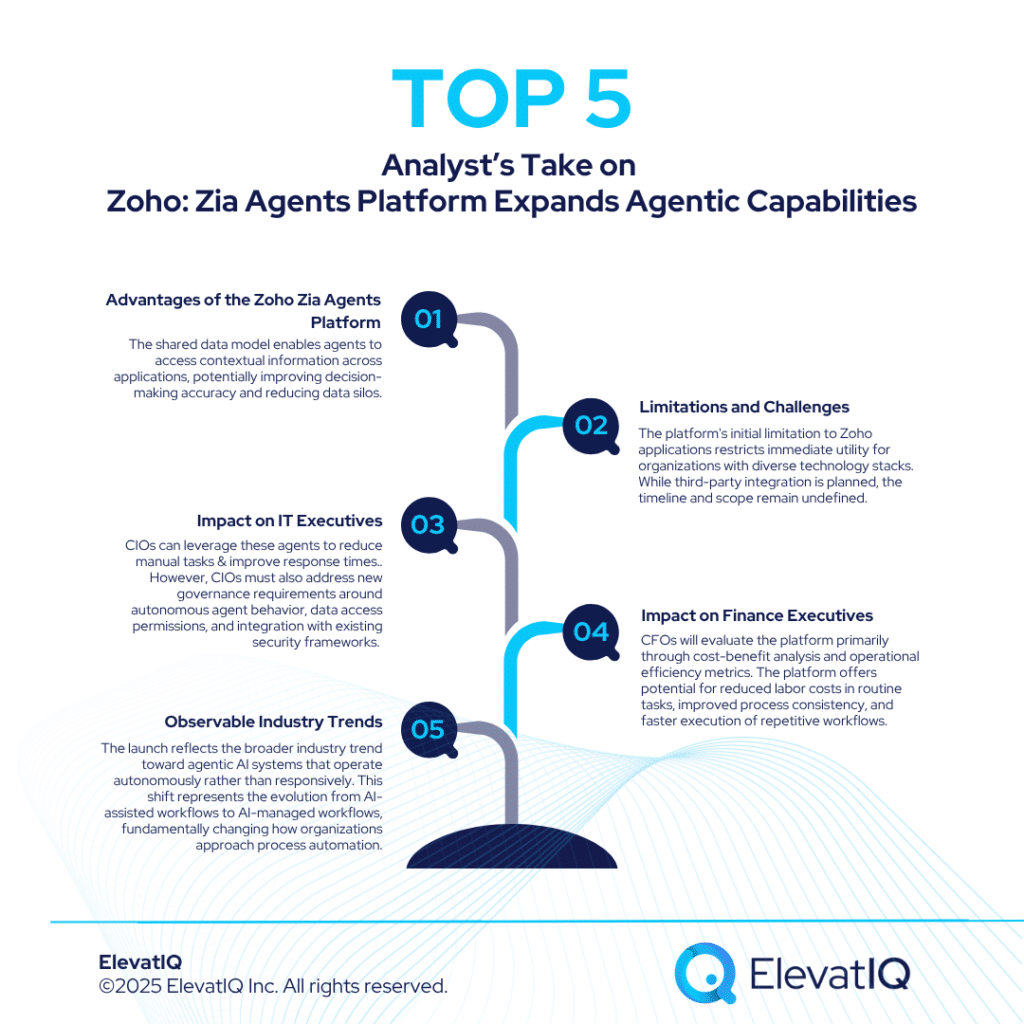
Zoho has built a strong position in the CRM market. It offers tailored products for different business segments. The company primarily focuses on SMBs but is slowly expanding into the enterprise space. Zoho provides flexibility through tools like Bigin for small businesses and its flagship CRM for larger organizations. These options support companies at different growth stages. Its broad suite of native applications covers many business functions. These range from sales to IT service management. Zoho delivers this range at a lower cost than many competitors. However, the suite-centric model has downsides. Zoho operates in a more closed ecosystem. It also offers limited third-party integrations. These limits can create challenges for businesses that want best-of-breed tools or highly customized CRM systems.
In comparison, SAP C/4 HANA is designed with large, product-centric enterprises in mind, particularly those already leveraging SAP’s broader ERP suite. Its capabilities in data governance, complex workflow management, and compliance make it ideal for regulated industries like pharmaceuticals and medical devices. But how do the trade-offs stack up? Are you prioritizing speed and simplicity of implementation, or do you need deep customization and regulatory controls? Is your business better served by Zoho’s broad but internally integrated suite, or SAP’s specialized and enterprise-grade stack? Download the ultimate Zoho vs SAP C/4 HANA CRM comparison guide now to explore these critical questions and find the right fit for your organization.
What Is SAP C/4 HANA CRM?
SAP C/4 HANA remains a strong choice for large enterprises. It appeals most to companies already using the SAP ecosystem. These businesses often prioritize compliance, omnichannel identity management, and advanced CPQ features. However, the platform has notable limitations. Its rigid data and process model can restrict flexibility. It also has a limited ecosystem and lacks intuitive marketing tools. As a result, many companies need to add third-party solutions. This increases both complexity and consulting costs. While SAP C/4 HANA is powerful in its specific niche, it has drawbacks. It doesn’t offer the flexibility of an all-in-one CRM. Teams that rely on seamless integrations or mobile-first tools may find it lacking.
In contrast, Zoho offers a more agile and cost-effective platform with user-friendly tools, mobile-ready workflows, and expanding AI functionality. Yet, its limited ecosystem openness and reliance on internally built apps may pose scalability issues for enterprises with diverse tech stacks. So, which trade-offs matter more for your business—enterprise-grade security and compliance, or lower cost and faster time to value? Are you prepared to invest in consulting support for SAP, or does Zoho’s DIY flexibility better match your in-house capabilities? Download the ultimate Zoho vs SAP C/4 HANA CRM comparison guide now to uncover which solution aligns best with your organizational priorities.
Zoho vs SAP C/4 HANA CRM Comparison
Zoho excels in offering a unified suite that’s accessible, cost-effective, and tightly integrated across its ecosystem. This makes it an appealing option for SMBs and growing enterprises that value agility and simplicity. In contrast, SAP C/4 HANA stands out with its deep enterprise-grade capabilities, offering a highly detailed data model and advanced support for CPQ, sales performance, and territory planning—ideal for large industrial firms with complex requirements.
That said, the trade-offs are significant. Zoho’s flexibility and ease of use may come at the cost of deep customization and regulatory readiness, while SAP’s robust architecture and enterprise integrations come with a steeper learning curve and higher total cost of ownership. Does your organization need a platform that emphasizes usability and affordability, or one that supports intricate enterprise workflows—even if it demands consulting support? Are you prepared to adopt SAP’s rigid structure, or does Zoho’s ecosystem provide the right balance of control and convenience? Download the ultimate Zoho vs SAP C/4 HANA CRM comparison guide now to uncover which CRM solution aligns best with your operational and strategic priorities.
Zoho vs SAP C/4 HANA CRM Module Comparison
Both Zoho and SAP C/4 HANA CRM come equipped with a wide range of features aimed at streamlining business operations and boosting overall efficiency. In this feature-by-feature comparison, we explore the unique strengths and functionalities of each platform across key operational areas. This analysis is designed to help businesses make well-informed decisions when selecting the right CRM solution. Accordingly, the following section evaluates capabilities across four critical modules: marketing, sales, customer service, and e-commerce.
Marketing
When comparing the marketing features of Zoho CRM and SAP C/4 HANA CRM, the differences stand out. Each platform supports marketing teams in its own way. Zoho offers a more user-friendly and integrated toolkit. It includes Zoho Campaigns for email marketing and Zoho Social for managing multiple social media accounts. It also provides apps like Writer and PageSense for content creation and optimization. These tools work well for businesses that want an affordable, do-it-yourself marketing setup. In contrast, SAP C/4 HANA focuses on its Marketing Cloud for email campaigns. However, it lacks built-in tools for content creation, SEO, or social media management. As a result, businesses may need third-party tools to build a complete marketing workflow.
For businesses aiming to centralize their marketing activities within a single ecosystem, does Zoho’s native integration offer more agility and ease of use? Or does SAP’s enterprise-grade email marketing—despite its steeper learning curve—align better with your compliance and scale needs? If you’re weighing depth of features against ecosystem openness and cost, downloading our Ultimate Zoho vs SAP C/4 HANA CRM Comparison Guide can help clarify the decision. Get your copy now to discover which platform best matches your marketing strategy and growth objectives.
Sales
When comparing the sales capabilities of Zoho CRM and SAP C/4 HANA CRM, the contrast between their approaches is quite distinct. Zoho CRM offers a suite of user-friendly tools designed to support end-to-end sales workflows—ranging from lead management and pipeline tracking to email tracking and meeting scheduling. These features are natively built and optimized for sales teams seeking agility and simplicity without the need for extensive configuration. On the other hand, SAP C/4 HANA CRM leans heavily on its broader enterprise ecosystem, with sales functionalities often delivered through integrations with other SAP modules, such as Sales Order Management. While this approach supports robust and scalable sales operations, it may require more effort to set up and use effectively—particularly for companies without dedicated IT or consulting support.
For businesses prioritizing quick implementation and native features, does Zoho’s integrated sales environment offer a more intuitive path forward? Or do the deeply integrated, enterprise-grade components of SAP C/4 HANA better serve complex, compliance-heavy sales environments? To help you decide which CRM aligns with your sales goals, download our Ultimate Zoho vs SAP C/4 HANA Comparison Guide today and gain actionable insights into choosing the best-fit solution for your organization.
Customer Service
When evaluating the customer service capabilities of Zoho CRM and SAP C/4 HANA CRM, it’s clear both platforms provide foundational features to support efficient service operations. Zoho CRM, powered by Zoho Desk and SalesIQ, excels in real-time communication and workflow automation, offering a seamless experience for managing tickets, automating support tasks, and engaging with customers across channels. These tools are particularly attractive to businesses seeking a flexible, cost-effective way to centralize customer interactions. SAP C/4 HANA CRM, on the other hand, delivers a more enterprise-oriented approach through its Service Cloud. With robust tools for ticketing, live chat, and omni-channel engagement, SAP’s strength lies in managing complex service environments with high volumes and strict compliance needs.
So which platform truly aligns with your customer support strategy—Zoho with its agile, all-in-one native tools or SAP C/4 HANA with its enterprise-grade support infrastructure? Does your team need fast, intuitive deployment or a solution built for scalability and integration with broader ERP systems? To find out which CRM solution best fits your service needs, download the Ultimate Zoho vs SAP C/4 HANA Comparison Guide now and make an informed decision backed by detailed insights.
E-commerce
When it comes to e-commerce capabilities, both Zoho CRM and SAP C/4 HANA CRM offer tools designed to support product management and customer-centric experiences, though they cater to different business scales and complexities. Zoho CRM integrates with tools like Zoho Inventory to manage product catalogs, inventory, and order fulfillment—making it a strong contender for small to mid-sized businesses seeking an all-in-one suite. Its flexibility and affordability are attractive, particularly for organizations looking to quickly launch and manage digital commerce without extensive IT resources.
SAP C/4 HANA CRM, however, leans into enterprise-grade e-commerce, offering powerful tools like SAP Commerce Cloud and advanced analytics for deeply personalized customer experiences. These capabilities are ideal for organizations with sophisticated digital storefronts and high-volume order management needs. So, which platform better supports your e-commerce strategy? Do you need the agility and simplicity of Zoho or the scale and depth of SAP? Download the Ultimate Zoho vs SAP C/4 HANA Comparison Guide now to uncover the details that will help you choose the right CRM for your e-commerce operations.
Zoho vs SAP C/4 HANA CRM Pros
When comparing Zoho and SAP C/4 HANA CRM, it becomes clear that each platform excels in different areas depending on business scale and regulatory needs. Zoho CRM provides a powerful low-code environment through tools like Zoho Creator, enabling businesses to customize workflows and build apps without heavy reliance on third-party tools. It also shines in sales compensation and territory planning, making it a good fit for growing companies that prioritize agility, affordability, and native integration within a broader suite of Zoho apps. Meanwhile, its pre-packaged workflow builder allows development-savvy teams to create intricate automation with ease.
SAP C/4 HANA CRM, on the other hand, emphasizes compliance, identity management, and cross-channel personalization. Its deep integration across SAP’s ecosystem stands out, especially for organizations already using other SAP products. If your business requires enterprise-grade CPQ, complex compliance workflows like GDPR or CCPA, or robust data governance across departments, SAP C/4 HANA may be a more aligned choice. But is your organization more in need of agile customization or bulletproof regulatory compliance? Are tight SAP integrations essential, or would broader third-party flexibility serve you better? Download the Ultimate Zoho vs SAP C/4 HANA Comparison Guide now to make the most informed CRM decision.
Zoho vs SAP C/4 HANA CRM Cons
While both Zoho and SAP C/4 HANA CRM offer compelling value, they come with notable limitations that businesses must consider. Zoho CRM, while strong on native app integration, lacks the advanced territory management and sales planning functionalities often required by larger organizations. Its more closed ecosystem can hinder flexibility, especially for companies looking to adopt best-of-breed strategies with third-party tools. Furthermore, Zoho’s customizability—though improving—still trails behind platforms like Salesforce or Microsoft Dynamics when it comes to handling highly complex operational processes or extensive pre-sales planning.
On the other hand, SAP C/4 HANA CRM is built with large enterprises in mind, but its complexity and rigidity can become a hurdle for organizations that need agility and intuitive workflows. The platform often requires heavy consulting support, both during implementation and ongoing customization, which can dramatically increase the total cost of ownership. Is your organization ready to invest in the infrastructure and expertise needed to run SAP C/4 HANA effectively? Or does a leaner, more modular platform like Zoho offer better alignment with your operational goals? Download the Ultimate Zoho vs SAP C/4 HANA Comparison Guide now to dive deeper into these trade-offs and choose the CRM that’s right for your business.
Acumatica has announced strategic partnerships with JobPlanner and STACK Construction Technologies to enhance its Construction Edition with comprehensive project lifecycle support. The company revealed these integrations, targeting improved productivity gains and end-to-end construction project management capabilities. The Acumatica construction partnerships aim to address market demands for enhanced collaboration, workflow automation, and project execution within budget and timeline constraints.
Structured Breakdown of the News
Partnership Scope and Strategic Objectives
Acumatica has formed strategic partnerships with two construction technology providers to expand the capabilities of its Construction Edition platform. JobPlanner brings collaborative project management functionality, while STACK Construction Technologies contributes advanced preconstruction and estimating capabilities. These integrations are designed to enhance the Acumatica Construction Edition’s ability to support construction companies in executing projects on time and within budget parameters.
Market Position and Industry Recognition
Acumatica Construction Edition represents the company’s most widely adopted Industry Edition, serving construction businesses with cloud-native solutions. Construction Executive recognized Acumatica as one of the Top Construction Technology Firms, highlighting the company’s market presence in the construction technology sector. The platform has established a reputation for scalability and usability among construction firms seeking tailored solutions.
JobPlanner Integration Components
JobPlanner provides collaborative project management capabilities designed for general contractors, subcontractors, and vendors. The platform includes job costing and bid management functionality that enables construction teams to manage budgets, track expenses, and facilitate bidding processes. JobPlanner features a user-friendly interface and native mobile application that connects back office operations to field workers for improved operational efficiency.
JobPlanner Leadership Perspective
DeWayne Adamson, CEO of JobPlanner, highlighted the value proposition of the Acumatica construction integration. “Integrating JobPlanner into Acumatica Construction Edition brings unparalleled value to construction professionals,” Adamson explained. “Acumatica’s robust platform, combined with JobPlanner’s collaborative project management capabilities, will help contractors streamline their workflows, enhance communication and achieve project goals more effectively.”
STACK Integration Capabilities
STACK offers preconstruction platform functionality designed to help contractors drive growth and boost profitability through accurate takeoffs and customizable estimates. The platform provides intuitive and collaborative preconstruction tools for calculating labor and material requirements while forecasting project costs. The integration enhances Acumatica Construction Edition’s preconstruction capabilities to support improved project planning and cost management.
STACK Leadership Statement
Ray DeZenzo, President of STACK, emphasized the shared objectives between the two companies. “STACK and Acumatica share a commitment to empowering construction leaders with innovative solutions that drive operational excellence and profitability,” DeZenzo stated. “By integrating STACK’s advanced capabilities with Acumatica Construction Edition, we’re enabling contractors to secure more projects, optimize performance and achieve sustained growth in a competitive market.”
The 2026 Digital Transformation Report
Thinking of embarking on a ERP journey and looking for a digital transformation report? Want to learn the best practices of digital transformation? Then, you have come to the right place.
What specific construction processes do these integrations address?
The JobPlanner integration is expected to focus on project management, job costing, bid management, budget tracking, and expense monitoring. The STACK integration addresses preconstruction activities including takeoffs, estimating, labor calculation, material requirements planning, and project cost forecasting.
How do these partnerships affect existing Acumatica Construction Edition users?
Existing users will likely gain access to enhanced collaborative project management through JobPlanner and advanced preconstruction capabilities through STACK. The integrations extend the platform’s functionality without replacing core Acumatica construction features.
How do the mobile capabilities work with field operations?
JobPlanner includes a native mobile application that is expected to connect back office operations to field workers. This functionality complements existing Acumatica construction mobile capabilities to improve field-to-office communication and data synchronization.
Analyst’s Take
Customer Requirements Analysis
Construction companies evaluating the Acumatica construction partnerships typically seek comprehensive project lifecycle support, improved collaboration capabilities, and enhanced preconstruction accuracy. The JobPlanner integration addresses project management and collaboration requirements, while STACK focuses on preconstruction and estimating needs. However, organizations must consider integration complexity, data synchronization requirements, and training needs when implementing multiple integrated platforms.
Impact on IT Executives
CIOs benefit from integrated construction technology platforms that reduce system fragmentation and improve data consistency across project lifecycles. The Acumatica construction partnerships provide cloud-native integration capabilities that can simplify IT infrastructure management and reduce maintenance overhead. However, CIOs must evaluate data security, integration architecture, and system performance implications when implementing multiple integrated solutions. The partnerships may require additional technical resources for implementation and ongoing system administration.
Impact on Finance Executives
CFOs gain enhanced project cost visibility and financial control through improved job costing, bid management, and cost forecasting capabilities. The integrated solutions can provide better project profitability analysis and budget management tools for construction operations. However, CFOs must consider total cost of ownership including additional licensing fees, implementation costs, and training expenses for the integrated platforms. The enhanced estimating accuracy from STACK integration may improve project margin predictability and financial planning capabilities.
Future Industry Predictions
Construction technology integration will likely accelerate as companies seek comprehensive platforms that eliminate data silos and improve project visibility. The Acumatica construction approach of partnering with specialized providers rather than building all capabilities internally may become a preferred strategy for ERP vendors serving construction markets. Integration standardization and API development will become increasingly important for construction technology ecosystems.
Observable Industry Trends
Construction ERP providers are pursuing partnership strategies to expand platform capabilities without extensive internal development investments. The focus on end-to-end project lifecycle support reflects market demand for comprehensive construction management solutions. Cloud-native integration approaches are becoming standard for construction technology platforms as companies prioritize scalability and accessibility. Mobile-first design considerations are increasingly important for construction applications that serve field operations and remote project teams.
FAQs
What specific construction processes do the JobPlanner and STACK integrations address?
The JobPlanner integration focuses on project management, job costing, bid management, budget tracking, and expense monitoring capabilities. It provides collaborative project management functionality designed for general contractors, subcontractors, and vendors. The STACK integration addresses preconstruction activities including takeoffs, estimating, labor calculation, material requirements planning, and project cost forecasting. STACK offers preconstruction platform functionality designed to help contractors drive growth and boost profitability through accurate takeoffs and customizable estimates.
How do these partnerships affect existing Acumatica Construction Edition users?
Existing users will gain access to enhanced collaborative project management through JobPlanner and advanced preconstruction capabilities through STACK. The integrations extend the platform’s functionality without replacing core Acumatica construction features. These strategic partnerships are designed to enhance the Acumatica Construction Edition’s ability to support construction companies in executing projects on time and within budget parameters, providing comprehensive project lifecycle support.
How do the mobile capabilities work with field operations?
JobPlanner includes a native mobile application that connects back office operations to field workers for improved operational efficiency. This functionality complements existing Acumatica construction mobile capabilities to improve field-to-office communication and data synchronization. The mobile application enables construction teams to access project management tools and maintain connectivity between field operations and office-based systems, enhancing overall workflow automation and collaboration.
TrueCommerce has secured SAP certification for its EDI solution’s integration with RISE with SAP S/4HANA Cloud Private Edition. The company announced this development as an expansion of its certified SAP integration portfolio. Thus, including both public and private cloud editions of SAP S/4HANA. The TrueCommerce EDI integration supports S/4HANA Cloud Private Edition versions 2023 and newer.
Structured Breakdown of the News
Certification Scope and Technical Specifications
The SAP Integration and Certification Center has certified TrueCommerce EDI Integration version 8.12.2.110 for compatibility with RISE with SAP S/4HANA Cloud using standard integration technologies. This certification specifically covers SAP S/4HANA Cloud Private Edition versions released in 2023 and subsequent versions. The integration operates alongside TrueCommerce’s existing SAP-certified EDI solution for SAP S/4HANA Cloud Public Edition.
Key Integration Features
The TrueCommerce EDI solution delivers several core capabilities for SAP S/4HANA Cloud Private Edition users. The integration automates critical business document exchanges, reducing manual processing requirements and minimizing error potential. Advanced Shipping Notice (ASN) support accommodates various ASN types to meet diverse trading partner compliance requirements.
Performance and Processing Capabilities
Multi-threading functionality enables simultaneous processing of multiple large transactions, reducing processing delays and improving overall system performance. The TrueCommerce EDI integration provides comprehensive document support across order-to-cash, procure-to-pay, and warehousing workflows. Drop shipping operations and multi-channel eCommerce integration capabilities allow businesses to respond to market demands efficiently.
Strategic Product Portfolio Context
Ryan Tierney, Senior Vice President of Product at TrueCommerce, stated: “Coming on the heels of our EDI integration with SAP S/4HANA Cloud Public, this latest certification for SAP S/4HANA Cloud Private extends our EDI integration offering for companies on the path to digital transformation with S/4HANA Cloud.” He added: “As we continue to expand our portfolio, we remain focused on the future—providing our customers with cutting-edge options and the flexibility to choose the integration approach that best aligns with their unique business needs and positions them for long-term growth.”
Common Questions That We Are Hearing
What is the difference between SAP S/4HANA Cloud Private and Public Edition integration?
The TrueCommerce EDI integration is likely to support both deployment models. SAP S/4HANA Cloud Private Edition offers dedicated infrastructure and greater customization options, while Public Edition provides standardized functionality in a multi-tenant environment. Both versions receive certified TrueCommerce EDI integration support.
Which SAP S/4HANA Cloud Private Edition versions are supported?
The certified TrueCommerce EDI integration supports SAP S/4HANA Cloud Private Edition versions 2023 and newer. Organizations using earlier versions would need to upgrade to access the certified integration capabilities.
What business processes does the integration cover?
The integration supports order-to-cash, procure-to-pay, and warehousing workflows. It includes drop shipping functionality and multi-channel eCommerce integration capabilities for comprehensive supply chain operations.
The 2026 Digital Transformation Report
Thinking of embarking on a ERP journey and looking for a digital transformation report? Want to learn the best practices of digital transformation? Then, you have come to the right place.
Multi-threading allows the TrueCommerce EDI system to process multiple large transactions simultaneously rather than sequentially. This likely reduces processing delays and improves overall system throughput for high-volume EDI operations.
Analyst’s Take
Customer Requirements Analysis
Organizations evaluating TrueCommerce EDI integration typically prioritize compliance capabilities, processing performance, and workflow coverage. The Advanced Shipping Notice support addresses trading partner compliance requirements, while multi-threading capabilities meet high-volume processing demands. However, organizations must consider integration complexity and ongoing maintenance requirements when implementing comprehensive EDI solutions.
Impact on IT Executives
CIOs benefit from standardized integration approaches that reduce technical complexity and maintenance overhead. The SAP-certified TrueCommerce EDI integration provides validated compatibility, reducing implementation risks and support complexity. However, CIOs must evaluate integration architecture decisions between private and public cloud deployments based on security, compliance, and customization requirements. The dual certification approach offers deployment flexibility but requires careful architecture planning.
Impact on Financial Executives
CFOs gain operational cost benefits through automated document processing and reduced manual intervention requirements. The TrueCommerce EDI integration can decrease processing errors and associated correction costs while improving supplier relationship efficiency. However, CFOs must consider total cost of ownership including integration licensing, implementation services, and ongoing maintenance expenses. Multi-threading capabilities may reduce infrastructure requirements for high-volume processing scenarios.
Future Industry Predictions
EDI integration demand will likely increase as organizations migrate to cloud-based ERP systems. The TrueCommerce EDI certification for both SAP S/4HANA Cloud deployment models positions the company for broader market opportunities as SAP customers evaluate cloud migration strategies. Integration standardization through SAP certification programs will become increasingly important for vendor selection decisions.
Observable Industry Trends
Enterprise software vendors are pursuing comprehensive certification strategies across multiple cloud deployment models to address diverse customer requirements. The TrueCommerce EDI approach of supporting both private and public cloud editions reflects market demand for deployment flexibility. Organizations are prioritizing certified integrations to reduce implementation risks and ensure long-term vendor support capabilities.
FAQs
What versions of SAP S/4HANA Cloud Private Edition are supported by TrueCommerce’s certified EDI integration?
The certified TrueCommerce EDI integration supports SAP S/4HANA Cloud Private Edition versions 2023 and newer. Organizations using earlier versions would need to upgrade to access the certified integration capabilities. The certification specifically covers TrueCommerce EDI Integration version 8.12.2.110 for compatibility with RISE with SAP S/4HANA Cloud.
How does the multi-threading functionality improve EDI processing performance?
Multi-threading allows the TrueCommerce EDI system to process multiple large transactions simultaneously rather than sequentially. This reduces processing delays and improves overall system throughput for high-volume EDI operations. The capability enables businesses to handle larger transaction volumes more efficiently, reducing bottlenecks in critical business processes.
What business processes and workflows does the TrueCommerce EDI integration cover?
The integration provides comprehensive document support across order-to-cash, procure-to-pay, and warehousing workflows. It includes drop shipping functionality and multi-channel eCommerce integration capabilities for comprehensive supply chain operations. The solution also features Advanced Shipping Notice (ASN) support that accommodates various ASN types to meet diverse trading partner compliance requirements, while automating critical business document exchanges to reduce manual processing requirements and minimize error potential.
Zoho CRM is widely adopted by SMB marketing agencies, tech startups, and software development firms, although its presence in the enterprise space is more limited. It’s particularly advantageous for businesses already using other Zoho products, like HCM or accounting tools. However, Zoho may not meet the needs of product-centric organizations that require more complex CRM capabilities. Additionally, Zoho has fewer third-party integrations compared to platforms like HubSpot or Salesforce, which could limit flexibility for businesses with diverse tech stacks.
In contrast, Zendesk Sell is an entry-level CRM tailored for companies using Zendesk for customer service and ticketing workflows. While both Zoho and Zendesk Sell focus on sales, Zendesk Sell’s integration with Zendesk’s customer service suite is relatively minimal. This is due to Zendesk Sell being acquired rather than built in-house, resulting in separate data stores and tech stacks that limit seamless connectivity.
Zoho and Zendesk both focus on suite-based features. Zoho offers a broader platform that covers sales, marketing, customer service, and field service. Zendesk focuses more on customer service and sales. It includes some marketing automation but depends on third-party add-ons for extra features. Both platforms have strong financial support. Zoho stands out as a leading CRM and HCM provider. Zendesk is more widely used for customer service and often pairs with other CRMs. Some businesses choose Zendesk Sell for its simplicity. It combines CRM and customer service under one vendor, offering a unified experience.
When it comes to integration and ecosystem, Zoho operates within a largely closed ecosystem with limited third-party integrations. On the other hand, Zendesk focuses more on customer engagement, customer success, and telecommunications, with integrations extending to some ITSM providers.
The 2026 Digital Transformation Report
Thinking of embarking on a ERP journey and looking for a digital transformation report? Want to learn the best practices of digital transformation? Then, you have come to the right place.
Zoho offers a wide range of CRM products for different market segments. It mainly targets SMBs but has also expanded to serve some enterprise clients. The suite includes tools like Bigin for small businesses and Zoho CRM for larger organizations. These products have improved significantly in recent years. However, Zoho’s CRM tools often struggle with integration. Many apps run on separate data models, which creates communication issues across the platform. This setup limits flexibility for businesses that need seamless data flow or want to integrate external tools. Zoho’s closed ecosystem can also drive up costs. Integration and implementation often require more effort, especially for companies with tight budgets or complex tech environments.
While Zoho provides a comprehensive set of tools for building a complete tech stack, Zendesk Sell offers a more streamlined CRM experience focused primarily on sales and customer service. Unlike Zoho, Zendesk Sell’s integration with Zendesk’s customer service suite remains somewhat separate, limiting connectivity. For businesses focused on customer service workflows, Zendesk Sell might feel more suited to their needs, but for those requiring deeper customization or more complex processes, Zoho’s diverse app portfolio may provide the necessary flexibility. Which solution aligns better with your company’s needs—Zoho’s comprehensive platform or Zendesk Sell’s streamlined approach? Is Zoho’s complex ecosystem a hindrance or a benefit for your team? To explore how these two CRM solutions compare in more detail, download the Ultimate Zoho vs Zendesk Sell CRM Comparison Guide now!
What Is Zendesk Sell CRM?
Zendesk Sell CRM is a budget-friendly, entry-level CRM solution designed primarily for SMBs, offering an easy-to-use interface with basic workflows and integration capabilities. It is a good choice for companies seeking a simple CRM without the complexity of advanced customization or enterprise-level features. However, Zendesk Sell lacks the extensive customization options that larger businesses often require. It is built with a focus on industries that already rely on Zendesk’s customer service products, such as tech, media, and telecommunications. This alignment makes Zendesk Sell a strong fit for businesses that need a straightforward CRM to complement their existing Zendesk suite, especially those operating call centers or customer support teams.
Despite its ease of use, Zendesk Sell falls short when compared to more robust CRM solutions, particularly for organizations looking for deep customization or complex application development. Does your business need a CRM that supports high-level customization or integrations with other advanced enterprise applications? Could Zendesk Sell’s simplicity be an advantage or a limitation for your growing needs? If you’re exploring options between Zendesk Sell and more advanced CRM platforms like Zoho, what level of customization or scalability do you require? For a deeper understanding of how Zendesk Sell compares to other CRM platforms, download the Ultimate Zoho vs Zendesk Sell CRM Comparison Guide now!
Zoho vs Zendesk Sell CRM Comparison
Zoho CRM offers a robust data model similar to Salesforce’s, with strong integration capabilities across its ecosystem, making it suitable for organizations that require extensive customization. While Zoho’s ecosystem is relatively closed, it excels at streamlining operational processes, particularly for SMBs. However, Zoho may not be the best fit for larger companies with complex regulatory or compliance needs, as its customization options and data models may present limitations for businesses with highly specialized requirements.
In contrast, Zendesk Sell CRM uses a simpler and more limited data model. This design makes it easier to implement, especially for SMBs with basic CRM needs. It integrates smoothly with Zendesk’s customer service tools, offering a unified experience. However, its customization and operational features are not as extensive as Zoho’s. It falls short in areas like marketing automation and advanced reporting. Zendesk Sell works well for companies focused on customer service or already using Zendesk products. But if your business needs deeper CRM functionality or strong MarTech integrations, Zendesk Sell may not be enough. So, what matters more to you—customization or ease of use? Do you prioritize robust features or a simple setup? To help you choose, download the Ultimate Zoho vs Zendesk Sell CRM Comparison Guide now!
Zoho vs Zendesk Sell CRM Module Comparison
Both platforms provide a wide range of features and functionalities aimed at improving business operations and boosting efficiency. In this comparison, we explore the unique capabilities of Zoho vs Zendesk Sell CRM across key areas, offering insights to help businesses make informed decisions about their CRM choice. This section covers the features of each platform across essential modules, including marketing, sales, customer service, and e-commerce.
Marketing
Zoho CRM supports content creation through tools like Zoho Writer, PageSense, Sites, and Docs. However, it does not offer a dedicated content creation module like HubSpot. On the social media front, Zoho integrates with Zoho Social. This helps businesses manage and monitor their social media presence in one place. It provides a solid solution for social media management. In addition, Zoho includes SEO tools and a strong email marketing system. These features make it a solid choice for businesses looking for an all-in-one marketing platform.
In contrast, Zendesk Sell CRM falls short in these marketing-specific areas. While it offers email integration, bulk email sending, and automated email sequences, it does not provide dedicated tools for content creation, SEO, or social media management. This limitation may prove restrictive for businesses that need more than just a basic email marketing platform. Are you looking for a CRM that seamlessly integrates marketing functions or do you just need basic email capabilities? How important is content creation and social media management in your CRM strategy? To explore all the nuances between Zoho and Zendesk Sell CRM, download the ultimate Zoho vs Zendesk Sell CRM comparison guide now!
Sales
When comparing the sales capabilities of Zoho CRM vs Zendesk Sell CRM, Zoho CRM offers a more comprehensive set of tools for managing and optimizing sales processes. Zoho helps businesses efficiently capture, nurture, and convert leads with its lead management features. It provides a visual sales pipeline, helping teams track deals across various stages while offering insights into email performance through email tracking. With integrated calendar tools, Zoho also allows users to schedule meetings and collaborate in real time with its built-in chat functionality. These features make Zoho CRM an ideal solution for businesses looking for a robust, all-in-one sales management tool.
On the other hand, Zendesk Sell CRM provides core sales functionalities but with fewer specialized tools. While it offers solid lead management, including building targeted prospect lists and setting up follow-up sequences, it lacks a dedicated meeting scheduling tool. Zendesk Sell also provides email integration and performance tracking, along with tools for call logging and syncing customer information across teams. However, it may not be as well-suited for companies that require a high level of collaboration and advanced sales process management. Does your team need an all-in-one solution or are you focused on core CRM functionalities? How important is advanced lead nurturing and meeting management to your sales success? To dive deeper into their differences, download the ultimate Zoho vs Zendesk Sell CRM comparison guide now!
Customer Service
When comparing the customer service capabilities of Zoho vs Zendesk Sell CRM, Zoho CRM offers a more integrated approach to handling customer support. With Zoho CRM, you have access to Zoho Desk and Zoho SalesIQ, providing live chat and efficient ticket management, including SLA tracking. Zoho’s customer support automation allows businesses to streamline workflows, implement escalation rules, and use predefined response templates for a faster, more organized support process. Additionally, Zoho’s omni-channel support allows businesses to manage customer interactions across various communication platforms, ensuring a seamless support experience.
Zendesk Sell CRM, while effective for sales management, relies on its parent platform, Zendesk Support, for customer service functionalities like ticket management, live chat, and omnichannel support. The integration with Zendesk Support offers a robust solution for handling customer inquiries and automating support processes, but it may not provide the same depth of integration for CRM users within the Zendesk Sell ecosystem. Does your business require advanced support features integrated directly into your CRM or is using a separate platform for customer service sufficient? Are omnichannel support and automation essential to improving your customer service experience? To learn more about how Zoho and Zendesk Sell compare in customer service, download the ultimate Zoho vs Zendesk Sell CRM comparison guide now!
E-commerce
When comparing the e-commerce capabilities of Zoho vs Zendesk Sell CRM, Zoho CRM stands out with its strong product catalog management, order fulfillment, and personalized shopping experiences. With Zoho Inventory, businesses can easily manage inventory, warehouse operations, and streamline order processing, providing a comprehensive solution for e-commerce operations. Additionally, Zoho CRM integrates seamlessly with other Zoho applications, allowing businesses to create personalized shopping experiences for their customers. This interconnected system enables businesses to provide a more tailored experience, improving customer satisfaction and driving sales growth.
On the other hand, Zendesk Sell CRM lacks native e-commerce capabilities, such as product catalog management and order fulfillment, which may be a limitation for businesses with significant online retail operations. While it can handle basic CRM functions and integrates well with Zendesk Support for customer service, it doesn’t offer the same level of e-commerce functionality that Zoho provides. Does your business require e-commerce tools like order management and product cataloging integrated into your CRM? Or do you prefer to use specialized e-commerce platforms alongside a more basic CRM? To dive deeper into the strengths and weaknesses of Zoho and Zendesk Sell for e-commerce, download the ultimate Zoho vs Zendesk Sell CRM comparison guide now!
Zoho vs Zendesk Sell CRM Pros
When it comes to evaluating CRM solutions, understanding the unique strengths of Zoho vs Zendesk Sell CRM is crucial for businesses aiming to optimize their operations. Zoho CRM offers powerful capabilities, such as a pre-packaged workflow builder that allows teams with development expertise to create intricate workflows tailored to their needs. Additionally, the inclusion of Zoho Creator enables developers to integrate other software and build custom applications quickly, providing flexibility for businesses with specific requirements. With strong sales compensation and territory planning features, Zoho CRM is well-suited for businesses that require robust, customizable processes.
On the other hand, Zendesk Sell CRM is designed with simplicity in mind, making it an excellent choice for startups or businesses with limited technical expertise. Its user-friendly interface is perfect for sales development reps who are focused on executing multi-touch campaigns. Zendesk Sell excels in providing a straightforward experience for companies that need basic CRM functions without a steep learning curve. Does your team need a highly customizable CRM, or are you looking for something that’s easy to adopt and use right away? To learn more about how Zoho and Zendesk Sell compare across various critical features, download the ultimate Zoho vs Zendesk Sell CRM comparison guide now!
Zoho vs Zendesk Sell CRM Cons
While recognizing the strengths of Zoho vs Zendesk Sell CRM is crucial, it’s equally important to understand their limitations and challenges. Zoho CRM, while powerful in many aspects, lacks robust support for territory management and sales team planning, which can be a significant drawback for businesses that require complex sales strategies. Additionally, Zoho’s integration options outside of its own ecosystem are somewhat limited, which could pose challenges for businesses that rely on a diverse tech stack. Moreover, users have reported occasional glitches in the system, which could hinder the user experience.
Zendesk Sell CRM, on the other hand, faces its own set of limitations. The integration between Zendesk Sell and Zendesk Support is not as tight as some might expect, potentially causing some friction when managing customer service and sales data. Furthermore, the marketing automation capabilities in Zendesk Sell are not as advanced as in other CRM systems, limiting the ability to streamline marketing efforts. Do you need seamless integration and advanced automation, or does your business require a simpler solution? To find out how these CRMs compare in more detail, download the ultimate Zoho vs Zendesk Sell CRM comparison guide now!
Zoho Corporation announced the launch of Zoho Payments, marking the company’s entry into the U.S. payments processing market. The unified payment solution enables businesses to collect card and ACH payments while integrating directly with Zoho’s existing business software ecosystem. The Zoho Payments launch addresses the growing demand for connected financial workflows as 87% of transactions are likely to be cashless, and 81% of U.S. consumers prefer card payments.
Structured Breakdown of the News
Core Product Features
The Zoho Payments launch introduces a comprehensive payment processing solution that handles both card and ACH transactions. The platform supports card payments in over 135 currencies globally, while ACH payments remain limited to U.S. domestic transactions. Major card networks including Visa, Mastercard, American Express, Discover, JCB, UnionPay, and Diners Club are supported through the unified system.
The solution operates natively within Zoho’s existing application suite, connecting with finance, operations, sales, marketing, low-code, and collaboration platforms. Third-party systems can also integrate through available APIs, extending the platform’s reach beyond Zoho’s ecosystem.
Payment Collection Methods
Businesses can collect payments through multiple channels following the Zoho Payments launch. The platform supports invoice-based payments sent directly to customers, payment links for quick transactions, and hosted payment pages for both one-time and recurring billing scenarios. Also, E-commerce integration capabilities can allow online retailers to process transactions through their existing stores.
Security and Compliance
The Zoho Payments launch includes PCI DSS Level 1 compliance, representing the highest security standard for payment processing. The platform incorporates fraud protection mechanisms designed to reduce chargebacks and minimize losses from fraudulent transactions. Additionally, risk management tools are built into the core system to help businesses maintain secure payment operations.
Operational Capabilities
Automated reconciliation features can reduce manual work for finance teams while improving accuracy in financial record-keeping. The platform provides faster settlements compared to traditional payment processors and offers customized payout scheduling options. Thus, transaction volumes can now scale with business growth through the platform’s designed architecture.
Analytics and Reporting
The system provides visibility into payment transactions, payouts, refunds, and payment failures through integrated dashboards. It also offers account summaries which gives insights into cash flow patterns, payment trends, and operational bottlenecks. These reporting capabilities aim to support business decision-making through data-driven insights.
Pricing Structure
Domestic card transactions are priced at 2.9% plus 30 cents per transaction, covering all supported card networks. International card transactions carry an additional 1.5% fee on top of the domestic rate, resulting in a total fee of 4.4% plus 30 cents for cross-border payments.
Common Questions We Are Hearing
How does Zoho Payments compare to existing payment processors like Stripe or Square?
The Zoho Payments launch differentiates through native integration with Zoho’s business software suite. Thus eliminating the need for separate logins and complex integrations. Pricing at 2.9% + 30¢ for domestic cards aligns with industry standards, while the 4.4% + 30¢ rate for international cards falls within typical ranges for cross-border transactions.
The 2026 Digital Transformation Report
Thinking of embarking on a ERP journey and looking for a digital transformation report? Want to learn the best practices of digital transformation? Then, you have come to the right place.
A: The Zoho Payments launch includes ACH processing for U.S. domestic transactions only. Specific ACH pricing was not disclosed in the announcement, though businesses can process bank-to-bank transfers through the unified platform.
Can existing Zoho customers migrate their current payment processing?
A: The Zoho Payments launch targets existing Zoho users through seamless integration with applications like Zoho Books. The platform works out-of-the-box with current Zoho installations, though migration timelines and processes might vary.
What countries can accept payments through the 135+ currency support?
A: While the Zoho Payments launch supports 135+ currencies for card transactions, the announcement focuses on U.S. market entry. International availability and specific country support details are not clear yet.
How does the automated reconciliation feature work?
A: The automated reconciliation capability reduces manual finance team work by automatically matching payment transactions with corresponding invoices and records. Specific technical details about the reconciliation process might vary and would need further investigation.
Analyst’s Take
Customer Impact Analysis
The Zoho Payments launch addresses legitimate business pain points identified in the announcement. James Martin, Founder and CEO of Keystone Transport Services, stated: “Our transportation company has used third-party payment portals before, but they came with extra logins and separate integrations that didn’t fit smoothly into our workflow.” This feedback highlights the integration challenges that the new solution aims to resolve.
However, businesses must weigh the benefits of integrated payments against potential vendor lock-in concerns. While seamless workflow integration offers operational advantages, companies may find themselves more dependent on Zoho’s ecosystem for critical payment functions.
Merit:
Seamless experience for Zoho ecosystem users
Built-in automation and fraud detection
High scalability for growing transaction volumes
Demerit:
Businesses outside the Zoho ecosystem may face technical friction
Pricing may be comparable to other leading providers but not lower
Impact on IT Executives
CIOs will likely view the Zoho Payments launch as an opportunity to reduce system complexity and integration overhead. The native connection to existing Zoho applications eliminates the need for custom API development and ongoing maintenance of third-party payment integrations.
The security benefits include PCI DSS Level 1 compliance handling, which reduces compliance burden on internal IT teams. However, CIOs must consider the implications of centralizing payment processing within a single vendor ecosystem, particularly regarding backup payment processing capabilities and disaster recovery planning.
Impact on Finance Executives
CFOs may find value in the automated reconciliation features and integrated financial reporting capabilities offered through the Zoho Payments launch. The promise of better authorization rates could improve revenue capture, while fraud protection mechanisms may reduce chargeback-related losses.
The pricing structure at 2.9% + 30¢ for domestic transactions aligns with market rates, though CFOs should evaluate total cost of ownership including potential savings from reduced manual reconciliation work. The 4.4% + 30¢ rate for international transactions may impact businesses with significant cross-border payment volumes.
Industry Trend Analysis
The Zoho Payments launch reflects a broader industry trend toward integrated business software platforms. Companies increasingly seek unified solutions that eliminate data silos and workflow disruptions between different business functions.
Raju Vegesna, Chief Evangelist at Zoho, emphasized this trend: “As digital payments become the default preference for everything from online purchases to subscription services, businesses need a payment solution that not only offers flexibility, but is also tightly connected to their financial operations.”
This approach contrasts with the historical model of best-of-breed point solutions, suggesting that integration capabilities may become more important than specialized features for certain market segments.
Future Predictions
The Zoho Payments launch likely represents the first phase of Zoho’s broader financial services strategy. The company may expand into additional payment methods, international markets, and complementary financial products to compete with established players like Stripe and Square. The success of this integrated approach could influence other business software providers to develop native payment capabilities rather than relying on third-party partnerships.
This trend may lead to increased competition in the small and medium business payment processing market. The emphasis on automated reconciliation and financial workflow integration suggests that future payment processing solutions will need to demonstrate clear operational efficiency benefits beyond basic transaction processing capabilities to remain competitive in the evolving market landscape.
FAQs
What payment methods does the Zoho Payments launch support?
The Zoho Payments launch supports both card and ACH transactions. Card payments are accepted in over 135 currencies and include major card networks such as Visa, Mastercard, American Express, Discover, JCB, UnionPay, and Diners Club. ACH payments are limited to U.S. domestic transactions.
How does Zoho Payments benefit businesses already using Zoho applications?
The Zoho Payments launch enables seamless integration with Zoho’s existing business software, including finance, operations, and CRM tools. This eliminates the need for separate logins and reduces integration overhead. Automated reconciliation and unified dashboards offer operational efficiency and improved financial visibility.
What are the pricing details for using Zoho Payments?
Domestic card transactions are priced at 2.9% plus 30¢ per transaction. International card payments incur an additional 1.5%, making the total 4.4% plus 30¢ for cross-border transactions. ACH pricing details were not disclosed in the announcement.