Food and Beverage

Top 10 ERP Systems For 2025

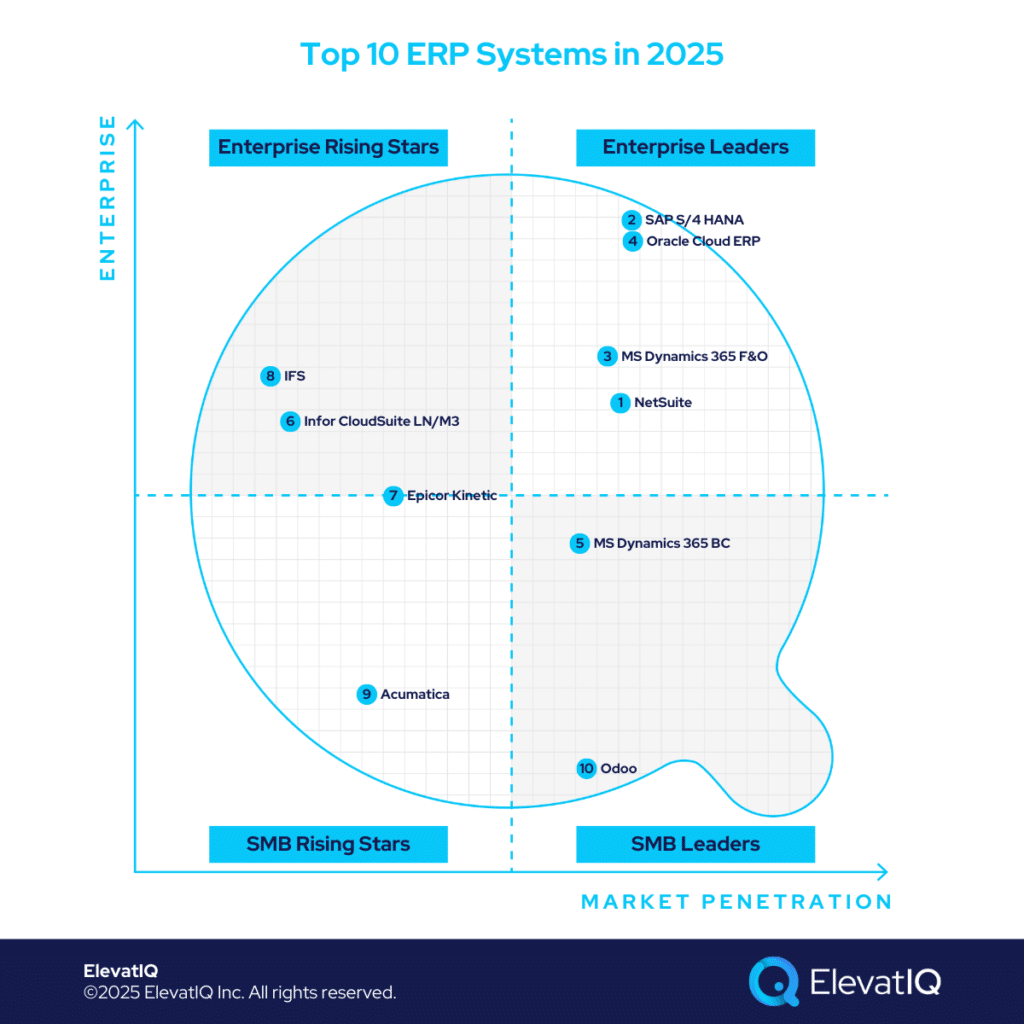
Top 10 ERP Systems in 2025

AI advancements have pushed ERP systems to a critical inflection point in 2025. While generative AI remains in the experimental phase, its impact on application interaction models is still evolving. To stay competitive, buyers will explore AI-centric ERP solutions; however, finding mature, AI-driven systems may prove challenging.

Another key factor that could significantly impact ERP rankings in the coming years: is whether cloud nativeness will continue to drive procurement cycles. While migrating legacy systems to the cloud has been a major focus recently, this trend may lose relevance once AI agents reach maturity. At that point, systems with legacy data models could become just as user-friendly as their cloud-native counterparts.

Despite ongoing changes, several established factors remain relevant and were considered in our evaluation this year. These include whether a system is designed to support diverse business models or emphasizes suite-centric capabilities with pre-integrated, industry-specific solutions.

For instance, a large enterprise engaged in frequent M&A may prioritize a robust global financial core over extensive operational features or specialized integrations for individual business units. Horizontal solutions typically emphasize global and generic ERP capabilities, while industry-specific functionality is often delivered through third-party solutions. Conversely, what suits an enterprise may not align with a startup’s needs.

Broader industry trends are equally relevant, such as solution consolidations or vendor acquisitions, which often reshape a system’s architecture and scope. Additionally, consider adjacencies like community strength and market momentum. Each ERP system has its unique strengths, and identifying the right fit requires careful analysis of specific needs and efficiency goals. Join us as we explore the top ERP systems.


ERP Selection: The Ultimate Guide

This is an in-depth guide with over 80 pages and covers every topic as it pertains to ERP selection in sufficient detail to help you make an informed decision.

10. Odoo

Odoo is a solid choice for smaller companies transitioning from QuickBooks or Xero, consolidating operations previously managed through spreadsheets, add-ons, and disconnected applications. It provides essential transactional processing across ERP, CRM, and HCM categories, all within a unified data model and app suite.

Ideal for budget-conscious businesses, particularly those with in-house developers, Odoo’s modular design enables flexible app purchasing for startups unable to commit for longer term fixed costs. However, its data model lacks tight integration, which may concern companies requiring strict financial control. This limitation can be especially challenging for less experienced firms struggling with internal processes and data management.

Another drawback is Odoo’s limited support for advanced ERP processes and transactions, typically found in more mature systems like Acumatica or NetSuite. How does this impact growing businesses looking for scalability without excessive customization costs? While Odoo offers a compelling entry point for startups and smaller enterprises, does its multi-country management capability outweigh its constraints in advanced ERP functionalities? Compared to competitors like Zoho and ERPNext, is Odoo’s connected data model enough to justify its ranking? To see how Odoo stacks up against the top ERP solutions of 2025 and find the best fit for your business, download the full Top ERP Systems in 2025 Report now.


ERP Selection Requirements Template

This resource provides the template that you need to capture the requirements of different functional areas, processes, and teams.

9. Acumatica

Acumatica is an excellent choice for companies transitioning from smaller ERP or MRP systems. However, businesses without experienced CFOs, operations executives, or controllers skilled in process and data translation for ERP systems may face challenges. Founder-led companies, in particular, might find implementation demanding due to the need for expertise in translating manual processes. Adapting to Acumatica’s structured data model—with its intricate business rules for enhanced financial control—can be a hurdle for those unfamiliar with such systems.

Acumatica’s versatility makes it a strong choice for businesses with diverse operations. But how does it compare to more mature ERP systems in terms of advanced features like dimensional inventory and global localization? While its cloud-native design and marketplace extensions offer flexibility, can they fully bridge the gaps in deeper operational capabilities? With competition from AI-first systems and dominant players like NetSuite and Sage Intacct, will Acumatica’s recent Professional Services edition be enough to gain market share? Download the full Top ERP Systems in 2025 Report now to see where Acumatica stands among the top ERP solutions.


ERP System Scorecard Matrix

This resource provides a framework for quantifying the ERP selection process and how to make heterogeneous solutions comparable.

8. IFS

Like other upper mid-market ERP solutions such as Infor LN, QAD, and Sage X3, IFS offers extensive functionality, particularly suited for companies with asset-intensive and field service operations. Uniquely positioned in the market, IFS appeals to enterprises seeking mature, industry-specific capabilities—reducing the need for extensive customization compared to vanilla ERP systems like SAP or Oracle. It serves as a strong alternative in the upper mid-market space, offering both best-of-breed asset management and field service capabilities, as well as a comprehensive ERP solution tailored for asset-centric industries, including telecom, energy, construction, MRO, airlines, and IT field services.

IFS’s complex data model and advanced asset scheduling make it a strong fit for upper-mid-market companies, but does its need for experienced internal teams and external advisors pose a challenge for growing enterprises? With its cloud-native architecture and global multi-entity capabilities, is it the best choice for businesses nearing the $1 billion revenue mark? As IFS expands in North America and invests in AI-driven acquisitions, will its unclear generative AI roadmap impact its competitive edge against other top ERP solutions? Download the full Top ERP Systems in 2025 Report now to see how IFS compares in this year’s rankings.

7. Epicor Kinetic

Epicor Kinetic is the company’s flagship solution. It excels in supporting manufacturing companies with structured processes. Its unique data model and BOM structure are key. It also has strong planning for dimensional inventory. This makes it ideal for industries like metal, fasteners, and fabrication. It works well for aerospace, automotive, and medical device manufacturers. Epicor Kinetic supports complex planning across various business models. These include manufacturing, distribution, and construction. Its advanced features manage WBS-centric processes. This allows efficient management of large programs with centralized cost tracking.

Epicor Kinetic is designed for companies beyond basic transactional processing. It offers a sophisticated data model. This model surpasses entry-level ERP systems like Acumatica and NetSuite. It targets businesses needing advanced manufacturing capabilities like MRP, allocation, and scheduling. Successful implementation requires deep expertise in process and data coding. It’s less suitable for founder-led companies without experienced executives. The rigid revision model can be challenging. Companies with poor SKU and BOM structures may face issues. Strong internal capabilities and advisory support are crucial.

Epicor Kinetic has evolved with modern cloud capabilities and a familiar Microsoft Dynamics-style interface, but do its financial management tools still lag behind competitors? With recent acquisitions enhancing field service, S&OP, and PIM, has Epicor truly differentiated itself, or does its suite-centric approach blend in with other ERP vendors? Its generative AI announcements are among the most exciting in the space, but will it outpace competitors in delivering AI-driven innovations? Download the full Top ERP Systems in 2025 Report now to see where Epicor Kinetic stands in this year’s rankings.

6. Infor CloudSuite LN/M3

Infor LN and M3 are Infor’s flagship solutions. They cater to distinct micro-verticals across industries. Both are built on the Infor OS platform. They share similar suite capabilities. These solutions are well-established in the upper mid-market. They target companies with $250 million to $750 million in revenue. They are for businesses outgrowing entry-level ERPs like Acumatica, Infor CSI, or NetSuite. Infor LN and M3 offer mature capabilities for complex manufacturing and distribution. They provide a suite experience similar to SAP and Oracle. Key features include PLM, WMS, WFM, BI, and a supply chain collaboration platform.

Infor LN is designed for discrete manufacturing sectors, including automotive, aerospace, and high-tech industries. In contrast, Infor M3 specializes in process and apparel manufacturing, serving industries like fashion, food & beverage, and chemicals. Both solutions excel in supporting advanced global operations, particularly for multinational companies seeking cost synergies across regions. Their native capabilities effectively address global trade and compliance requirements, making them a strong choice for international business operations.

Infor LN and M3 serve enterprise companies well in a two-tier ERP strategy. But does their limited industry focus restrict growth opportunities for businesses pursuing diversification or M&A? With a complex data model and BOM structure requiring significant expertise, are the operational efficiencies worth the investment? As Infor shifts toward a platform-driven approach rather than major functional advancements, can it stay competitive in an evolving ERP landscape? Download the full Top ERP Systems in 2025 Report now to see where Infor LN and M3 rank among the top ERP solutions.

5. Microsoft Dynamics 365 Business Central

Microsoft Dynamics 365 Business Central, designed for SMBs, is a natural choice for companies transitioning from smaller ERP, MRP, and accounting systems such as QuickBooks, Microsoft GP, Odoo, Katana, or Fulcrum. Competing with NetSuite, Sage Intacct, and Acumatica, Business Central offers a robust ecosystem with numerous industry-specific add-ons. However, successfully leveraging this ecosystem requires expertise in evaluating unproven code from VARs and ISVs. A solid approach of system architecture is essential to prevent conflicts between plugins and ensure unpainful implementation.

Business Central is particularly well-suited for companies with diversified global operations looking to consolidate all entities into a single database. This is useful for streamlined reconciliation and tracking. While add-ons can extend its functionality for complex industrial operations, its core design aligns best with industries such as non-profits, the public sector, FMCG, and F&B distribution. It is also a strong fit for light assembly manufacturing, telecommunications, media, technology, energy, and utilities.

Business Central’s strong consulting ecosystem and global adoption make it a popular choice, but is it the right fit for companies needing more advanced operational capabilities beyond financial reporting? As Microsoft leads AI-driven innovation, how will Business Central’s alignment with this strategy shape its future compared to other ERP solutions? With many vendors still refining their AI approaches, will Business Central’s stability give it a competitive edge? Download the full Top ERP Systems in 2025 Report now to see where Microsoft Dynamics 365 Business Central ranks this year.

4. Oracle ERP Cloud

Oracle ERP Cloud remains a top choice for large enterprises across diverse industries, including media, telecommunications, construction, energy, oil and gas, and healthcare (following the acquisition of Cerner). It is particularly well-suited for organizations with strong internal IT expertise and a need to integrate various proprietary and third-party software systems, such as patient claims management or utility billing solutions.

Oracle ERP Cloud is an ideal solution for global companies using it as their corporate financial ledger while maintaining other systems at the subsidiary level. Its robust financial capabilities support organizations requiring ledger-level security and hierarchical financial reporting. They might require this whether by line of business, function, or fund. Additionally, it offers seamless integration with a powerful HCM suite and a natively embedded EPM solution.

Oracle ERP Cloud is a strong choice for financial services and insurance, but does its limited success in product-centric industries make it less viable for manufacturing and supply chain-heavy businesses? With many enterprises using it primarily as a corporate ledger, does it provide enough operational depth at the subsidiary level? As competitors like Microsoft and SAP push AI-first strategies, can Oracle ERP Cloud maintain its leadership without a clear roadmap for innovation? Download the full Top ERP Systems in 2025 Report now to see how Oracle ERP Cloud ranks this year.

3. Microsoft Dynamics 365 Apps

Microsoft Dynamics 365, now referred to by various names for different industries—such as Supply Chain Management or Project Operations—has become one of the most in-demand ERP solutions for upper mid-market and large enterprises. While Microsoft doesn’t disclose specific revenue figures for its Dynamics portfolio, estimates suggest that the business unit generates several billion dollars in revenue, significantly smaller than SAP but notably larger than many smaller ERP vendors.

Microsoft Dynamics 365 is particularly well-suited for large global organizations, especially in regions where niche ERP solutions are less prevalent, such as Eastern Europe, South America, or Australia. These regions present unique localization challenges that require tailored solutions to meet specific country- and province-level compliance needs. In many cases, organizations deploy Microsoft Dynamics 365 primarily for accounting and financial reporting, while relying on specialized operational systems for subsidiary-level functions.

Microsoft Dynamics 365’s vast consulting ecosystem and strong ISV marketplace give it a unique edge. But does the complexity of navigating these add-ons lead to higher implementation risks? With unqualified ISVs and VARs contributing to a higher failure rate, how can businesses ensure a successful deployment? As Microsoft prioritizes AI-driven innovation, will Dynamics 365 regain momentum despite facing stronger competition this year? Download the full Top ERP Systems in 2025 Report now to see where Microsoft Dynamics 365 ranks in this year’s analysis.

2. SAP S/4 HANA

SAP S/4HANA continues to be the top choice for large enterprises. The large enterprises with global operations and extensive localization needs across multiple continents, with Oracle being its primary competitor. While alternatives like Unit4, IFS, or Deltek may handle the demands of larger enterprises, they often fall short in delivering the robust global compliance and transactional capabilities that SAP S/4HANA excels at. Additionally, SAP S/4HANA stands out for its superior transactional workload handling capabilities, as well as outstanding traceability for large, complex organizations.

SAP S/4HANA is also an ideal choice for companies seeking a best-of-breed architecture tailored to specific functional needs. This architecture allows for operational cores on isolated sub-ledgers, which is particularly crucial for large distribution and 3PL companies managing complex WMS networks. Companies with intricate HCM operations and stringent compliance requirements may need to integrate best-of-breed systems. Moreover, SAP S/4HANA offers the essential capabilities for enterprises requiring sophisticated eCommerce platforms, including features like CDP and CPQ. Its flexibility and enterprise-grade architecture make it a standout solution for diverse operational needs.

SAP’s impressive growth in 2024, fueled by strategic acquisitions and a strong AI strategy, has positioned it as a leading ERP contender, but will its focus on core ERP workflows give it a lasting competitive edge over customer-centric solutions? With initiatives like RISE and GROW targeting the mid-market, can SAP successfully expand beyond its traditional enterprise stronghold? As it aligns with Databricks and enhances adoption rates, will SAP’s momentum continue? Download the full Top ERP Systems in 2025 Report now to see where SAP S/4HANA ranks this year.

1. NetSuite

Securing the top position, NetSuite remains the leading ERP solution. It is recognized for its broad industry success, robust ecosystem, credible marketplace add-ons, and comprehensive functionality. While not as complex as competitors like SAP S/4HANA or Microsoft Dynamics 365 F&O, NetSuite excels in supporting diverse business models, including omnichannel operations, matrix/dimensional inventory, and subscription-based models.

Despite its versatility, NetSuite may not be the best fit for industrial distributors and manufacturers due to limitations in pricing and item master capabilities. However, it performs exceptionally well in lighter manufacturing and consumer-centric industries such as health and beauty, fashion, apparel, and CPG. Its strong financial capabilities, coupled with an integrated HCM solution, also make it a preferred choice for service-centric industries, including smaller banks, credit unions, financial services, non-profits, as well as the technology and media sectors.

NetSuite’s top ranking is backed by its product quality. But how can businesses avoid the common pitfalls of over-customization and integration issues that lead to implementation failures? With no clear AI-first roadmap and limited portfolio momentum, does NetSuite risk falling behind its competitors in the long term? As it enters the field service vertical to compete with Acumatica, will NetSuite’s strategic direction be enough to maintain its position? Or will it be overshadowed by newer market challengers? Download the full Top ERP Systems in 2025 Report now to see where NetSuite ranks this year.

Conclusion

Choosing the right ERP system can be a daunting task due to the many factors to consider. When it comes to critical digital transformation initiatives, where the stakes are high and job security could be affected, it’s important not to base your decision on popularity alone. While systems like SAP may carry a strong reputation, relying on this alone can be a risky strategy.

Instead, adopt a more structured approach to ERP selection by carefully assessing solutions that are tailored to your specific industry or market segment. This thoughtful, strategic process will increase the chances of finding an ERP system that truly meets your organization’s unique needs and long-term goals.

FAQs

Top 10 ERP Systems in 2025 Read More »
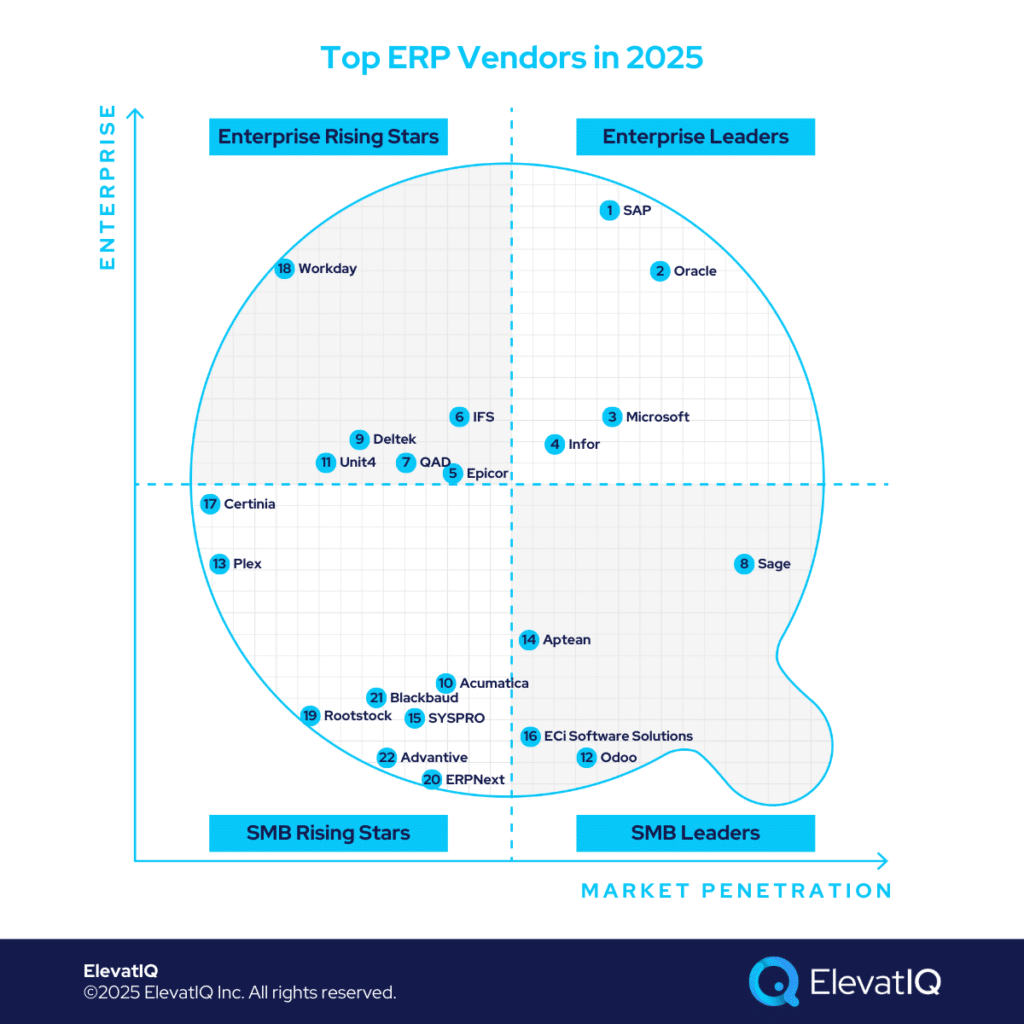
Top 10 ERP Vendors in 2025

Top ERP Vendors for 2025

With uncertainty surrounding how AI agents will influence transactional applications, many ERP vendors are still in the experimentation phase until clearer expectations emerge across the industry. This phase could lead to intriguing developments, such as new interaction models, architectural changes, or even the potential obsolescence of certain categories. It could also significantly alter the positions of ERP vendors.

In recent years, cloud-nativeness and upgrades to cloud technologies have been a dominant focus for both vendors and customers. Newer cloud-native vendors held an unfair advantage over legacy vendors, mainly because they faced fewer challenges related to backward compatibility. However, this advantage may no longer hold in the new world. In fact, legacy vendors could now have the upper hand over cloud-native vendors, thanks to their more robust backend layers and the ease of integrating AI agents, which, in terms of efforts required, might be simpler than completely rewriting an application with cloud-native technologies.

Ease of implementation is just one advantage; it also offers superior interfaces, potentially revolutionizing the ERP industry and significantly shifting vendors’ positions. As with any technological advancement, new vendors could emerge if building AI-first systems becomes easier than upgrading legacy systems, further disrupting the market. Another key innovation that could have a major impact on the ERP market is the adoption of no-schema databases, once (if ever) proven to provide the same transactional integrity required by ERP applications. While there are significant developments on the horizon, it’s still too early to predict the future direction of the ERP industry. Therefore, for this year, the positions of ERP vendors will remain relatively stable, with some changes.


ERP Selection: The Ultimate Guide

This is an in-depth guide with over 80 pages and covers every topic as it pertains to ERP selection in sufficient detail to help you make an informed decision.

10. Acumatica

Breaking into the top 10 ERP vendors is no small feat for companies with revenue under $100 million, yet Acumatica has successfully earned its place. However, its presence in segments exceeding $100 million in revenue remains limited, with stronger traction among businesses generating $50–100 million. Geographically, Acumatica’s footprint is also narrower, concentrated in developed markets like the US, UK, and Australia. While Acumatica delivers solid operational capabilities as a true ERP solution, its micro-capabilities are relatively lean for complex industries such as manufacturing. Competitors like Infor, Epicor, and IFS offer deeper functionality for businesses advancing their ERP maturity. That said, Acumatica’s simplicity, affordability, and ease of implementation make it a strong choice for companies moving beyond entry-level solutions like Odoo or QuickBooks.

Is Acumatica’s focus on cloud-native features like enterprise search and mobility enough to meet your business needs, or could its limited operational depth pose challenges? How does its vibrant marketplace help fill solution gaps, and what risks come with its limited native global localization compared to competitors like NetSuite and Sage Intacct? While Acumatica’s pricing is often viewed as a strength, how might its complexity affect your budgeting? With recent updates introducing a PSA module for professional services, how does this change its suitability for your industry? And with lingering questions about its AI roadmap and presence among larger enterprises, is Acumatica still a top contender for your ERP strategy in 2025? For deeper insights, download the full Top ERP Vendors in 2025 report now!


ERP System Scorecard Matrix

This resource provides a framework for quantifying the ERP selection process and how to make heterogeneous solutions comparable.

9. Deltek

Deltek is a specialized ERP vendor with a strong focus on government contracting, construction, and architecture sectors. It has a proven track record of success in small to upper-mid-market accounts within these verticals, offering tailored capabilities and data platforms designed to meet their unique needs. However, its suitability may be limited for companies with diversified business models or those pursuing M&A strategies to expand beyond their core industries.

How does Deltek’s ownership by Roper Technologies impact its growth potential compared to ERP vendors backed by larger private equity firms? What role do strategic acquisitions, such as IntelliTrans, play in strengthening Deltek’s capabilities for regulated manufacturing industries? With its proprietary data and research providing a unique edge, how can businesses leverage these resources for benchmarking and compliance? While Deltek’s subject matter expertise continues to secure major clients, will its slower AI innovation hinder its long-term competitiveness? And as Deltek’s dominance in its niche industries remains strong, is it still the right choice for your ERP strategy in 2025? For deeper insights into Deltek and other leading ERP vendors, download the full Top ERP Vendors in 2025 report now!


ERP Selection Requirements Template

This resource provides the template that you need to capture the requirements of different functional areas, processes, and teams.

8. Sage

Sage, traditionally known as an accounting software vendor with strong distribution channels through accounting firms, maintains a presence in the ERP market. Their legacy products—Sage 100, 200, 300, and 500—continue to serve existing customers, while Sage 50 competes directly with QuickBooks in the small business segment. Sage’s growth strategy emphasizes newer solutions like Sage Intacct, which targets smaller service-sector accounts, and Sage X3, positioned for larger enterprises and process manufacturing industries such as Food & Beverage and Life Sciences.

How does Sage’s reliance on partner add-ons impact its ability to compete with cloud-native ERP vendors offering richer operational capabilities? With Sage’s legacy solutions still maintaining market presence, what challenges might your business face when transitioning to its newer offerings? While Sage’s strong focus on security and regulatory compliance aligns well with AICPA standards, could these features feel excessive for smaller businesses without stringent audit needs? And with Sage’s AI strategy remaining unclear, how might this uncertainty affect its long-term competitiveness? To explore Sage’s positioning and insights into other leading ERP vendors, download the full Top ERP Vendors in 2025 report now!


The 2026 Digital Transformation Report

Thinking of embarking on a ERP journey and looking for a digital transformation report? Want to learn the best practices of digital transformation? Then, you have come to the right place.

7. QAD

QAD stands out as a specialized ERP solution designed for supply chain-intensive industries such as Automotive, Food & Beverage, and Life Sciences. With integrated supply chain and PLM capabilities, QAD effectively addresses complex challenges within highly specific micro-verticals—challenges that many broader industry solutions may struggle to meet.

How will QAD’s transition to its new O3 cloud-native platform impact its competitiveness in the ERP market? With its move to AWS, Java, MariaDB, and TypeScript aligning with modern architectures like NetSuite, could this shift improve scalability and flexibility for your business? How does QAD’s acquisition of Redzone—integrating HCM and shop floor processes—enhance its value for manufacturers and industrial businesses? As QAD aligns its cloud transformation with emerging AI trends, could this timing position it for greater long-term success? And with Thoma Bravo’s typical investment timeline nearing its midpoint, how might future ownership changes influence QAD’s strategy? For deeper insights into QAD and other leading ERP vendors, download the full Top ERP Vendors in 2025 report now!

6. IFS

IFS follows a strategy similar to QAD, Deltek, and Unit4 but distinguishes itself with higher revenue. Like Epicor, IFS has experienced notable growth, recently surpassing the $1 billion revenue milestone. Positioned as a strong alternative for enterprise companies seeking deep operational functionality, IFS offers capabilities that go beyond traditional horizontal ERP solutions like SAP and Oracle. Its enterprise-grade EAM and field service capabilities have helped IFS secure contracts with major airlines and MROs—markets historically dominated by SAP and Oracle—where managing large fleets of service technicians is critical.

How will IFS’s strategic acquisitions and focus on predictive maintenance reshape its role in manufacturing-centric ERP solutions? With its expanding presence in North America, can IFS effectively challenge established players like Infor, SAP, and Microsoft in larger enterprise accounts? While IFS’s AI investments have focused on data-related innovations, how might its approach to generative AI influence its future capabilities? And given IFS’s significant install base of best-of-breed solutions, how should buyers assess its ERP-specific value? To explore IFS’s positioning and insights into other leading ERP vendors, download the full Top ERP Vendors in 2025 report now!

5. Epicor

Like IFS, Epicor belongs to the exclusive $1 billion revenue club, offering a diverse portfolio of industry-leading solutions across multiple micro-verticals. Notable products include Epicor Kinetic, Epicor Prophet 21, Epicor Eclipse, BisTrack, and LumberTrack. While Epicor was slower to adopt cloud technologies than some legacy vendors, it has made significant progress. Its Kinetic UI and UX now deliver mature cloud capabilities, including enterprise search. Epicor has also been developing enterprise traceability transactional maps similar to those found in SAP, marking a key advancement for the platform.

How does Epicor’s deep focus on micro-verticals give it an edge in industries like metal, automotive, and aerospace? With its fully integrated MES available as a standalone solution, could Epicor be the right fit for businesses seeking advanced Industry 4.0 capabilities? How will Epicor’s recent acquisitions, such as S&OP planning and PIM, enhance its integrated suite—and what challenges might arise for customers needing to replace existing solutions? As Epicor’s leadership shifts focus toward AI readiness, how soon can businesses expect meaningful innovations? To learn more about Epicor’s position and other top ERP vendors in 2025, download the full top ERP vendors in 2025 report now!

4. Infor

Infor’s revenue surpasses that of Sage and Epicor but remains significantly lower than the largest ERP vendors. With its comprehensive product suite, Infor competes with Epicor, SAP, Oracle, and Microsoft, offering enterprise-grade solutions tailored to specific industries. While Infor’s global reach may not match SAP or Oracle, its strength lies in deep vertical specialization. It is also among the few vendors outside the industry’s largest players capable of delivering a best-of-breed architecture similar to SAP, Oracle, and Microsoft. In certain areas, such as workforce management (Infor WFM) and supply chain connectivity (Infor Nexus), its capabilities may even outperform Microsoft’s, which relies on third-party add-ons for these capabilities.

How does Infor’s ability to deliver robust industry-specific functionality give it an edge over smaller vendors like Epicor and Aptean in demanding sectors such as Aerospace, Healthcare, and Utilities? With its recent shift toward a platform-centric approach, how might Infor’s strategy mirror successful models from Salesforce and Microsoft? As Infor announces AI initiatives, what gaps remain in its roadmap for integrating AI-driven innovations? And with new partnerships positioning Infor to target larger accounts, can it successfully expand its presence in enterprise markets? For deeper insights into Infor’s strategy and other leading ERP vendors, download the full Top ERP Vendors in 2025 report now!

3. Microsoft

Microsoft has significantly strengthened its cloud-native capabilities across its two flagship ERP solutions: suites of applications targeting larger companies such as Project Operations or Supply Chain Management — and Business Central. Similar to SAP and Oracle, Microsoft offers a comprehensive suite of best-of-breed applications to support enterprise architecture, with Azure standing out as a leading cloud infrastructure platform for custom application development. Its seamless integration with the Microsoft 365 Suite further enhances its overall value proposition.

How does Microsoft’s dominance in both ERP and CRM categories enhance its competitive edge, particularly against SAP and Salesforce? With its cloud-native ERP capabilities outperforming SAP in some areas, could Microsoft’s solutions better support your business model needs? While Business Central’s reliance on third-party add-ons may limit its core operational depth, does Microsoft’s extensive developer ecosystem help mitigate these gaps? And as Microsoft positions itself as an AI leader, how might its still-unclear roadmap impact future innovation? For a deeper look at Microsoft’s strategy and insights into other top ERP vendors, download the full Top ERP Vendors in 2025 report now!

2. Oracle

Oracle offers two prominent cloud ERP solutions: Oracle Cloud ERP and NetSuite. Both are highly advanced in cloud capabilities, though they cater to different segments. NetSuite, with its extensive localization and deep operational functionality, is particularly well-suited for small to upper-mid-market companies.

How does Oracle’s deep integration with Java and Oracle databases give it an advantage in industries like media, telecom, and energy? With its strong presence in both enterprise and mid-market segments, can Oracle maintain its ERP leadership despite its growing focus on database and cloud infrastructure? Will NetSuite’s vibrant ecosystem offset Oracle’s slowing ERP momentum? And how will Oracle’s Cerner acquisition shape its influence in the healthcare sector? For a comprehensive analysis of Oracle’s position and insights into other top ERP vendors, download the full Top ERP Vendors in 2025 report now!

1. SAP

SAP holds the largest market share in the ERP space, driven largely by its dominance in enterprise deals, which are significantly larger than mid-market transactions. Its extensive portfolio features best-of-breed solutions, particularly within the SAP S/4HANA Suite, which is favored by enterprise-grade organizations. Key offerings such as SAP SuccessFactors (HCM), SAP Hybris (Commerce), SAP EWM (WMS), Ariba (P2P), and Concur (T&E) further expand its comprehensive capabilities.

How does SAP S/4HANA’s in-memory architecture give it an edge in managing high transaction volumes and complex traceability? With its ability to streamline multi-country operations in a single database, could SAP be the right fit for your global business needs? As SAP continues to refine its mid-market strategy with Rise and Grow, will it successfully capture SMB traction despite lingering uncertainties around SAP Business One and ByDesign? And how might SAP’s Databricks partnership enhance its cloud capabilities in a competitive landscape increasingly shaped by AI innovation? For deeper insights into SAP’s positioning and other leading ERP vendors, download the full Top ERP Vendors in 2025 report now!

Conclusion

The ERP market is set for significant transformation in 2025, with AI-first strategies likely taking center stage. The traditional advantage held by cloud-native vendors may no longer be as relevant, paving the way for new categories and potentially new vendors offering AI-driven solutions. While AI is expected to be the dominant theme of 2025, other developments, such as no-schema databases, could also have a profound impact on the ERP landscape.

Though it’s too early to predict how these trends will reshape the industry and affect vendor positioning, one thing is certain: ERP as we know it today will look very different in the near future. Who’s ready for an exciting (and possibly uncertain) journey ahead?

FAQs

Top ERP Vendors for 2025 Read More »
ERP System Price How Much Does ERP Software Cost

ERP System Price: How Much Does ERP Software Cost?

The ERP system price is complex to understand. It contains several variables impacting not only your costs but the outcome of your project. With several options available, it’s often hard to compare them and assess the actual ERP software cost of ownership.

Although you might appreciate the straightforward ERP System Price with fewer variables, they offer flexibility. Some pricing models could be more affordable than others, depending on your business model.

Therefore, a thorough understanding of different variables of ERP System Price and how they would impact the implementation is essential.

This article will teach you various factors that drive the costs of your ERP project.


The 2026 Digital Transformation Report

Thinking of embarking on a ERP journey and looking for a digital transformation report? Want to learn the best practices of digital transformation? Then, you have come to the right place.

ERP Project Cost Categories

Before we start understanding each cost element, let’s first discuss the categories that impact the costs of an ERP project.

Depending on the complexity of the project, the category of costs could vary. For example, the regulatory or public sector space could have many more cost elements underneath hosting costs.

Similarly, suppose the scope of your ERP project extends beyond the traditional ERP capabilities. In that case, you might require several ERP add-ons, creating a further need for several integration platforms. That said, here are the most common categories:

  1. ERP Software Licensing Costs
  2. Project Implementation Costs
  3. ERP Add-on Licensing Costs
  4. Integration Platform Licensing Costs
  5. IT Infrastructure and Hosting Costs
  6. Internal Staffing Allocation and Opportunity Costs
  7. ERP Support Costs and Upgrade Costs


ERP Selection: The Ultimate Guide

This is an in-depth guide with over 80 pages and covers every topic as it pertains to ERP selection in sufficient detail to help you make an informed decision.

ERP Software Licensing Costs

On-prem ERP System Price Option

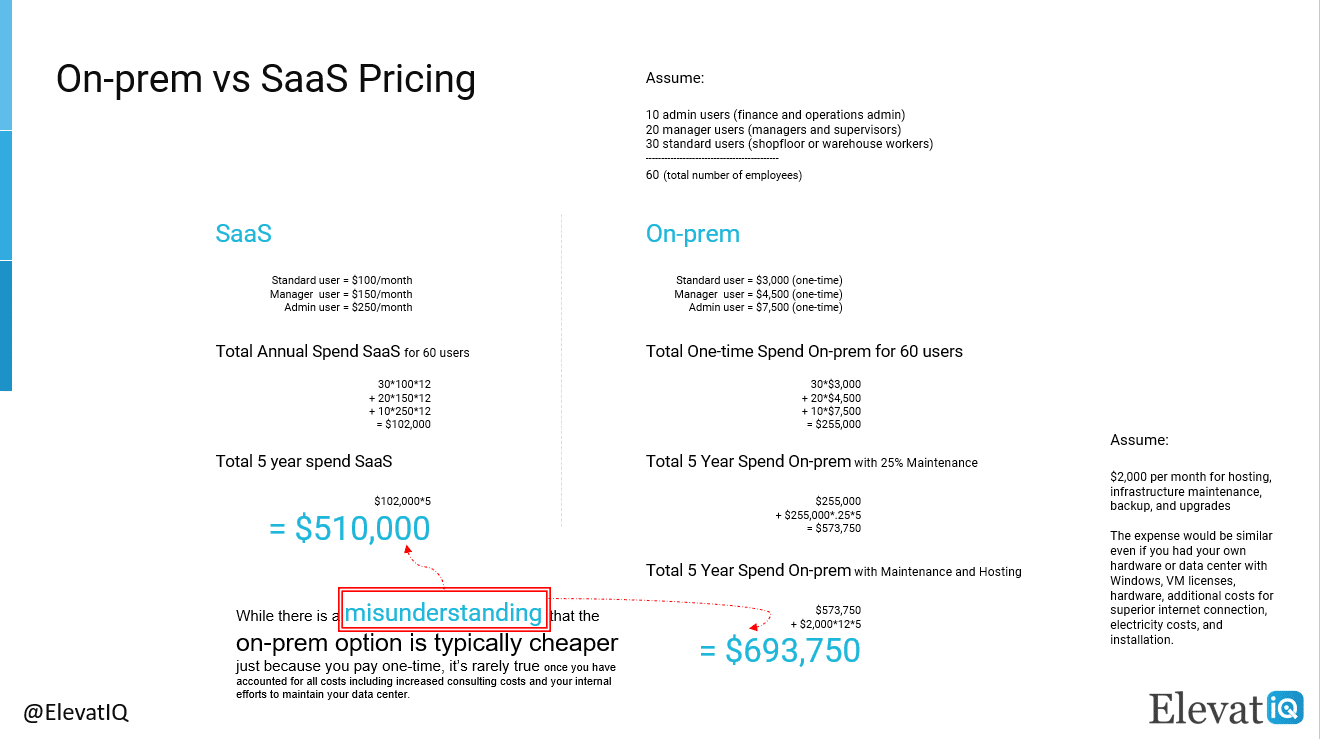
When it comes to ERP software licensing costs, the on-prem and cloud pricing models could differ significantly. The one-time ERP system price for an on-prem individual license could be 2.5-3x of a SaaS user. Additionally, the on-prem model will require you to pay software maintenance costs of ~25% of your licensing fees each year.

With an on-prem option, since you pay upfront, your first year’s spend is likely to be more. On-prem users are typically more expensive because cloud models allow you to distribute your license costs over several years.

On-prem ERP System Price Option | ElevatIQ

On-prem Users are 2.5x – 3.5x more expensive than SaaS

To compare the On-prem and SaaS model differences, suppose that both options support three user tiers.

Also, assume that you have 60 employees in total. Of these, ten are financial and operations admins requiring access to planning modules and financials. Twenty are managers/supervisors who approve POs and assign tasks, etc. The remaining 30 could be shopfloor or warehouse workers. They might require interactions with ERP for data entry, such as labor or material reporting. Here is how you can compute the costs by comparing both on-prem and SaaS options.

Total Spend Calculation
  • # of users: standard users = 30, manager users = 20, admin users = 10
  • SaaS: standard user = $100/month, manager user = $150/month, admin user = $250/month
  • Total Annual Spend SaaS for 60 users = 30*100*12 + 20*150*12 + 10*250*12 = $102,000
  • Total 5 Year Spend Saas = $102,000*5 = $510,000
  • On-prem (one-time fee): standard user = $3,000, manager user = $4,500, admin user = $7,500
  • Total Spend On-prem for 60 users = 30*$3,000 + $4,500*20 + $7,500*10 = $255,000
  • Total 5 Year Spend Including 25% annual Maintenance = $255,000 + $255,000*.25*5 = $573,750
  • Assume that you will spend $2,000 per month for hosting, infrastructure maintenance, backup, and upgrades. Even if you decided to maintain your server and hardware, you would spend about the same on Windows, VM licenses, and hardware. You might also pay additional costs for a special internet connection, electricity costs, installation, etc.
  • Total 5 Year Spend Including Maintenance and Hosting = $573,750+ $2,000*12*5 = $693,750

Depending on the price offered by the vendor, the on-prem option could be higher or lower.

For the on-prem option, just because you pay one time, there is a prevalent misunderstanding that it is typically cheaper. Once you have accounted for all costs, you would realize that it is rarely the case. These costs could include increased consulting costs and internal efforts to maintain your data center. Additionally, the on-prem option would not scale as quickly. Furthermore, you might also have a significant unused capacity to accommodate for your seasonal spikes in volume.

Concurrent Option

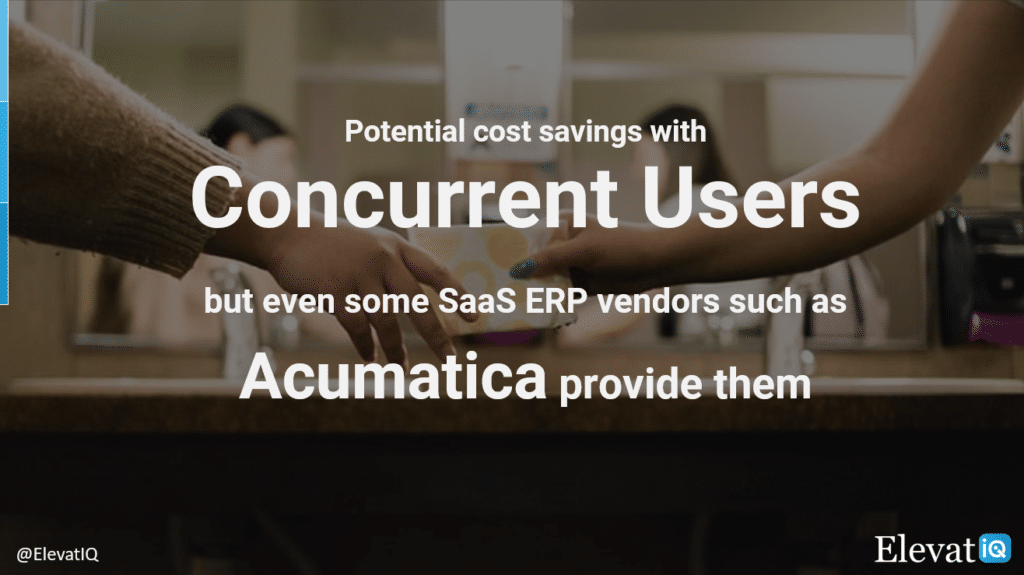
However, there could be potential cost savings opportunities with an on-prem option if you bought concurrent users. While rare with cloud ERP providers, some cloud ERP vendors such as Acumatica also offer this option. A concurrent license allows multiple users to access the same license seat simultaneously. But its cost could be 2-3x of the regular user.

Concurrent User Pricing | Acumatica Cloud ERP | ElevatIQ
Concurrent User Pricing | Acumatica Cloud ERP


Therefore, if you plan to opt for this model, you may need to analyze your ERP users’ expected usage behavior. If most of your users are seasonal workers or work in shifts, the concurrent option could be appropriate. This option allows your shift workers to use the same license seat without impacting other users’ workflow. It will also help save significantly in licensing costs.

SaaS ERP System Price Option
Named User Option

The named user option, which is the most common cloud ERP licensing model, allows you to pay for each user. Besides paying for each user, some ERP vendors may also have additional surcharges for base costs or a minimum number of ERP users. Additionally, they might increase their ERP system price based on the edition.

The other ERP vendors make it more comfortable with their flat ERP system price per user option without any complications. But the disadvantage of the flat-price-for-all model is that you might pay higher for non-admin users.

Several ERP vendors that serve small-sized customers might also have tiers with their ERP pricing. For example, the starter edition for these ERP vendors could be significantly cheaper. But once you reach 20 users, they might upgrade you to the next tier, increasing your per-user ERP system price.

Consumption-based Option

The consumption-based ERP system price is another standard pricing model that exists for cloud ERP software. The consumption-based price tier design bases on the number of transactions as opposed to the number of users. The transactions could be the monthly volume of sales orders, purchase orders, or invoices, depending upon whichever is higher.  Once you grow the volume, you might need to upgrade to an expensive tier.

The advantage of a consumption-based ERP system price is that you will get an unlimited number of users. However, the pricing model is even more complicated as it’s hard to estimate the expected transaction volume. Also, the perceived fear due to unpredictable costs with expensive tires may keep off several buyers. These tiers, however, could exist even with the named users.

Still, once you understand the model’s nuances, you could have significant cost savings. These cost savings could especially be relevant if you are a low-volume business. Some examples of these low-volume businesses could include high-dollar manufacturing (MTO, CTO, or ETO). They could also include distribution (industrial or machinery), services, or construction businesses.

Entity-based Option

Another ERP system price model for cloud ERP software is to charge based on the number of entities. This pricing model includes entities as an additional variable in its model, together with users.

+

ECommerce Supply Chain Transformation

Learn how LockNLube transformed its inventory and supply chain challenges by consolidating over 20 systems.

ERP System Implementation Costs

Besides your ERP software license costs, you will need ERP consulting help to make sure the new ERP system configures appropriately. You will also need their help to customize the ERP software as per your business requirements.

The need for an ERP system implementation consultant

If you had never bought an ERP before and used smaller-sized business software such as Xero or QuickBooks, you might mistakenly assume and question the need for ERP consultants and training.

Businesses that assume this might learn the hard way as implementing ERP software is like learning a new language.

Since ERP implementation systems are highly configurable and customizable, even the best ERP system may not provide an optimum throughput if not configured correctly. To calibrate optimally, the ERP consultant must have experience working with similar businesses to reduce their training time on your business.

ERP Consultant Is Not An Option | ElevatIQ
“ERP Consultant Is Not An Option. You need it, ” Sam Gupta, Principal Consultant, ElevatIQ

Additionally, they require mastery of that specific ERP software to recommend appropriate options and structure your data in a way that reduces friction from processes and expedites your business transactions.

Finally, since ERP systems are highly involved in nature, the implementation also includes training your team to ensure that your team can successfully use the product for their day jobs.

How ERP system implementation consultants charge

Since ERP consulting cost line item differs from your ERP software license, you might likely sign two separate contracts with two completely different companies. They might also follow completely different payment terms and structures.

Unlike your ERP software license, ERP implementation costs are project-based and require you to pay one time depending upon the efforts needed to implement an ERP project.

The duration and skillsets required for your ERP project could vary depending upon the complexity of your business operations and your ERP system needs. More straightforward ERP implementation could take 6-9 months, while smaller companies may be able to go live within a few months.

Your ERP implementation duration would also range based on your data’s current state and your process documentation maturity.

Types of ERP Implementation Project Contracts

The pricing model for ERP implementation could vary depending on the engagement model of your consultant. The four most common models exist when it comes to ERP implementation projects.

Time and Material (T&M)

The most common model is time and material (T&M), which essentially charges based on the hours worked.

With a T&M mode, you may want to go for dedicated resources since an ERP implementation project could involve many stakeholders. And if you don’t allocate dedicated resources to the ERP project, resource constraints could cause additional wait times and a longer implementation cycle, increasing your costs and risks. The downside of the dedicated resources is that the ERP consultant might bill you for hours even while waiting for your team to make progress.

Due to the high rate for ERP consultants, you might perceive the T&M mode to be the most expensive. But like other service companies, ERP consulting companies most commonly use them as it offers the least risk for them due to the cost overruns or changed scope. It is also the most recommended methodology as ERP projects are harder to scope and execute as fixed-bid projects.

Fixed-bid

The other standard ERP implementation model includes fixed-bid where the consultant charges based on the project or the scope.

While it might appear attractive at a surface level, it’s tough to assess an ERP implementation scope beforehand.

The ERP consultant might bill you for any scope creep, which might have significant cost overruns. With fixed-bid, you might also not have the flexibility to change the requirements as you gather more information about your business.

Recurring Model

The third and perhaps the most effective for both parties would be the recurring model. This model charges based on per day or month (sometimes distributed over several years).

Computed non-linearly, the average per-hour rate in this model is highly subsidized and lower as the consulting company has a predictable, fixed revenue stream. This model also doesn’t have as much admin overhead compared to the T&M model.

The advantage of this model is that you don’t pay the cost-prohibitive per-hour rate for each ERP consultant. And at the same time, you don’t lose the flexibility you would with the fixed-bid pricing model. However, not every ERP vendor would agree to this pricing model due to the significant risks involved from their perspective.

Read The Fine Lines of Your ERP Contract
“Make Sure to Read The Fine Lines of Your ERP Contract,” Sam Gupta, Principal Consultant, ElevatIQ

Whichever ERP implementation project contract you choose, make sure you read the fine lines of the agreement. Sometimes an ERP consultant might claim that they might finish the ERP implementation at half the cost. But the fine lines might include only a certain number of hours in that price that might be valid for a couple of months.

After you exceed that timeline, they might bill you a very high per-hour rate to make up for the lost revenue as part of your fixed bid ERP project contract. Additionally, with this contract, the assumption would be that you will carry out most of the responsibilities and get trained using the documented resources.

Unless you have an in-house consultant with deep familiarity with the ERP system, you will require a lot more handholding than your ERP vendor would provide as part of their fixed bid.

Therefore, the fixed-bid option may appear most lucrative on the surface. It requires significant expertise to make it work. With the other models, you have flexibility and control in measuring and controlling your costs.

+

ERP Implementation Failure Recovery

Learn how Frederick Wildman struggled with Microsoft Dynamics 365 ERP implementation failure even after spending over $5M and what options they had for recovery.

ERP Add-on Licensing Costs

Depending upon the complexity of your needs, business operations, and ERP product maturity, you might require several ERP add-ons. The add-ons could be as big as other ERP software with deeper capabilities in a specialized area such as Workday for deeper HR capabilities not offered by your core ERP system. Or it could be a plugin to integrate two software for them to be able to communicate—for example, an outlook or a credit card processing plugin.

These add-ons may not be part of the core ERP software just because not everyone uses them. Or they might be out of the scope of core ERP system capabilities.

ERP Projects Need Add-Ons | ElevatIQ
“ERP project add-ons are not part of your core ERP offering and may require separate contracts, ” Sam Gupta, Principal Consultant, ElevatIQ

Depending upon the publisher of the add-ons, the pricing model and licensing could vary. For example, if the add-on belongs to the ERP publisher, they might align both their products’ pricing, making the purchase experience more comfortable. If your ERP reseller or the ERP consulting company owns the add-on and is built specifically for your ERP software, they might also align with your core ERP system.

However, suppose a company owning the add-on supports multiple ERP software, or the add-on is not necessarily ERP-centric. In that case, the add-on could follow a completely different pricing and licensing model. While your ERP system could be a cloud ERP software, it doesn’t mean that the add-on would be cloud software as well.

Like ERP software, since an add-on is software in itself, the cost categories discussed in this article could apply to the add-on. Besides, you may have a separate consulting company that might specialize in that product, so you need to accommodate their implementation costs as well. Furthermore, you might need to align the user types in both software to ensure that appropriate users can communicate with both systems.

Integration Platform Licensing Costs

Like add-ons, you might require several integration tools depending upon your add-ons and ERP software’s underlying technologies. If your ERP publisher or consulting company owns the add-on, they might bundle the integration platform as part of the core ERP system. In this case, it might also be cheaper as they might include as part of their core offering to upsell their ERP add-on software.

1+1=11 in case of technology integration due to its complexity | ElevatIQ
“1+1=11 in case of technology integration due to its complexity, ” Sam Gupta, Principal Consultant, ElevatIQ

However, suppose the add-on differs entirely from the underlying ERP. In that case, you might require a specialized integration platform or might pay your consultant to develop the custom integration code if the add-on doesn’t include a pre-integrated option. As an add-on, an integration platform is software in itself and may require you to consider all the cost elements discussed in this article, along with the costs for an ERP integration consultant. You might also need to align all software licenses involved in the integration to ensure you have appropriate licensing privileges to communicate with all software.

IT Infrastructure and Hosting Costs

This cost is only applicable if you decide to go for an on-prem ERP software or private-cloud option or if one of the add-ons may not support cloud options. Estimating IT infrastructure and hosting costs could be even more involved tasks and a project in itself.

As a first step, each software publisher will provide a software and hardware requirement sheet that you can use to estimate the software and hardware needs for your ERP project. After consolidating all software and hardware requirements, you need to work with an IT infrastructure company specializing in provisioning infrastructure or the cloud. Your ERP consultant may have in-house capabilities, or they might partner with another IT firm to provide this capability for you.

“Don’t Forget to Include IT Infrastructure and Hosting Costs With Your On-Prem ERP System,” Sam Gupta, Principal Consultant, ElevatIQ

Internal Staffing Allocation and Opportunity Costs

Most companies might exclude opportunity costs just because they might not be capable of tracking internal costs. However, this is a critical cost element to calculate the total cost of ownership and compare different ERP vendors. It’s also an important metric to assess the activities that might be cheaper to perform internally vs. externally.

Opportunity Costs Calculation

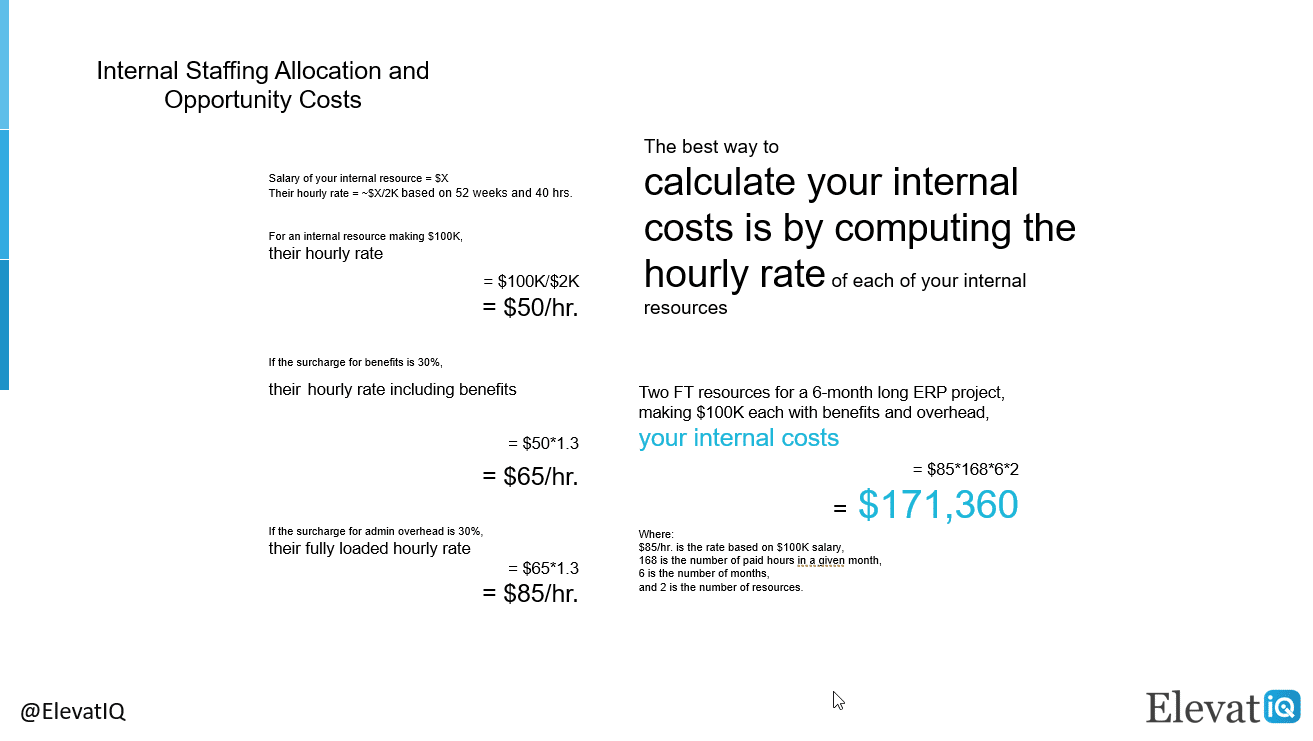
The best way to calculate your internal costs is to compute each of your internal resources’ hourly rates. For example, if your internal resource’s salary is $X, then their hourly rate wholly based on this salary would be ~X/2K. So, if your resource makes $100K in annual salary, the hourly rate for this resource would be $100K/2k = $50/hr.

If they utilize benefits and vacation, you might have a surcharge of another 30% on top of this rate. So the total rate accommodating these benefits could be $50*1.3 = $65/hr. Additionally, you might want to include marginal admin costs associated with this resource. These admin costs could be their individual need for equipment such as their computers, tools, software license costs, and costs of running their payroll, etc. If this admin marginal overhead could also be 30%, their fully loaded hourly rate could be $65*1.3 = $85/hr. Likewise, you might want to accommodate all your variable costs and proportionate fixed costs to come up with your resources’ fully-loaded costs.

Once you have computed the hourly rate for each of your internal resources, estimate the time they will invest in the project. For example, suppose you have two full-time resources that make $100K in salary, each dedicated to the six-month project. In that case, your internal costs could be $85*168*6*2 = $171,360, where $85/hr is the rate based on $100K salary, 168 is the number of paid hours in a given month, 6 is the number of months, and 2 is the number of resources.

Internal Staffing Allocation and Opportunity Costs with ERP System Purchase | ElevatIQ
Internal Staffing Allocation and Opportunity Costs

ERP Support Costs and Upgrade Costs

There would be several cost elements that would affect this line item. The number of cost elements could also vary based on the configuration and ERP deployment model selected. The consulting and support costs could be higher for the on-prem model to maintain infrastructure, backup, and hardware upgrades. For the cloud ERP, the major cost drivers include tier upgrade, additional storage required, and the cost to maintain separate test or dev instances.

Infrastructure Support Costs

If you opt for an on-prem ERP, you might want to account for maintaining windows and VM licenses and additional costs, including consulting help to upgrade them. With the cloud ERP option, your ERP vendor will take care of these activities for you, and your licensing costs would include them. The cloud ERP option includes most costs from an infrastructure perspective as part of your licensing bundle.

User Support Costs

The user support would be similar in both options, where the ERP publisher would cover any product-related issues. At the same time, your ERP consultant provides support only for a few weeks after the ERP project implementation.

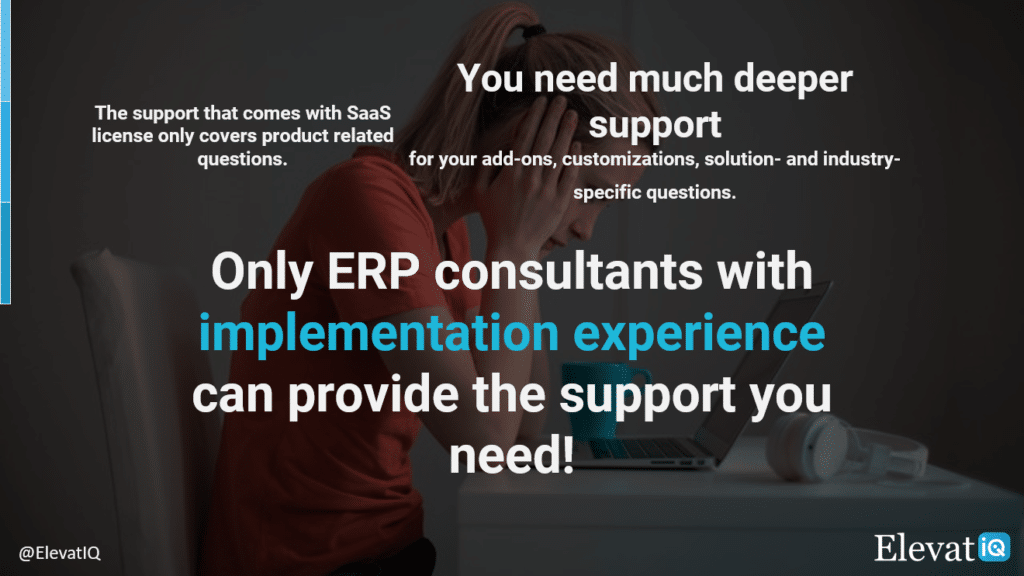
If several add-ons and integration tools are associated with your ERP implementation, each company owning the code might support their respective products. However, if there is an issue that you can’t attribute to a specific product, or if it is related to your specific requirements, you might not get much help from publishers. The support reps at publishers may not have ERP implementation experience or expertise with your industry so that communication could be a challenge as well.

Only ERP consultants with ERP implementation experience can provide the support you need | ElevatIQ
“The product support from ERP publisher is not enough for you – you would need support from an ERP consultant with deep implementation experience, ” Sam Gupta, Principal Consultant, ElevatIQ

The best way to ensure that you always have one point of contact and want to invest predictable cash flow in your support costs instead of a steep hourly rate for your ERP consultant is to subscribe to a premium support package. They might cover it on a per-user basis or as a percentage of your license fee to provide one point of contact for all your support needs.

If you didn’t have access to such support from your ERP consultant, you might invest a ton of money in briefing and training each new consultant that you might hire to support you with your issues. The premium support from the ERP consultant would provide a straightforward computation of your support expenses. For example, they might charge $50-$100 per user per month, depending upon the number of ERP users accessing the system.

Version Uplift Costs

With a cloud ERP system, you get the most recent functionality frequently. While you have access to the most updated product all the time, it might be an issue during version uplifts. The newly released functionality may cause merge issues with your customizations. To resolve these merge issues, you would need consulting help. The premium support may include the version uplifts as part of their package.

Tier Upgrade Costs

Some cloud ERP software may also have limitations with their tiers. For example, they might have storage or bandwidth limitations. Once you run out of the provider’s storage or if you need more bandwidth to accommodate your growing user base, your cloud ERP publisher might charge you extra to upgrade.

Conclusion

ERP pricing is not easy to understand. Each ERP software, add-on, and consultant may have their model. And each decision you make may have implications for you. A thorough understanding of your cost elements is essential to avoid any cost overruns and mistakenly selecting options that might appear cheaper on the surface.

When you are ready to dive deeper into understanding different cost elements for all your ERP system purchases, make sure to choose the most economical ERP system appropriate for your business model. Also, make sure you account for all internal and external costs to determine the total cost of ownership of an ERP software purchase.

FAQs

ERP System Price: How Much Does ERP Software Cost? Read More »

A DIY ERP Implementation Do You Need Consulting Help

A DIY ERP Implementation: Do You Need Consulting Help?

As an ERP consulting company, we often need to demonstrate our value. We come across two sets of potential customers. The first group is entirely on board with the reason why an ERP implementation requires consultants’ help. On the other hand, the second group is slightly adventurous with their preference for a DIY ERP implementation.

This article will help you understand why DIY ERP implementation isn’t as economical as it appears.

Briefly About the ERP Implementation Process

If you are not familiar with the ERP implementation process, the process will start once you finalize the ERP product and the ERP consultant. The ERP implementation project effort could be a couple of weeks or months, depending upon your processes’ complexity and automation goals.

For the sake of simplicity, let’s take an example of a simple ERP project. Most ERP projects would start with the requirements workshops. The workshops will follow rounds of testing once the consultants have completed the configuration, finally, the data load and go-live. 


The 2026 Digital Transformation Report

Thinking of embarking on a ERP journey and looking for a digital transformation report? Want to learn the best practices of digital transformation? Then, you have come to the right place.

Requirements Phase

During requirement workshops, the ERP consultant may follow a series of configuration checklists. Most information they require would have interdependencies. The checklists will help you stay on track as you identify foundational elements. They will also help you identify the dependent data needed to construct the whole solution.

A DIY ERP Implementation Data Model Image
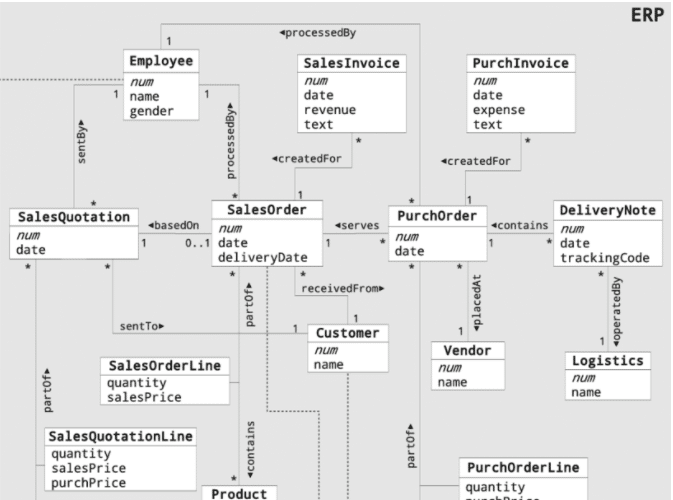
A DIY ERP Implementation Data Model Image – Screenshot researchgate.net

For example, before they could configure vendors, the payment terms need to be set up in the system. Similarly, before they could set up the payment terms, the ERP system needs to have a chart of accounts.

The process of mapping these data objects’ dependencies makes the ERP implementation project challenging. Also, even if you have mastered other ERP solutions, the new ERP solution will still have a learning curve. Each product follows its design and data model.

Without access to ERP consultants and checklists, the DIY ERP implementation process may not be as organized.

Construction and Testing Phase

After the requirement workshops, your ERP consultant will configure the solution. They will then test it as per their understanding of your business processes.

Once the ERP software has enough details configured to perform transactions, the consultant might release the ERP system for you to test. The transactions could include creating a sales order or entering a bill.

As you make progress with your ERP implementation, they will configure appropriate security levels and personalize it for each user.

Data Load and Go-Live Phase

Once you have tested the configuration data, the ERP consultant will upload the other datasets, such as vendors or customers. You will then run the final tests before going live.

Your ERP consultants will expect you to take ownership of the project with their technical or product support. They might walk you through the pros and cons of each decision, but they will rely on you to make decisions after getting a consensus from your team.

Your roles and responsibilities during an ERP implementation

While your overarching role is to own the ERP project and make critical business decisions, your team will still share 50% of the project’s responsibilities.

ERP Implementation is a partnership

Requirements Phase

During requirement workshops, your role is to gather details needed to set up in the ERP system. This exercise will require discussions with your internal team to accommodate their current and future needs.

For example, in the old ERP system, especially if you had disconnected processes, your AP team might use six different payment terms. In contrast, your Account Receivable team may use four of them. When you finalize these details, you need to develop a standard solution after discussing it with each relevant stakeholder.

If some of your processes were paper-based, you might need to gather these details by looking at previous invoices and orders. This comprehensive research will ensure that the new system will handle all of your business scenarios.

Suppose your old system is a smaller accounting system, such as QuickBooks, without enough relational controls built to ensure data consistency. In that case, you may need to cleanse your data before your ERP consultant can import it.


ERP Selection: The Ultimate Guide

This is an in-depth guide with over 80 pages and covers every topic as it pertains to ERP selection in sufficient detail to help you make an informed decision.

Construction and Testing Phase

Once the system has enough data to perform transactions, they will expect you to write test cases with their support. You will then test the system and report any issues.

After they fix the problems, you will need to test again to ensure the fixes are resolved. You might also need to test for each user role to ensure that they have appropriate privileges.

Data Load and Go-Live Phase

To keep the consulting costs low, you may want to choose a train-the-trainer approach. This approach assumes that you will train your users while the ERP consultant helps you or a couple of crucial users from your side.

This method ensures that you get an immersive experience with the product before going live on the new ERP system. It will also guarantee that the new ERP system’s knowledge doesn’t become a barrier to running your business.

+

ECommerce Supply Chain Transformation

Learn how LockNLube transformed its inventory and supply chain challenges by consolidating over 20 systems.

Your consultant’s role during the ERP implementation process

Requirements Phase

During the requirement workshop phase, the ERP consultant will walk you through each detail, what they need, and in which structure. They will also address any questions you might have related to any specific data set.

Once you provide enough details, they might create a blueprint document listing all your processes. The document will capture both your as-is and to-be processes.

Once you both agree on the details and before they start configuring them, they might ask you to sign off on the design document.

Construction and Testing Phase

After completing the configuration, they will conduct multiple sessions with you to review the new system’s business scenarios. You will also be testing along to become familiar and ensure that it satisfies your needs.

In parallel, the development team might work on developing forms and reports as per your requirements. They might also work on integrating any external systems such as EDI or e-commerce.

Data Load and Go-Live Phase

After they finish testing the master configuration of your ERP solution, your consultant will upload all of your data (such as vendors, customers, and items). You will then need to perform the final rounds of testing before going live.

You need to own your ERP implementation.

The ERP consultant will support you with any issues your team might experience after going live for a couple of weeks. They might also provide support during your first month close. However, you will be responsible for managing your live ERP solution and ensuring your users’ success.

The risks of DIY ERP Implementation

While ERP software might appear easy on the surface, the relational dependencies between business objects make it harder to learn and implement. Identifying each of these dependencies and structuring them to fine-tune the ERP solution for specific needs is an art.

In addition, ERP products follow a hierarchy of different data objects, such as pricing and discounting rules. While these hierarchies provide appropriate control and flexibility to the system, they require years of expertise before you can debug issues in an ERP system.

Unless you have years of experience with the new product, taking the DIY approach may end up being more expensive

The Consequences of the DIY ERP Implementation

Before taking the adventurous path of DIY ERP Implementation, you may want to review the following consequences associated with this approach.

  1. More Expensive. Your users may not be able to perform the transactions due to the system’s misconfiguration. They may get unknown errors that might require more consulting time later to debug and fix.
  2. Inefficient Solution. Since your team may not be familiar with the product’s best practices and design guidelines, your processes could be counterproductive. 
  3. Waste of your License Money. You might end up wasting your money as you might not be able to go-live on the product. The ERP consultant might end up charging more, as they may need more time to clean up the misconfiguration first.
  4. Longer Implementation Time. The lack of training of your team may lead to them taking more time to implement the solution. Ignoring the opportunity costs, you will pay for the software license unnecessarily for the time you can’t go live.
  5. System Adoption Issues. If your users can’t perform their duties smoothly on the ERP system, they might not use it at all. They might also avoid entering your crucial business data. Without this essential data, your planning may not be accurate, causing issues during your production runs and order fulfillment.

Conclusion


Implementing a fully integrated ERP system may appear easy on the surface. In reality, though, it requires you to thoroughly understand the data model and best practices.

The ERP system has more settings than a typical machine on your production floor or in your warehouse. As with your machines, you need to calibrate your ERP systems to get optimum results from them. Only certified technicians with implementation experience can help you get the optimum results from your ERP purchase.

FAQs

A DIY ERP Implementation: Do You Need Consulting Help? Read More »

Read This Before Buying QuickBooks’ WMS Add-On

Read This Before Buying QuickBooks’ WMS Add-On

If you are a warehouse-centric business such as distribution or manufacturing, automating your warehouses using barcode scanners is a must-have, especially, for growing companies. But why? To expedite your fulfillment processes and gain efficiencies. So do I need software to do that? Yes, a warehouse management system (WMS). It is a system or module that allows you to achieve your warehouses’ automation goals. Are they available for QuickBooks users as well? Yes, read on to learn your options.


The 2026 Digital Transformation Report

Thinking of embarking on a ERP journey and looking for a digital transformation report? Want to learn the best practices of digital transformation? Then, you have come to the right place.

Why Do you need a WMS add-on for QuickBooks?

While QuickBooks is a great accounting system that provides a quick jump start to your accounting and finance processes, it’s limiting. With it, you might need to manage your operations manually (or with spreadsheets). Its design is not suitable for automating other business processes, such as managing your warehouse or fulfilling your orders.

As you grow, your operational processes could become overwhelming. The amount of churn required to fulfill your orders (or revenue collection being late) is due to the amount of bookkeeping or administration needed. As well as due to disconnected processes. These issues could lead to the need to increase your warehouse staff’s headcounts to fulfill your orders within time.

Even if you managed to increase your warehouse’s labor capacity to circumvent this challenge, some related issues might persist with customer orders. Issues such as customers not receiving the right items or too many customers returning their orders. This could lead to further problems such as an increased workload for your customer service department.

There could be several drivers why a company may look for a WMS add-on, such as 1) the perceived costs. 2) unqualified advice from unreliable sources. 3) perception of disruption to existing working processes. Or 4) perception of bandwidth required to change a component vs. big bang approach.

+

Omnichannel ECommerce Customer Experience Transformation

Learn how fashion retailer AKIRA built a digital roadmap and managed stakeholder expectations to transform its processes and systems.

Why is QuickBooks WMS add-on not the right solution?

Generally, two factors drive the need for a WMS system and why the above problems exist with businesses that use QuickBooks. 1) the need for automation of warehouse processes. And 2) the lack of necessary controls throughout business processes, which might be impacted by warehouse processes.

While challenging, even if you succeed in achieving your automation goals through a WMS add-on, these heterogeneous technologies may fail. But fail in what sense? To provide the necessary control that you would need in your processes.

There are two reasons why lack of control would be an issue with a WMS add-on. 1) QuickBooks is not designed to give control across your operational processes. And 2) unless an add-on is built using the same technology or supplied by the publisher (in this case, Intuit) that developed QuickBooks, the add-on would have limited control over someone else’s software.

+

Digital Transformation Change And Project Management

Learn how Big Country Raw managed the change and transformation despite their limited budget for ERP implementation and eCommerce integration.

QuickBooks WMS add-on alternatives and their benefits

The right way to solve this problem would be to find an integrated option developed from the ground up for a company of your size. These integrated options, such as Acumatica or Infor CloudSuite Industrial (Syteline), would natively support the accounting and warehouse automation processes out of the box using the same code base. Their operational procedures contain built-in controls to ensure the consistency of items throughout the order-to-cash cycle. And avoid scenarios such as the mixing of orders or items.

If the costs are your primary driver, an add-on might appear to be a lucrative option in the short term. Over time, though, you will spend more due to maintenance costs as you will have to deal with multiple vendors and their terms and contracts. The price for finance modules with software such as Acumatica could be lower than QuickBooks due to their bundled offering. Plus, you have the option to grow with it by adding as many modules as you like, in the same technology built by the publisher as opposed to a third party.

On the other hand, in the case of time and effort. Irrespective of whether you purchase a QuickBooks’ WMS add-on or the integrated option, your accounting procedures are likely to be impacted. Why? Because you are likely to have several ad-hoc processes unique to your business due to the lack of enforcement provided by QuickBooks. The WMS add-on would require you to standardize them as most companies, including these third parties, design their code using standard practices commonly used in the industry. For this reason, whether you consider an add-on or the integrated option, your perception of saving time or money would not be a reasonable reason to buy a WMS add-on.


ERP Selection: The Ultimate Guide

This is an in-depth guide with over 80 pages and covers every topic as it pertains to ERP selection in sufficient detail to help you make an informed decision.

Wrapping up!

QuickBooks’ design doesn’t support the operational processes of a growing company. It’s a small accounting system designed to jumpstart your accounting processes. Rather than creating patchy architecture by adding add-ons for your critical processes and spending more in the long term due to its consequences, you should find appropriate software for your stage once you outgrow QuickBooks. Adding an add-on will only make your problems worse!

Read This Before Buying QuickBooks’ WMS Add-On Read More »

A Comprehensive Review of ERP Purchase Process

A Comprehensive Review of the ERP Purchase Process

Finding a suitable ERP system for your company and going through the long ERP purchase process could be stressful because of the unforeseen risks and required persuasion. The first time is even more difficult. So, how do you start the process? The first question you might have is about the steps involved in the ERP purchase process.

While the process may vary depending on your industry’s unique requirements or business situation, there are similarities. This comprehensive review will help you understand the commonly used stages involved. As well as your roles and responsibilities in the process, and strategies for championing internally with success.

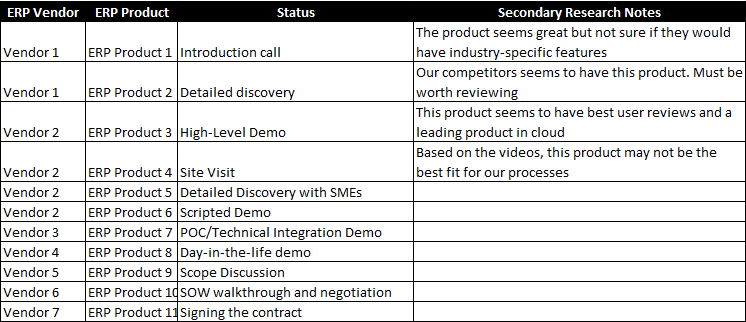
Generally, the ERP purchase process contains the following phases for an SME buyer:

  1. Introduction call
  2. Detailed discovery with the champion
  3. High-level demo
  4. Site visit
  5. Detailed discovery with individual SMEs
  6. Scripted demo
  7. Optional: POC/Technical integration demo
  8. Optional: Day-in-the-life demo
  9. Scope discussion
  10. SOW walkthrough and negotiation


The 2026 Digital Transformation Report

Thinking of embarking on a ERP journey and looking for a digital transformation report? Want to learn the best practices of digital transformation? Then, you have come to the right place.

1. Introduction call

The ERP Purchase Process typically begins with an introduction call with an ERP consultant. The purpose? To assess if their products might be the right fit for your needs. This call will identify a few ERP consultants you may want to potentially select for the next round. Most ERP consultants will keep these calls brief for 30-45 mins over the phone.

If you are talking to an ERP publisher directly, the first few calls would be to assess your needs. And identify a suitable product before introducing you to a solution consultant or a reseller. Some famous publishers include Infor, Acumatica, Sage, SAP, Oracle, Microsoft, etc.

Tip: If you are not familiar with ERP publishers and resellers’ relationships, publishers produce the product. In contrast, resellers are local distributors responsible for reselling them. Since resellers’ business models allow them to serve their local customers at much lower costs with specific expertise for your industry and geography, most ERP publishers don’t sell directly to consumers like you. For this reason, you need to work with a consulting company or a reseller. You might be able to save some time for yourself by calling a reseller directly. And avoiding the process of a fortune-500 company, as most publishers are relatively large organizations and busy chasing much bigger customers.

As you progress with your discussions, you may want to create a sheet similar to below to keep track of things and your ERP purchase process organized.

Tip: Note that secondary research is one of the most critical columns of this sheet. While resellers might answer most of your questions during your calls with them, the secondary research column would help assess their credibility. And vet their knowledge of the market and their products. We recommend performing this research before contacting them by reading credible blog sources such as ElevatIQ. As well as watching YouTube videos, and reading online reviews on G2Crowd and Capterra.

While we have shown ten different consultants in the above sheet, our recommendation would be to assess the time you want to spend on your ERP purchase process. And choose the number of consultants accordingly.

Some customers like to select five to six consultants initially, while others opt for more. As for the initial screening, closer to five is a good number without wasting unnecessary time while having enough samples for your comprehensive review.

Tip: If a partner seems to be overcommitting with your demands, it’s very likely that they might just be overpromising. And it might increase the risk of delivery. Understanding these nuances could help find the right partner for your project.

After finalizing the consultants’ list for the next round, you might want to develop an initial matrix to compare the consultants’ capabilities. This matrix will evolve as you conduct more discussions. From our experience, the most efficient matrix is straightforward. Focusing primarily on the most critical success factors essential for your business operations.

For example, are some of your production processes outsourced? The product under consideration may not work for your business processes if it doesn’t support outside process management capability. On the other hand, if you have to opt between e-commerce and payroll integration, you may want to select e-commerce integration over payroll if your business is customer-facing, high volume with fewer employees. Similarly, payroll integration may be more critical for you if your business is service-oriented with low volume.

Once you have concluded calls with all of your consultants, you might want to document a refined understanding of your needs. And compare them with your initial secondary research. If a consultant is too far off with their claims, they may not be the best fit. Why? Because they might be overselling their capabilities.


ERP Selection: The Ultimate Guide

This is an in-depth guide with over 80 pages and covers every topic as it pertains to ERP selection in sufficient detail to help you make an informed decision.

2. Detailed discovery with the champion

After the initial intro call, where the intent is to assess the fit, the discovery call is slightly detailed. The purpose of a discovery call is three-fold:

The initial discovery calls could be up to two to four hrs long with each consultant and the product. During these calls, the consultant will dig deeper into your business processes such as order-to-cash or procure-to-pay. As well as may invite a few subject matter experts with specific expertise to help from their side.

Their purpose is to get enough details from your side to meet the above three objectives. Not sure about some of their questions? Are these discussions highly detailed? You may want to ask a couple of process owners from your side to join.

Tip: most consultants are likely to have similar questions, so you might want to prepare a brief package right after your first calls to save time. However, the meetings are still necessary to make it interactive with each consultant to ensure that you don’t miss critical details and find surprises later.

To provide you a more profound sense of the discovery meeting, below is a sample of questions related to a few business processes the consultants generally ask during their interviews. However, they will tailor these questions based on their understanding of your business.

To use your time effectively, most credible consultants pre-research their customers. They might share their understanding to demonstrate their expertise in your industry and save you time in repeating generic details. If a consultant can relate to your business, he/she is likely to be experienced with similar companies or well prepared.

Tip: if a consultant asks unnecessary questions such as “tell me how you do your business, ” it could be a red flag as it shows their lack of diligence and preparation on their end.

Upon the conclusion of this call, the consultants might ask you to share sample documents such as sample invoices, order forms, etc., allowing them to do the second-level check and eliminate high-risk areas before committing to showing you a demo in the next step.

3. High-level demo

In some cases, this step could be part of the stage above, depending upon your preferences and your consultants’ approach.

The purpose of this demo is to show you the product without any configuration or customizations tailored to your business process or data. This demo also helps you relate to the previous step’s questions better and assess if you are still confident in the product’s and consultant’s capabilities.

This demo is for the audience who may have prior familiarity with an ERP system such as controllers, CFOs, or IT directors. By contrast, scripted demos described below would be more suited to the audience without any prior background with the ERP systems to help them relate better. For this demo, you may want to invite only a couple of key members.

The phases that follow the high-level demo would require more time commitment from your team members, so you may want to limit the finalists to 3-4 consultants for the next round. However, you may not want to announce the winners just yet in case the primary ones drop out, or you no longer feel comfortable continuing with previously selected consultants.

4. Site visit

This step is the most critical of the discovery process, especially if you are a manufacturing or distribution business. This step helps consultants visualize and understand your business processes by watching the field crew remove the project risks because of miscommunication or misunderstanding.

Tip: If a consultant does not commit to an on-site visit, you might not want to continue with them. An on-site visit helps acquaintance with your consultant better and aligns the project and processes’ scope.

This visit could also be an excellent opportunity to introduce your team to consultants to get a second opinion. Sometimes combined with the other steps, this stage could be a perfect opportunity to interview each process owner in detail, do an in-person demo, or collaborate in workshops to understand your business processes better.

5. Detailed discovery with SMEs

As a champion, you might want to watch your team members’ time to make the process efficient. The process owners may be busy with their day jobs and might not cooperate with you if you ask for meetings too frequently. For this reason, it is crucial to limit the finalists to 3-4 consultants.

The purpose of these meetings is to get more in-depth insight into high-risk areas. These meetings also allow you to respond to consultants’ previously unaddressed questions and validate your shared details. The consultant might want to have a couple of these meetings depending on your process’s complexity and your consultant’s comfort level.

The consultant might ask to share data from individual process owners for the scripted demo if required. The purpose of this data is to help them visualize the process from their perspective utilizing their data.

This step also provides an opportunity to agree on the demo’s scope and structure/scenarios so that there are no surprises during the demo.

+

Digital Transformation Change And Project Management

Learn how Big Country Raw managed the change and transformation despite their limited budget for ERP implementation and eCommerce integration.

6. Scripted demo

A scripted demo helps you provide a better sense of the platform by tailoring it to your business process and data. This step is perhaps the second most critical step of the ERP purchase process. It will also require the most time from your team.

A scripted demo could be anywhere from 4-8 hrs, depending upon the scope of the demo. During this step, the consultant also puts substantial effort, typically 1-2 weeks, to customize the demo instance to agreed sample processes.

This step provides an excellent opportunity for you to invite as many members to offer them first-hand experience tailored to their day jobs. You may like to divide it into phases with specific functional areas (such as finance, manufacturing, sales, and purchasing) and invite appropriate team members to their respective sessions to effectively utilize their time.

This step allows you to uncover risk areas that you may not have thought of before and may want to address before committing to the product and the partner.

After reviewing the scripted demo of 3-4 finalist consultants, you may want to meet with your team to get a second opinion. Their concerns could be about the capabilities that they didn’t quite understand or relate to their functions.

7. Optional: POC/Technical integration demo

This step is typically optional and only applicable if any processes require customizing the product that consultants cannot demo with the out-of-the-box processes.

In that case, you may want the consultant to put together technical feasibility documentation/presentation to ensure that the consultant has thought through the solution and has removed any significant technical risks.

8. Optional: Day-in-the-life demo

This step is also optional and only applicable if your decision-makers can’t relate to the product for their day jobs. In this step, the consultant will sit with your teams, such as sales or purchasing, and show them how they would be spending their day with the product.

Some of your team members may not have had an opportunity to talk during the scripted demo. They might be more comfortable sharing their concerns and opinions in these 1:1 meetings.

9. Scope discussion

Before this discussion, the consultant may have presented the ballpark numbers for the implementation.

This discussion allows you to confirm the details such as # of users required, their roles, and appropriate licenses, the modules you would need. It also provides a chance to validate the processes to be implemented, the systems to be integrated, and the data elements you want to migrate.

These details will help the consultant to put together a detailed quote about software as well as implementation.

10. SOW walkthrough and negotiation

During this step, the consultants will prepare a detailed SOW that will include the following topics:

  • Scope
  • Implementation plan/schedule
  • The final quote of the software as well as the implementation
  • Payment terms and schedule
  • Roles and responsibilities of each party
  • Details about the training and support

Each consultant will walk you through their proposal. Your goal here should be to engage with a consultant with the most realistic plan and cost expectations.

Each consultant might propose different models of delivering the project. Some consultants might opt for a fixed cost, other ones might go for time and material, while the rest may have a fixed fee per month or day.

Each model has its pros and cons. While the fixed cost model may appear most lucrative from your perspective, it comes with significant challenges and is not the right fit for everyone.

Reviewing these models and their risks will allow you to make a prudent decision for your company.

Conclusion

As with any expensive purchases and initiatives that require cross-functional collaboration, be ready for ups and downs, and embrace it as a learning experience. Once you have gone through the process and felt the benefits first-hand, the process might not feel stressful and frightening.

When you are ready to go through the process, this review will provide a better understanding of the process and help you avoid potential risks.

A Comprehensive Review of the ERP Purchase Process Read More »

ERP Historical Data Lose Or Don't lose

Your New ERP No Longer Requires You to Lose Valuable Historical Data

“Did you just mean that we have to start as a clean slate with a new ERP? ” Said the customer we were trying to convince on a new ERP. “It feels as if we are starting a new company from scratch. I thought digital transformation meant enabling customer experience. From what angle the customer experience will be superior if we forget everything we know about them? ” He expanded.

If you have gone through a new ERP implementation, you must have felt the same. A new ERP project often meant losing your historical transactional data as migrating it is generally costly and risky. With the advancement of technologies and better collaboration among ERP publishers, some ERP publishers can provide a seamless ERP upgrade experience.


The 2026 Digital Transformation Report

Thinking of embarking on a ERP journey and looking for a digital transformation report? Want to learn the best practices of digital transformation? Then, you have come to the right place.

What are ERP datasets?

As far as ERP implementations are concerned, three different datasets are often relevant.

  1. Master and configuration data. This dataset is the master configuration data such as products, customers, vendors, and price lists. The master settings required to conduct transactions
  2. GL balances and active transactions. This dataset is the chart of account balances used to construct your financial statements. The active transactions are open orders and invoices that are yet to be collected and closed.
  3. Historical transaction data. This is the historical transactional data such as closed POs and Invoices. The quotes customers requested in the past. And the leads that approached from specific accounts, and their interactions

From the perspective of accounting and finance, as most people perceive ERP systems as financial or accounting systems, the only datasets that matter are #1 and #2. Why? Those are enough to run a company and move to a new ERP system. However, if you think from the perspective of customer experience or operational planning, dataset #3 is their gold mine.

What Is ERP Historical Data, And Why Does It Matter?

Without having access to historical data in the traditional ERP implementations, the planning teams circumvented this problem by keeping its snapshot in data warehouses. They combined (in the database terms, making a join) it with the current ERP data to get insight into past sales trends, past credit trends, and supply chain planning, through a visualization tool such as Power BI or Infor Birst.

If the planning team had challenges with the snapshot approach, teams involved in customer interactions struggled more with this approach due to rising customer expectations. Your sales and finance teams need access to historical transactional insight for their daily operations decisions. The more information you have about your customers, the more comfortable customers will feel working with your company. More transactional insight not only enhances customer experience, but it also helps with revenue opportunities.

For example, looking into previous sales history could enable your sales team to remind your customers about an item they may have forgotten to include with their purchase while also creating a cross-sale opportunity for your sales team.

Similarly, your finance team could review previous purchases to determine customers’ likelihood to pay on time and decide on extending the credit. Another example would be visiting a customer and reminding them about a conversation you had ten years back with the help of a recorded interaction in your CRM system.

The list is endless with possibilities in how historical intelligence can help boost customer experience. The value of historical data presented here isn’t new to SME business owners. Still, they had no choice but to sacrifice it as, traditionally, bringing historical data has been prohibitively expensive.

+

Digital Transformation Change And Project Management

Learn how Big Country Raw managed the change and transformation despite their limited budget for ERP implementation and eCommerce integration.

Why ERP historical data is challenging to migrate

You must be wondering why it is such a big deal to migrate #3 if the ERP vendors can bring the #1 and #2 datasets mentioned above. To answer this question, let’s review the process of migrating data.

Typically most business software products such as an ERP control their data integrity through a set of business or accounting rules. The underlying data model is like a spreadsheet that changes with each version. Each product may have its spreadsheet with millions of business rules embedded in it.

If you try to migrate from an identical spreadsheet to another with the same embedded business rules, it is easy. With each version or product having its underlying spreadsheet and accompanying business rules, you need to go through the data translation process when you move from one product/version to the next, even with the same publisher.

The process is still manageable if we talk about non-financial data. With accounting data, however, business rules are even more involved. The accounting data requires us to rewind the whole process of capturing and closing each transaction in their appropriate financial periods starting from year one while resolving issues as you move along due to the interdependencies.

As you can imagine, how cumbersome and labor-intensive the process could be if you have to review and capture each transaction since you started your business. Due to the involved process of migrating this data, ERP vendors typically recommend against it.


ERP Selection: The Ultimate Guide

This is an in-depth guide with over 80 pages and covers every topic as it pertains to ERP selection in sufficient detail to help you make an informed decision.

Why new ERP projects no longer require losing historical data

While the process of migrating historical data is still the same today, ERP publishers have come up with innovative solutions to ease the transition.

Some ERP publishers have started collaborating with other ERP publishers in aligning the underlying data model for their products and of their collaborators. While these efforts are underway, it may take years before these initiatives are ready for commercial use.

The other vendors, such as Infor and Acumatica, offer shorter-term solutions for their product families. For example, Infor has done the entire translation project for Infor Visual, Syteline, and Point.Man products if their customers want to move to CloudSuite Industrial, the cloud version of Syteline. They have the capability to take your entire database from these legacy products and convert them into a new database.

Through this approach, you not only get your master and configuration data, but you also get your historical transactional data. These projects were easy for Infor as they understood the data structures of their products well.

Conclusion

Migrating historical transactional data has never been easier. Traditionally ERP publishers have recommended against it due to it being risky and expensive, and SME business owners had to sacrifice it with a new ERP implementation.

The unique approaches have enabled ERP publishers like Infor to streamline data migration across their product lines. As a result, you no longer have to lose your ERP historical data with your new ERP implementation.

Now that you have the option to carry over your historical transaction data without breaking your wallet, you must consider historical data migration as a factor before choosing an ERP vendor.

Your New ERP No Longer Requires You to Lose Valuable Historical Data Read More »

What are Fake Clouds

What are Fake Clouds? And why you should care!

What are fake clouds? And how are they relevant to the ERP systems? Buying a fake cloud ERP system could be worse than not considering a cloud system at all. Irrespective of whether you are inclined towards on-prem or cloud, both could be great strategies as long as they are natively built for each option. This article provides an in-depth overview of how fake clouds work and why they could be worse than pure on-prem or cloud.


The 2026 Digital Transformation Report

Thinking of embarking on a ERP journey and looking for a digital transformation report? Want to learn the best practices of digital transformation? Then, you have come to the right place.

The comparison between on-prem and cloud-native design principles

If you have a compelling reason to buy an on-prem system, you should purchase a system designed utilizing on-prem technologies and optimized for the on-prem infrastructure. Similarly, if you are on board with cloud technologies, you can buy a natively-designed cloud ERP system that uses cloud technologies with the optimization for cloud form factors.

Taking shortcuts of deploying a natively-designed on-prem ERP application on the cloud is remarkably inefficient.

Taking shortcuts of deploying a natively-designed on-prem application on the cloud may be more comfortable and might reduce time-to-market. Still, the app would rarely be efficient with the most impact on user experience and efficiency, defeating the overarching purpose of automation through your software investment.

On-prem ERP applications are monolithic, tightly-coupled, and designed to work only on desktops.

Traditionally, most on-prem ERP applications followed monolithic 3-tier architecture, where the customer-facing tier would be a thick UI layer written in on-prem technology. As you might be able to relate with applications such as Excel or old accounting systems, they performed amazingly well on a desktop system due to the design of their services or database layer aligned to provide a superior experience to desktop users. They were equally inefficient on mobile or browser. Imagine performing data analysis using your favorite spreadsheet on a mobile device.

The cloud ERP applications are composed of a self-independent, self-multiplying network of reusable building blocks catering to multiple channels’ needs.

The modern cloud applications, by contrast, followed either a similar 3-tier or microservices architecture. Still, the most significant difference between on-prem and cloud is that the tiers in the cloud world are not as tightly-coupled as they would be in the case of an on-prem application.

Why is on-prem ERP design inefficient?

To understand the implications of a monolithic, inflexible architecture, let’s review our workforce habits and how they have changed from the 2000s to the 2020s. In the decade of 2000, we all went to offices, and we had access to mobile technologies, but the devices back then were relatively primitive and could not perform the heavy processing they can do today.

No one thought we would be using an ERP application on a mobile device. The way we thought social media was only for kids. We have been proven wrong with our assessment and capabilities of these technologies, and so have some legacy ERP vendors.

+

ERP Optimization And Integration Architecture Development

Learn how Work Sharp fixed their broken ERP implementation that caused customer service issues and improved Supply Chain planning.

The migration options for on-prem ERP vendors

When they created these apps in the decade 2000, the only channel they had to worry about was the desktop. With mobile devices’ penetration, we have far more channels in the form of mobile, tablets, apps, notebooks, desktops, IoT machines, and sensors. This paradigm shift is only going to grow, as the devices get more processing power, and we get data that helps in making business decisions. Thus, they need to rewrite their apps following lean cloud architecture principles where none of the layers are tightly-coupled, and the processing components are independently scalable. To understand this, think of monolithic applications as a giant machines that could do a lot of things from processing a sales order to closing your books.

Suppose there is a spike in sales quotes, which doesn’t necessarily result in a corresponding increase in load for financial transactions. If you want to handle this workload, you will have to buy another instance of that giant machine irrespective of these machines’ usage levels. This approach could not only be expensive, but it could also be a waste of your resources. Now contrast this with a cloud app where the cloud applications are a vast network of “micro-devices” with individual responsibilities, and they are independently scalable. They can multiply themselves as the load increases, which helps address the needs of each channel better as they could have its traffic and volume.


ERP Selection: The Ultimate Guide

This is an in-depth guide with over 80 pages and covers every topic as it pertains to ERP selection in sufficient detail to help you make an informed decision.

Why is user experience needs so different between on-prem and cloud ERP applications?

While it’s a great idea to create this network of micro-devices, if each channel had its way of communicating with users, there will be a significant switch when users moved from one device to the next. Suppose you created a report to track the KPIs from the office on a desktop application. When you step out of the office, you wanted to continue monitoring this report from your mobile device. Imagine how you would feel if you had to look at a screen with a completely different look and feel while switching them.

Consequently, cloud applications utilize a technology called HTML5, which automatically takes care of user experience on different devices and channels. Think of this as a technology that can morph into various shapes and sizes automatically as the resolution of a device changes.

+

Digital Transformation Change And Project Management

Learn how Big Country Raw managed the change and transformation despite their limited budget for ERP implementation and eCommerce integration.

Why can’t legacy ERP apps do the same as their cloud ERP counterparts are doing?

Legacy ERP applications didn’t have access to HTML5 technology. Moreover, they didn’t have to worry about it because their customers were happy as long as they created the best desktop experience. With the recent changes in how we work and how we access information, these on-prem applications are no longer sufficient as they are not mobile workforce friendly, and not as agile.

How much effort is required to convert these legacy ERP apps into modern cloud ERP applications?

ERP applications could have more than 10K tables and thousands of screens and reports. If you want to break this giant machine into these networked miniature devices that are self-sufficient and self-multiplying, it will require decades of effort. To put things in perspective, a programmer may be able to independently develop a screen or a report in a month. Imagine how much development power and, as a result, the investment they need to move these applications to newer cloud technologies.

If the effort is so high, how can legacy ERP vendors be cloud-ready in such a short time?

Consequently, legacy ERP vendors have discovered the shortcuts that can expedite this process. One commonly known alternative they take is to port the entire app as-is and put it in the browser window. If you follow this approach, as you can imagine, it will be like watching TV from a browser window. With TV, video players take care of optimization as the resolution and the form factor change. Plus, you don’t have to interact with it.

Imagine trying to click a dangling menu with your finger on a small mobile screen. You also can’t open this app in multiple tabs in a browser, the way you could open Facebook. These are some of the limitations that we can perhaps talk in 30 seconds. There are more profound implications of these shortcuts, but the only way to know them would be by actually using a legacy ERP app that is trying to pretend to be modern.

What else have legacy ERP vendors done to cut short the process?

The majority of legacy ERP vendors also focused on efforts where they have the highest economy of scale and ROI as the licensing revenues in the case of the cloud are far leaner than their on-prem counterparts. They had to catch up with modern cloud vendors in reducing their costs, or they will soon be out of business.

They also had the challenge of pleasing analysts firms such as Gartner that understand these capabilities at a deeper level. These analyst firms maintain a checklist with the options such as multi-tenant, and multi-site capabilities so that an average business user can easily compare these systems.

Have analyst firms such as Gartner caught up on this issue?

Since legacy ERP vendors wanted to compete with the modern breed of cloud vendors, they prioritized their investment dollars. One strategy they considered is to satisfy the checklist of these analyst firms, which also had the highest ROI for them.

However, because of this issue, the complete redesign and user experience took the backseat as the legacy ERP vendors knew that the user experience is not as quantifiable. Their checklists touch such issues only at the surface level with yes-no questions such as: is the app easy to use? Such items would not be able to catch the underlying architectural issues and implications because of them.

Also, ERP vendors were aware that they could create a shiny facade (or fake clouds) to lure them as most customers and analysts are likely to review the software at a surface level with the help of a checklist.

Do these issues ever get caught during or post-implementation?

The user experience component of a cloud application is critical as it has the most impact on efficiency, but measuring and quantifying user experience is always the hardest. Consequently, the legacy cloud ERP vendors have been successful in selling their fake clouds but failed in meeting their efficiency objectives because of poor user experience.

Because of this poor user satisfaction, cloud technologies often get blamed for the users’ complaints that they are not as efficient as their desktop counterparts. When in reality, the cloud is an amazingly powerful technology as long as you are using a real cloud and not fake clouds.

Where does each ERP vendor stand with their cloud maturity?

If you look at the cloud maturity of ERP vendors in the market, none of them are as deep in their capabilities as their on-prem counterparts. It will take years before cloud technologies can replace their on-prem version completely. The fake clouds vendors may have rewritten their apps by 20-40%, while 60-80% is still monolithic, legacy architecture.

On the other hand, modern cloud vendors are lean on their capabilities, covering only 20-40% of the functionality that a robust enterprise might need.

So, does it matter whether we go with a fake cloud or a real cloud ERP vendor?

While they both could be even with their cloud maturity today, the legacy vendors will take longer to catch up with modern cloud vendors as remodeling an old house is always harder than constructing one from the ground up. Also, remember the network of “miniature devices” with cloud vendors? These devices are not only independently scalable but also highly modularized and reusable.

This modular nature of the cloud application allows them to reuse pre-built components and keep building on top of them. As you add more capabilities, the faster you can develop. This “self-multiplying” effect allows the cloud ERP vendors to be faster than some of their legacy counterparts. As a result and as you may have noted, some of the pure cloud vendors, such as Acumatica, are among the fastest-growing cloud ERP systems.

Wrapping it up!

Now that you understand why fake clouds systems are worse. Your choice is to be with a vendor that may have deeper capabilities (with fake clouds) today but might be slower in rewriting the whole app designed for modern cloud architecture. Alternatively, you can work with a lean cloud ERP vendor in a phased manner where you upgrade a small division with a fully-enabled cloud solution and grow with them as they get more in-depth with their capabilities.

By selecting a native cloud ERP vendor, you will be fully matured with the cloud in half the time while reaping the benefits from day one of a native cloud system.

What are Fake Clouds? And why you should care! Read More »

Scripted ERP Demos. Are they effective?

Scripted ERP Demos. Are they effective?

Software demos suck. A scripted ERP demo sucks even more. They suck for everyone, irrespective of which side of the table you are on. While scripted demos reduce the transition for ERP buyers, they are not best suited to identify the right ERP software for your business. This article will help you learn why scripted demos aren’t the best and what you can consider instead.


The 2026 Digital Transformation Report

Thinking of embarking on a ERP journey and looking for a digital transformation report? Want to learn the best practices of digital transformation? Then, you have come to the right place.

What is a scripted ERP demo?

If you are not familiar with a scripted demo concept, it is one of the critical steps of the ERP purchase process to demonstrate the capabilities of an ERP system.

To prepare for this demo, your consultant might ask you to share a sample dataset that may consist of a set of items, customers, and vendors. They would use this dummy data and a few basic scenarios to configure a demo instance. This step would help align the expectations of the demo meeting.

How long is typically a scripted ERP demo and what it entails?

Typically a scripted demo could be between 4-8 hrs depending upon how much time you want to spend with each ERP vendor. During the demo, it is nearly impossible to cover each scenario in detail. Doing so might be overwhelming for your audience, especially if you are newer to ERP systems.

As part of these demos, ERP consultants typically like to cover only basic processes such as order-to-cash or procure-to-pay. Or they might show how to manufacture one of your products in the new ERP system.

Scripted ERP demos are a complete waste of time.

The scripted demos aren’t the best reflective of the capabilities of an ERP system as basic processes tend to be similar in most ERP systems. The critical differentiator among ERP systems is their planning capabilities.

With so many details thrown your way as part of ERP demos with each vendor, you are likely to be confused, and you might end up choosing a misfit ERP system based on the performance of the presenter or their understanding of your business. These factors are essential but not as critical as selecting the right ERP system for your business.


ERP System Scorecard Matrix

This resource provides a framework for quantifying the ERP selection process and how to make heterogeneous solutions comparable.

Sharing a sandbox could be a potential option and a viable alternative for scripted demos.

The frustration with scripted demos is not new. Due to the lack of alternatives, they are still widely used during the ERP purchase process. Some ERP vendors with smaller, prescriptive products have recently started sharing a sandbox to try their products. While this approach could be an excellent alternative for more straightforward products, it may not work for more extensive, highly customizable products.

The sophisticated counterparts require a bit of training before you could use them. Just because you are not able to use such products doesn’t mean that they could be any inferior or perceived as hard to use. It just means that you need to be trained in them. For some ERP vendors, this approach may not even be feasible as provisioning an instance and granting access to it could be highly expensive, and they might not be able to provide it during the sales process. You might lose on a fantastic product just because they cannot share a sandbox in this approach. Therefore, trying ERP systems in a sandbox is not a viable alternative for a scripted demo.


ERP Selection: The Ultimate Guide

This is an in-depth guide with over 80 pages and covers every topic as it pertains to ERP selection in sufficient detail to help you make an informed decision.

Collaborative demos are a more promising alternative to scripted demos.

With the advancement of remote technologies such as Zoom, a new pattern has emerged among recent customers with the request for a collaborative demo. A collaborative demo refers to a process where you, as a demo attendee, use the system while your consultant guides you using annotations (check #7 in this article if you are not familiar with the concept of annotations).

Your consultant would click each annotation to guide you where they want you to click. You would then follow it by actually performing that operation on a live system–similar to “assisted driving” in the real world. Irrespective of whether you prefer to meet in an in-person setting or virtual, this approach could be equally helpful. You don’t have anyone watching your shoulder as you are using the system but still getting enough guide sticks to maneuver around the system.


ERP Selection Requirements Template

This resource provides the template that you need to capture the requirements of different functional areas, processes, and teams.

Isn’t a collaborative demo just a better version of a scripted demo?

A collaborative demo uses the best practices of a scripted demo, such as aligning the dataset and scenarios and the overall flow of the meeting.

The only difference between a collaborative and a scripted demo is that rather than you watching your consultant drive, you drive yourself with assistance.

How to make a collaborative demo successful?

For a collaborative demo to be successful and for your team to get an immersive experience, you need to ensure that most of your team members use the system in turn. So, they can compare how each of the systems feels, or maybe come back for more of these sessions to refine their understanding once they are through their initial comparison.

Our recent collaborative demos have been widely successful as the customers don’t have to sit through boring monologues for eight hours. The workshop-style collaboration encourages participation from your users and helps them better understand the concepts while appreciating the deeper capabilities of various systems.

Conclusion

A collaborative demo is an excellent replacement for a scripted demo. You can even argue that it is just a better version of a scripted demo. Collaborative demos can help you understand and appreciate the system’s capabilities better.

The best part about collaborative demos is that you will no longer feel that the ERP demos suck. They could be enjoyable if done right.

Scripted ERP Demos. Are they effective? Read More »

Start Your ERP Project Today! Or Maybe Not?

Start Your ERP Project Today! Or Maybe Not?

“When is the right time to start a business?” A successful entrepreneur once said, “it is TODAY. “ They are spot on with their recommendation, as the aspiring entrepreneurs that procrastinate never end up starting one. We get similar questions from our prospects when it comes to ERP project planning. And like these smart and successful entrepreneurs, our answer always is the same, TODAY. Through this article, you will learn the value you can get by implementing an ERP sooner than later.


ERP Selection: The Ultimate Guide

This is an in-depth guide with over 80 pages and covers every topic as it pertains to ERP selection in sufficient detail to help you make an informed decision.

Let’s dig into the personas of these prospects a bit more. These prospects have a growing business with a proven product-market fit. As well as committed investors, and a sound belief in their business model. They understand the value of an ERP and appreciate the value automation brings to them. They also understand the costs associated and have no issues paying for them. The only barrier they have is: time.

Before you procrastinate on your decision to implement an ERP, you should be aware of the following issues. That you can expect with your business without an integrated ERP system. These are also management challenges that are harder to overcome later. By doing ERP project planning sooner, you can streamline the majority of your business processes from day one.


The 2026 Digital Transformation Report

Thinking of embarking on a ERP journey and looking for a digital transformation report? Want to learn the best practices of digital transformation? Then, you have come to the right place.

The 3Us of Business Processes: Unorganized, Undocumented, and Uncontrollable

Unorganized business processes

Everyone prefers doing things their way, and no one likes to be told how they should be doing their jobs. Our diverse backgrounds help with creativity and innovative ideas. Yet they are not as helpful in standardizing and harmonizing business processes. For example, the companies that don’t use an integrated ERP system, the teams would spend a significant amount of time debating how files and IDs should be named. How they would share among team members, and how they would structure BOMs.

Even after these debates, there will be chaos and confusion. While these debates may result in some improvements, the feeling of further refinement would still exist. They might bring industry experts who might spend countless hours bringing the best practices and spend tons of money on consulting fees. The ERP systems incorporate such best practices as part of their framework without the need for debates.

While the ERP systems provide flexibility on how you name your files or IDs, once you successfully do the ERP project planning, with the agreed operating framework, the governing structure is part of each workflow. These flows don’t require any manual intervention or assurance to ensure process compliance. ERP systems embed business rules as part of their implementation framework. The experience becomes so seamless that the collaboration would feel like a well-oiled machine.

Undocumented business processes

Companies that don’t use an integrated ERP never maintain comprehensive documentation about their business processes as it is nearly impossible to do because of maintenance efforts. The ad-hoc processes with no common consensus cause significant variations among users in how they understand each process. They are also likely to vary as employees leave the organization and new employees join.

The undocumented nature of business processes causes significant issues during ERP implementation. Most users struggle to define them due to the lack of control over process definitions. Once a company starts using an ERP system, the processes are inbuilt as part of the workflows with a negligible need for supplemental documentation.


ERP System Scorecard Matrix

This resource provides a framework for quantifying the ERP selection process and how to make heterogeneous solutions comparable.

Uncontrollable business processes

Once a company grows, it’s hard to attain process control without an integrated ERP system as there will be too many moving parts and stakeholders involved. The lack of control could result in a lack of financial transparency inside the organization, which might lead to financial loss. It might also result in customers or vendors double-dipping or taking advantage of process loopholes. It also impacts customer experience due to late collection or overcharges.

With an integrated ERP system and proper ERP project planning, these issues are taken care of by the system so that you can focus on growing your business.

The 3Is Data Syndrome: inaccurate, incomplete, or inconsistent

Inaccurate data

Without an ERP system that enables centralized process compliance, you leave too much room for your business users to enter erroneous data. Most smaller accounting systems such as QuickBooks or CRM systems such as Salesforce are inefficient in preventing business users across business functions from entering inaccurate master or business data. For example, the way your sales team might structure your customers could be different from how your finance team would view it.

The syndrome of inaccurate data leads to erroneous billing, maintenance nightmares, challenges with future streamlining efforts, and customer experience issues due to misinterpretation and misunderstanding of the master data. A sooner installation of an integrated ERP would prevent inaccurate data entry, but more importantly, it prevents the culture the piling on to inaccurate data.

Incomplete data

Without an integrated ERP system, you might have critical data that you may not capture just because your manual processes don’t require it, or the smaller software you may be using today may be too loose with control. Just because your process doesn’t capture it today, it doesn’t mean that you might not require it tomorrow. If regulatory bodies mandate such data, you may not have a complete view of your data.

Since thousands of businesses have already implemented and tested popular ERP systems, they capture all necessary data elements and take care of data integrity issues automatically.

Inconsistent data

The inconsistency of data across systems might be a significant issue if you don’t have seamlessly integrated systems. This issue exists as most systems follow their data structure and control.

Once you decide to implement an integrated system, data inconsistency would be a significant issue in integrating the processes. If you implement an integrated ERP system earlier, you will avoid these inconsistency issues that might be far more expensive to fix later.


ERP Selection Requirements Template

This resource provides the template that you need to capture the requirements of different functional areas, processes, and teams.

The 3Ds Disorder: Data, Duplication, and Dependency

Data Issue

With the delayed implementation of an integrated ERP system, you will lose on the historical data, which will provide you with deep insight into customers and products. This issue is especially relevant for businesses with newer business models as you need that critical insight to identify what is working and what is not.

Without this insight, you might be wasting your efforts chasing the wrong targets, and because of that, your growth might be slower.

The insight provided by an integrated system would help you refine your business model better and faster.

Duplication Issue

The isolated systems and manual processes would require duplication of data across software and analyst effort to fetch critical reports that you will need to run your operations and business.

Not only this insight will be delayed, but it will also be significantly expensive and inefficient with manual efforts.

Dependency Issue

The issue of isolated systems and manual processes would also foster a culture where vital information is not logged in the software and is instead retained by critical employees. This dependency would create a single point of failure with lost negotiation power. If your competitors poach one of your key employees, not only will it be hard to replace them, you might struggle to run your business as they might be the only resource who might be privy to these critical details.

Without an integrated system, management is likely to get filtered information from these critical employees. They will try to retain this information to maintain control over new hires. The integrated ERP system creates a culture of transparency and provides a level playing field for all employees with end-to-end traceability and clear metrics of success for everyone.

Conclusion

An integrated ERP system is not just nice to have. It’s required to have the right and fair culture from day one as well as to capture meaningful data that is hard to acquire through manual or isolated processes.

The investment you make with an ERP pays off quickly and only through the elimination of duplication and error-prone processes. Other benefits are the added perks. If time is the only factor that has been bothering you, hopefully, this article has convinced you to start your implementation, without a doubt, TODAY.

Start Your ERP Project Today! Or Maybe Not? Read More »
FREE RESOURCE

2026 Digital Transformation Report

This digital transformation report summarizes our annual research on ERP and digital transformation trends and forecasts for the year 2026. 

Send this to a friend